






Select the corresponding option according to the laser generator used. If the
laser generator model used is not included in the option, select the other option,
support universal DA controls the peak power of the laser generator, PWM sets the
real-time power of the laser generator, and the output port controls the light switch
signal of the laser generator.
Laser power: Set the power of the laser generator.
DA port selection: set the laser generator peak power DA output
port.
DA voltage range: 0~10V, 0~5V, and set the DA voltage output control
range.
PWM signal enable +: PWM enable output port end.
PWM signal enable-: PWM enable output port minus end.
Light out enable: set the optical switch output control port number
of the laser generator.
Light preparation: light preparation output port.
Red light control: red light control output port.
Note: The yellow part needs to be configured by the output port definition.
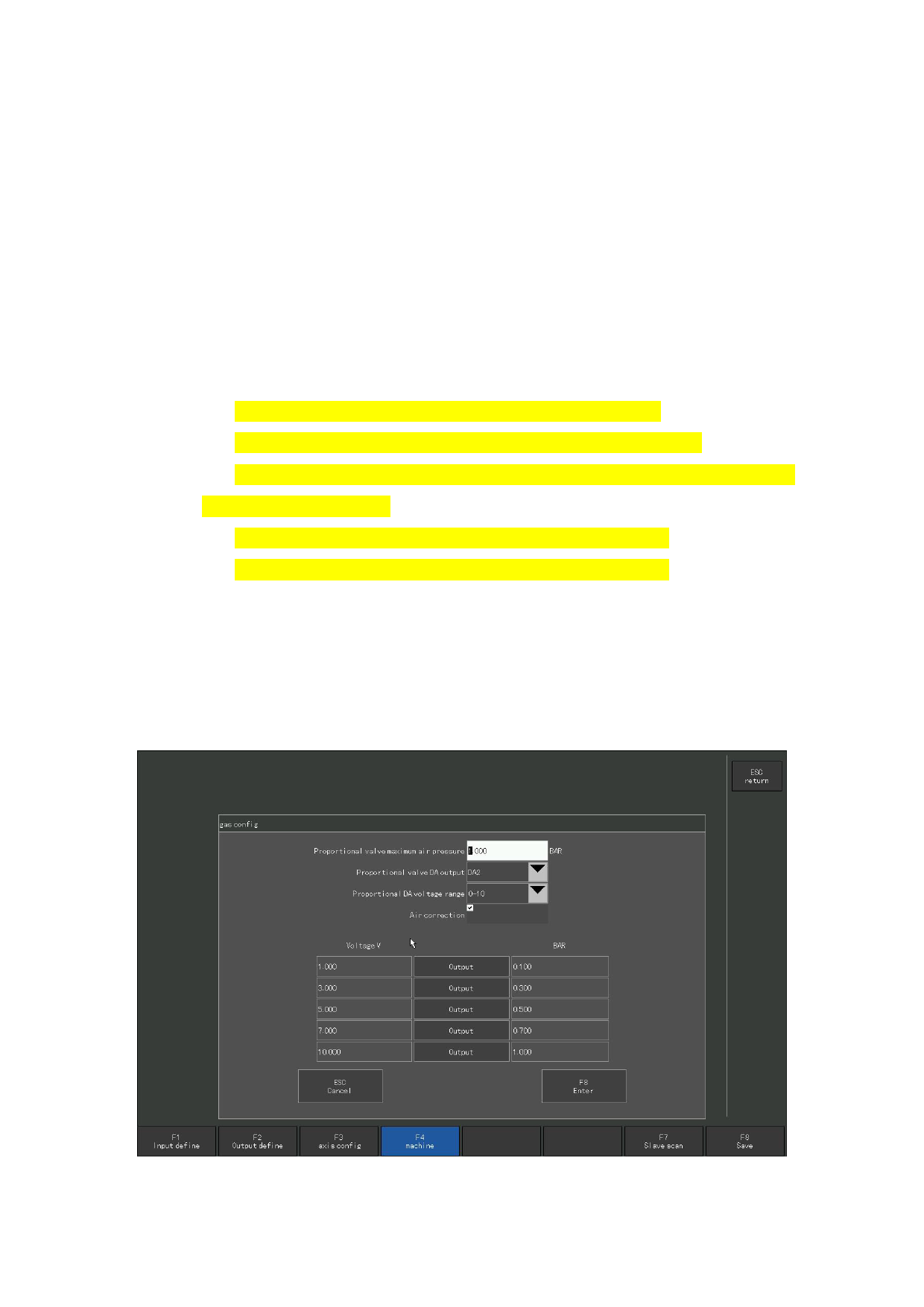
11 . 4.3 Gas configuration
F8 platform configuration-Click the gas configuration button in the F4 machine
tool parameters to enter the gas configuration interface, as shown in the figure.
Figure 11.7, Gas configuration
110







































































































































