






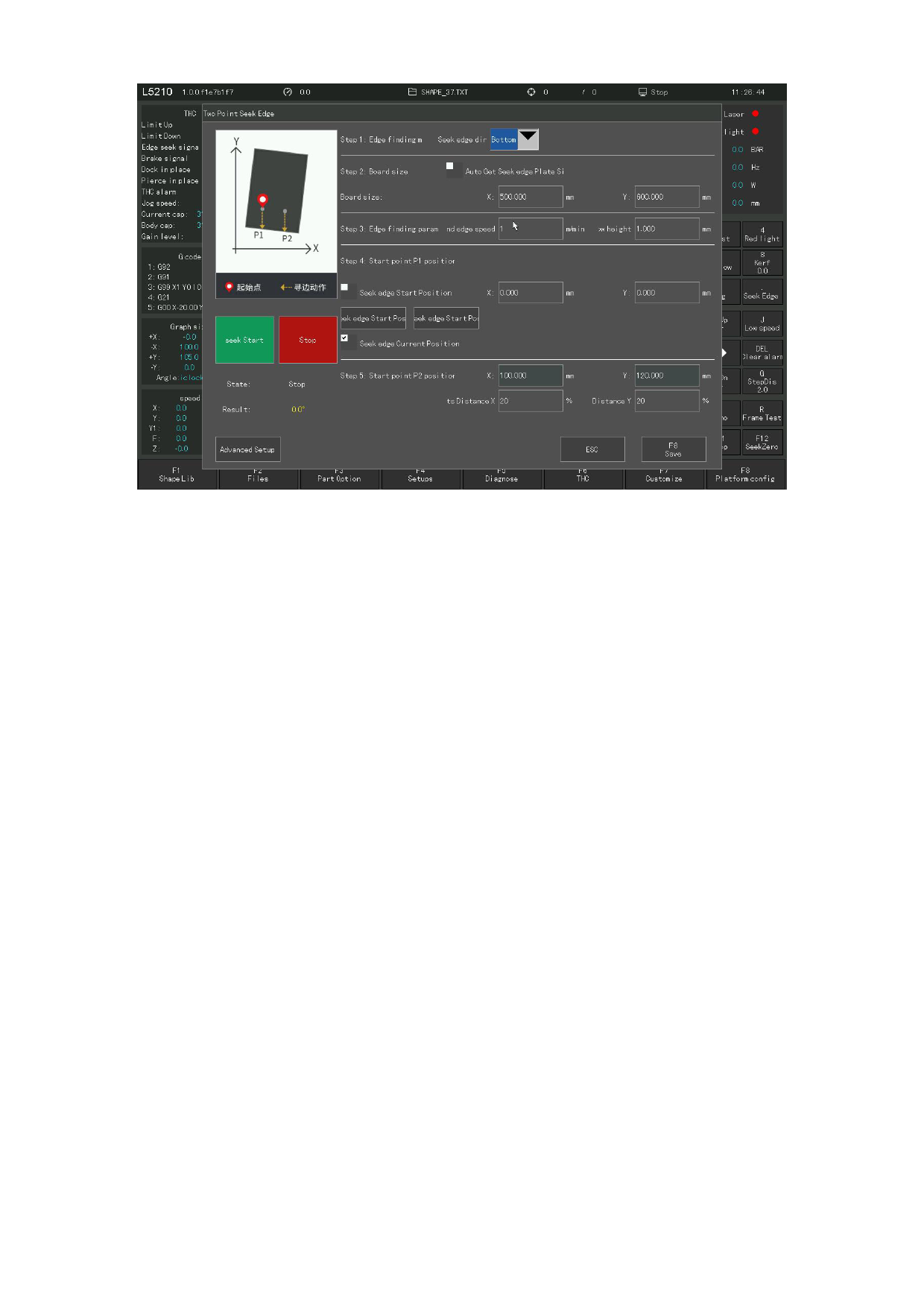
Figure 3. 9 Two-point edge search
Edge seeking direction: you need to manually select the edge seeking direction
according to the position of the straight edge of the plate. For example, when there
is a straight edge on the right side of the plate, hoping to use this edge to find
out the deflection Angle of the plate, you need to choose [right].
The two-point edge seeking parameter is the same as the three-point edge seeking
parameter. After setting the edge seeking parameter, click Save to start edge
seeking.
3.9.3 Manual edge searching
Manually move the cutting torch to the edge of the plate, record the coordinates
of two different positions on the one edge of the plate respectively, and the system
will automatically calculate the offset Angle of the plate. The greater the distance
between the two points, the more accurate the Angle is.
Click the "Manual edge search" button, according to the schematic in the dialog
box, the plate is oblique, click the direction button to move to the edge of the
X axis, click the "F6 Save" button to obtain the P1 point coordinates, click the
direction button to move to another point of the X axis, click the "F7 Save" button
to obtain the P2 point coordinates, the button will automatically calculate the
Angle, manual edge search can be set, the edge search results as shown in the
following figure:
110







































































































































