






成都兴多维科技有限公司
Chengdu multidimensional robotization technology company
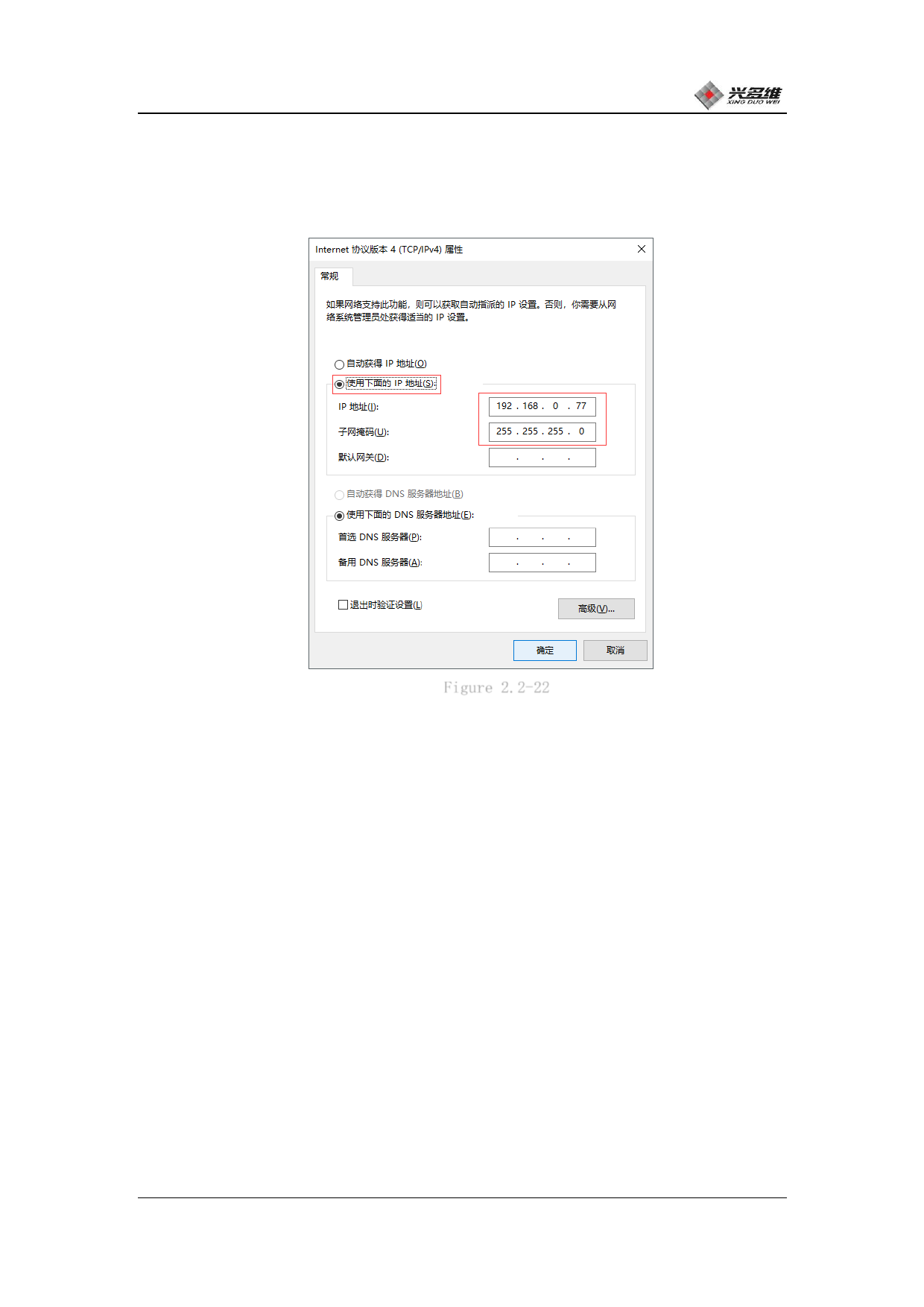
Open [Internet Protocol Version 4 (TCP/IPv4)] and pop up the pop-
up property box to change the IP address and subnet mask, as shown in
Figure 2.2-22:
Figure 2.2-22
After selecting [Use the following IP address], set the IP
address. Set the IP address to 192.168.0.xxx, and the last three
digits can be set to any number from 0-255. However, it should be
noted that it cannot be repeated with the IP address of the
controller and the lens. The IP of the controller defaults to 100,
and the camera IP is user-defined. That is to avoid 100 and user-
defined numbers. The subnet mask uses 255.255.255.0. After setting,
click OK to save the IP settings.
Open the GigE IP Configurator IP Configuration Tool to set the
camera's IP address. Click the desktop shortcut to open the Network
Configuration Tool. The interface is shown in Figure 2.2-23:
兴于思 维至精
22













































































































































































