Shanghai Fangling Computer Software Co., LTD.
Tel: 021-34290970 Website: www.flcnc.com
Special Note: This manual applies to three versions, so the version
you are currently using may not contain all of the features mentioned.
This manual is intended only as a guide to the use of the software and
should not be considered a complete list of software functions.
3、Software installation and uninstallation
1.Software operating environment requirements
(1)Windows 7 64-bit and above;
(2).NET Running environment for Framework 4.0 and above.
2.Installation procedure
(1)Before installation, please be sure to close all anti-virus
software, to prevent anti-virus software from misreporting the installation
file as a virus, resulting in the file being deleted or intercepted. This may
cause the software to fail to start normally or some functions cannot be
used normally.
(2)Double-click the installation package, click to agree the
software license statement, according to the software installation prompts
click "Next", until the software installation is complete;
(3)Before starting the software, make sure that the purchased USB
dongle is correctly inserted into the USB port of the computer running the
software. If not, the software will not start or fully use due to lack of
authorization.
Special note: The encryption dog is a tool used for software
authorization. An encryption dog is only applicable to one set of software.
If you need to use multiple sets of software or the encryption dog is lost,
you need to buy the software again. Therefore, please take good care of
the encryption dog.
Charpter 2 Introduction to the software
interface
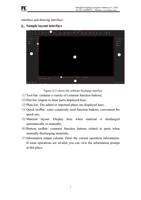
The software is mainly divided into two interfaces, namely sampling
6