- You are here:
- AM.CO.ZABuythisCNC Utilities Homepage
- PowerRoute-CNC-Router
- Mill Operation Manual.pdf
- Page 124 of 155

3.4.2 Simu. Setting
SYNTEC’s controller provides simulation program, after editing
machining program, users can easily simulate the path machining process,
this feature also contains checking features that help users to quickly
verify the syntax error in machining program or unreasonable actions, we
suggest users should use this function to check machining program.
Condition
Except single block mode
Operation
In the “File Management” page, select the program you
want to edit after completing edit program, press
F7-Simulation
Screen will switch to the “graphic simulation” page and
scan the contents of the program
Detail description
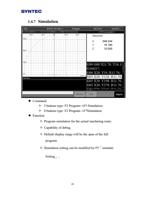
-Simulation screen
The solid line represents the cutting path
The dashed line represents the moving path
In the scanning process, if there is any syntax or content
error, they will be displayed on the screen with
corresponding error line number.
F1-step: To simulate tool path corresponding to single
block in NC files. It is used for coordinate checking
purpose.
F2-Continue: System scans the whole program first
before executing simulation.
122