YDFLP-CL2-200-1/5-A&YDFLP-CL2-300-1/5-A User Manual
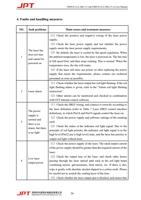
4. Faults and handling measures
NO. fault problems
Main causes and treatment measures
(1)Check the positive and negative wiring of the laser power
supply;
(2)Check the laser power supply and test whether the power
supply meets the laser power supply requirements;
The laser fan
(3)By default, the laser is cooled by fan speed regulation. When
does not turn
1
the ambient temperature is low, the laser is powered on. The fan runs
and cannot be
at full speed first, and then stops rotating. This is normal. When the
powered on
temperature rises, the fan will rotate;
(4)If the laser still does not power on after replacing the power
supply that meets the requirements, please contact our technical
personnel as soon as possible.
(1)Check whether the laser output has red light flashing. If the red
light flashing alarm is given, refer to the "Alarm red light flashing
2 Laser alarm
instruction"
(2)Other alarms can be monitored and checked in combination
with GUI internal control software.
(1)Check the DB25 wiring, and connect it correctly according to
the laser definition (refer to Table 7 Laser DB25 control interface
The power
definition), in which Pin18 and Pin19 signals control the laser on;
supply is
(2)Check the power supply and software settings of the marking
normal and
3
card;
there is no
(3)Check the status of the indicator red light signal. Due to the
alarm, but there
principle of red light priority, the indicator red light signal is in the
is no light
high level (Pin22 pin is high level) state, and the laser has priority to
output red light without laser.
(1)Check the power supply of the laser. The rated output current
of the power supply should be greater than the required current of the
laser;
(2)Check the output lens of the laser, and check other lenses
Low laser
4
passing through the laser optical path such as the red light beam
output power
combining mirror, galvanometer, field mirror, etc. If there is dirt,
wipe it gently with absolute alcohol dipped in a cotton swab. Please
be careful not to scratch the coating layer of the lens;
(3)Check whether the laser output spot is blocked, and ensure that
26