Home
3D
PrintUP 3D Printer
PioCreat 3D Printer
Printers
FastCOLOUR >>
ATools
DTF Textile
UV-DTF
FlatPRINT
PrintExp
InkRIP
Lasers
TruCUT CO
2
>>
TruCUT RDWorks
TruCUT 2020+
TruCUT Express
TruCUT Lite >>
4030 & Vertical Software
4030 & Vertical Documents
New 6040 Desktop
LabelMark
RayCUT
MorCUT >>
MorCUT-Cyclops
LaserMaster
Plasmas
MetalWise
Fabricam
Routers
EasyRoute
PowerRoute
Blade Cutters
Vinyl Cutters >>
V-Series
V-Smart
V-Auto (& V-Smart+)
Vinyl4
Flatbed Cutters >>
FlatCUT
Label Cutters >>
V-Auto Label Cutters
Software >>
VinylCut
More
FastCUT
Heatware
Rollman
ScreenMaster
Other Software
Miscellaneous
AM.CO.ZA
/
Buy CNC Software
/
CNC Software Training
/
CNC Software Downloads
Sales: 072 222 2211
Support: 076 666 6655
Training: 060 818 1818
Jo’burg: 087 802 5368
Cape Town: 087 802 7106
An
Project
Multimedia
Univision Videos
#SortIT Videos
MakersLab.TV
Software Training
Welldone Gallery
Updates
Prevision Blog
Cornerstone Trust
Email Campaigns
Contact Us
Sales WhatsApp
060 600 6000
Support WhatsApp
060 600 7000
Johannesburg Headquarters
011 397 1429
087 802 5368
Cape Town Showroom
021 555 3250
087 802 7106
Links
CNC Machine Repair
Vinyl Cutter
Heatware
You are here:
AM.CO.ZA
Buythis
CNC Utilities Homepage
FlatCUT-Flatbed-Cutting-Machine
MDR Oscillating Blade CNC Router
Hikrobot MVS (Machine Vision Software) User Manual.pdf
Page 114 of 155
Page 114 / 175 of Hikrobot MVS (Machine Vision Software) User Manual
Home
3D
PrintUP 3D Printer
PioCreat 3D Printer
Printers
FastCOLOUR >>
ATools
DTF Textile
UV-DTF
FlatPRINT
PrintExp
InkRIP
Lasers
TruCUT CO
2
>>
TruCUT RDWorks
TruCUT 2020+
TruCUT Express
TruCUT Lite >>
4030 & Vertical Software
4030 & Vertical Documents
New 6040 Desktop
LabelMark
RayCUT
MorCUT >>
MorCUT-Cyclops
LaserMaster
Plasmas
MetalWise
Fabricam
Routers
EasyRoute
PowerRoute
Blade Cutters
Vinyl Cutters >>
V-Series
V-Smart
V-Auto (& V-Smart+)
Vinyl4
Flatbed Cutters >>
FlatCUT
Label Cutters >>
V-Auto Label Cutters
Software >>
VinylCut
More
FastCUT
Heatware
Rollman
ScreenMaster
Other Software
Miscellaneous
AM.CO.ZA
/
Buy CNC Software
/
CNC Software Training
/
CNC Software Downloads
Sales: 072 222 2211
Support: 076 666 6655
Training: 060 818 1818
Jo’burg: 087 802 5368
Cape Town: 087 802 7106
An
Project
Multimedia
Univision Videos
#SortIT Videos
MakersLab.TV
Software Training
Welldone Gallery
Updates
Prevision Blog
Cornerstone Trust
Email Campaigns
Contact Us
Sales WhatsApp
060 600 6000
Support WhatsApp
060 600 7000
Johannesburg Headquarters
011 397 1429
087 802 5368
Cape Town Showroom
021 555 3250
087 802 7106
Links
CNC Machine Repair
Vinyl Cutter
Heatware
You are here:
AM.CO.ZA
Buythis
CNC Utilities Homepage
FlatCUT-Flatbed-Cutting-Machine
MDR Oscillating Blade CNC Router
Hikrobot MVS (Machine Vision Software) User Manual.pdf
Page 114 of 155
Hikr
o
b
o
t M
ac
h
ine V
i
sio
n
So
f
tw
ar
e
U
s
e
r
M
anu
al
Hi
k
r
o
b
o
t
M
a
c
h
i
n
e Vi
s
i
o
n
S
o
f
t
w
a
r
e
U
s
er
M
a
n
u
a
l
i
L
e
g
al
I
n
f
o
r
m
ati
o
n
©
20
22
H
a
n
gz
h
o
u
H
i
k
ro
bo
t
C
o
.
,
Lt
d
.
A
l
l
righ
t
s
re
s
e
rve
d
.
A
b
ou
t
th
i
s
M
a
n
u
a
l
T
h
e
M
a
n
u
a
l
i
n
c
l
u
d
e
s
i
n
s
t
ru
c
t
i
o
n
s
f
o
r
u
s
i
n
g
a
n
d
m
a
n
a
gi
n
g
t
h
e
P
ro
d
u
c
t
.
P
i
c
t
u
re
s
,
c
h
a
rt
s
,
i
m
a
ge
s
a
n
d
a
l
l
o
t
h
e
r
i
n
f
o
rm
a
t
i
o
n
h
e
re
i
n
a
f
t
e
r
a
re
f
o
r
d
e
s
c
ript
i
o
n
a
n
d
e
x
pl
a
n
a
t
i
o
n
o
n
l
y
.
T
h
e
i
n
f
o
rm
a
t
i
o
n
c
o
n
t
a
i
n
e
d
i
n
t
h
e
M
a
n
u
a
l
i
s
s
u
bje
c
t
t
o
c
h
a
n
ge
,
w
i
t
h
o
u
t
n
o
t
i
c
e
,
d
u
e
t
o
f
i
rm
w
a
re
u
pd
a
t
e
s
o
r
o
t
h
e
r
re
a
s
o
n
s
.
P
l
e
a
s
e
f
i
n
d
t
h
e
l
a
t
e
s
t
v
e
rs
i
o
n
o
f
t
h
i
s
M
a
n
u
a
l
a
t
t
h
e
H
i
k
ro
bo
t
w
e
bs
i
t
e
(
h
t
t
p
s
:/
/
e
n
.
h
i
k
r
o
b
o
t
i
c
s
.
c
o
m
)
.
P
l
e
a
s
e
u
s
e
t
h
i
s
M
a
n
u
a
l
w
i
t
h
t
h
e
gu
i
d
a
n
c
e
a
n
d
a
s
s
i
s
t
a
n
c
e
o
f
pro
f
e
s
s
i
o
n
a
l
s
t
rai
n
e
d
i
n
s
u
ppo
rt
i
n
g
t
h
e
P
ro
d
u
c
t
.
T
r
a
d
e
m
a
r
k
s
a
n
d
o
t
h
e
r
H
i
k
ro
bo
t
'
s
t
ra
d
e
m
a
rk
s
a
n
d
l
o
go
s
a
re
t
h
e
pro
pe
rt
i
e
s
o
f
H
i
k
ro
bo
t
i
n
v
a
rio
u
s
ju
ris
d
i
c
t
i
o
n
s
.
O
t
h
e
r
t
r
a
d
e
m
a
rk
s
a
n
d
l
o
go
s
m
e
n
t
i
o
n
e
d
a
r
e
t
h
e
pro
pe
rt
i
e
s
o
f
t
h
e
i
r
re
s
p
e
c
t
i
v
e
o
w
n
e
rs
.
D
i
s
c
la
ime
r
T
O
T
H
E
M
A
X
I
M
U
M
E
X
T
E
N
T
P
E
R
M
I
T
T
E
D
B
Y
A
P
P
LI
C
A
B
LE
LA
W
,
T
H
I
S
M
A
N
U
A
L
A
N
D
T
H
E
P
R
O
D
U
C
T
D
E
S
C
R
I
B
E
D
,
W
I
T
H
I
T
S
H
A
R
D
W
A
R
E
,
S
O
F
T
W
A
R
E
A
N
D
F
I
R
M
W
A
R
E
,
A
R
E
P
R
O
V
I
D
E
D
"A
S
I
S
"
A
N
D
"W
I
T
H
A
L
L
F
A
U
LT
S
A
N
D
E
R
R
O
R
S
".
H
I
K
R
O
B
O
T
M
A
K
E
S
N
O
W
A
R
R
A
N
T
I
E
S
,
E
X
P
R
E
S
S
O
R
I
M
P
L
I
E
D
,
I
N
C
LU
D
I
N
G
W
I
T
H
O
U
T
LI
M
I
T
A
T
I
O
N
,
M
E
R
C
H
A
N
T
A
B
I
LI
T
Y,
S
A
T
I
S
F
A
C
T
O
R
Y
Q
U
A
LI
T
Y,
O
R
F
I
T
N
E
S
S
F
O
R
A
P
A
R
T
I
C
U
LA
R
P
U
R
P
O
S
E
.
T
H
E
U
S
E
O
F
T
H
E
P
R
O
D
U
C
T
B
Y
Y
O
U
I
S
A
T
YO
U
R
O
W
N
R
I
S
K
.
I
N
N
O
E
V
E
N
T
W
I
LL
H
I
K
R
O
B
O
T
B
E
LI
A
B
LE
T
O
YO
U
F
O
R
A
N
Y
S
P
E
C
I
A
L,
C
O
N
S
E
Q
U
E
N
T
I
A
L
,
I
N
C
I
D
E
N
T
A
L,
O
R
I
N
D
I
R
E
C
T
D
A
M
A
GE
S
,
I
N
C
LU
D
I
N
G
,
A
M
O
N
G
O
T
H
E
R
S
,
D
A
M
A
GE
S
F
O
R
LO
S
S
O
F
B
U
S
I
N
E
S
S
P
R
O
F
I
T
S
,
B
U
S
I
N
E
S
S
I
N
T
E
R
R
U
P
T
I
O
N
,
O
R
LO
S
S
O
F
D
A
T
A
,
C
O
R
R
U
P
T
I
O
N
O
F
S
YS
T
E
M
S
,
O
R
LO
S
S
O
F
D
O
C
U
M
E
N
T
A
T
I
O
N
,
W
H
E
T
H
E
R
B
A
S
E
D
O
N
B
R
E
A
C
H
O
F
C
O
N
T
R
A
C
T
,
T
O
R
T
(I
N
C
LU
D
I
N
G
N
E
GLI
GE
N
C
E
)
,
P
R
O
D
U
C
T
LI
A
B
I
LI
T
Y,
O
R
O
T
H
E
R
W
I
S
E
,
I
N
C
O
N
N
E
C
T
I
O
N
W
I
T
H
T
H
E
U
S
E
O
F
T
H
E
P
R
O
D
U
C
T
,
E
V
E
N
I
F
H
I
K
R
O
B
O
T
H
A
S
B
E
E
N
A
D
V
I
S
E
D
O
F
T
H
E
P
O
S
S
I
B
I
LI
T
Y
O
F
S
U
C
H
D
A
M
A
GE
S
O
R
LO
S
S
.
YO
U
A
C
K
N
O
W
LE
D
G
E
T
H
A
T
T
H
E
N
A
T
U
R
E
O
F
T
H
E
I
N
T
E
R
N
E
T
P
R
O
V
I
D
E
S
F
O
R
I
N
H
E
R
E
N
T
S
E
C
U
R
I
T
Y
R
I
S
K
S
,
A
N
D
H
I
K
R
O
B
O
T
S
H
A
LL
N
O
T
T
A
K
E
A
N
Y
R
E
S
P
O
N
S
I
B
I
L
I
T
I
E
S
F
O
R
A
B
N
O
R
M
A
L
O
P
E
R
A
T
I
O
N
,
P
R
I
V
A
C
Y
LE
A
K
A
GE
O
R
O
T
H
E
R
D
A
M
A
GE
S
R
E
S
U
LT
I
N
G
F
R
O
M
C
YB
E
R
-
A
T
T
A
C
K
,
H
A
C
K
E
R
A
T
T
A
C
K
,
V
I
R
U
S
I
N
F
E
C
T
I
O
N
,
O
R
O
T
H
E
R
I
N
T
E
R
N
E
T
S
E
C
U
R
I
T
Y
R
I
S
K
S
;
H
O
W
E
V
E
R
,
H
I
K
R
O
B
O
T
W
I
LL
P
R
O
V
I
D
E
T
I
M
E
LY
T
E
C
H
N
I
C
A
L
S
U
P
P
O
R
T
I
F
R
E
Q
U
I
R
E
D
.
YO
U
A
GR
E
E
T
O
U
S
E
T
H
I
S
P
R
O
D
U
C
T
I
N
C
O
M
P
LI
A
N
C
E
W
I
T
H
A
LL
A
P
P
LI
C
A
B
LE
LA
W
S
,
A
N
D
YO
U
A
R
E
S
O
L
E
LY
R
E
S
P
O
N
S
I
B
LE
F
O
R
E
N
S
U
R
I
N
G
T
H
A
T
YO
U
R
U
S
E
C
O
N
F
O
R
M
S
T
O
T
H
E
A
P
P
L
I
C
A
B
LE
LA
W
.
E
S
P
E
C
I
A
LL
Y,
YO
U
A
R
E
R
E
S
P
O
N
S
I
B
LE
,
F
O
R
U
S
I
N
G
T
H
I
S
P
R
O
D
U
C
T
I
N
A
M
A
N
N
E
R
T
H
A
T
D
O
E
S
N
O
T
I
N
F
R
I
N
GE
O
N
T
H
E
R
I
GH
T
S
O
F
T
H
I
R
D
P
A
R
T
I
E
S
,
I
N
C
LU
D
I
N
G
W
I
T
H
O
U
T
LI
M
I
T
A
T
I
O
N
,
R
I
G
H
T
S
O
F
P
U
B
LI
C
I
T
Y,
I
N
T
E
LL
E
C
T
U
A
L
P
R
O
P
E
R
T
Y
R
I
G
H
T
S
,
O
R
D
A
T
A
P
R
O
T
E
C
T
I
O
N
A
N
D
O
T
H
E
R
P
R
I
V
A
C
Y
R
I
GH
T
S
.
YO
U
S
H
A
LL
N
O
T
U
S
E
T
H
I
S
P
R
O
D
U
C
T
Hi
k
r
o
b
o
t
M
a
c
h
i
n
e Vi
s
i
o
n
S
o
f
t
w
a
r
e
U
s
er
M
a
n
u
a
l
i
i
F
O
R
A
N
Y
P
R
O
H
I
B
I
T
E
D
E
N
D
-
U
S
E
S
,
I
N
C
LU
D
I
N
G
T
H
E
D
E
V
E
LO
P
M
E
N
T
O
R
P
R
O
D
U
C
T
I
O
N
O
F
W
E
A
P
O
N
S
O
F
M
A
S
S
D
E
S
T
R
U
C
T
I
O
N
,
T
H
E
D
E
V
E
LO
P
M
E
N
T
O
R
P
R
O
D
U
C
T
I
O
N
O
F
C
H
E
M
I
C
A
L
O
R
B
I
O
LO
GI
C
A
L
W
E
A
P
O
N
S
,
A
N
Y
A
C
T
I
V
I
T
I
E
S
I
N
T
H
E
C
O
N
T
E
X
T
R
E
LA
T
E
D
T
O
A
N
Y
N
U
C
LE
A
R
E
X
P
LO
S
I
V
E
O
R
U
N
S
A
F
E
N
U
C
LE
A
R
F
U
E
L
-
C
YC
LE
,
O
R
I
N
S
U
P
P
O
R
T
O
F
H
U
M
A
N
R
I
G
H
T
S
A
B
U
S
E
S
.
T
H
E
P
E
R
F
O
R
M
A
N
C
E
D
A
T
A
I
N
T
H
I
S
P
U
B
LI
C
A
T
I
O
N
I
S
B
A
S
E
D
O
N
H
I
K
R
O
B
O
T
'
S
I
N
T
E
R
N
A
L
R
E
S
E
A
R
C
H
/
E
V
A
LU
A
T
I
O
N
.
A
C
T
U
A
L
D
A
T
A
M
A
Y
V
A
R
Y
D
E
P
E
N
D
I
N
G
O
N
S
P
E
C
I
F
I
C
C
O
N
F
I
GU
R
A
T
I
O
N
S
A
N
D
O
P
E
R
A
T
I
N
G
C
O
N
D
I
T
I
O
N
S
A
N
D
H
I
K
R
O
B
O
T
S
H
A
LL
N
O
T
B
E
A
R
T
H
E
C
O
N
S
E
Q
U
E
N
C
E
S
A
R
I
S
I
N
G
T
H
E
R
E
F
R
O
M
.
I
N
T
H
E
E
V
E
N
T
O
F
A
N
Y
C
O
N
F
LI
C
T
S
B
E
T
W
E
E
N
T
H
I
S
M
A
N
U
A
L
A
N
D
T
H
E
A
P
P
LI
C
A
B
LE
LA
W
,
T
H
E
LA
T
T
E
R
P
R
E
V
A
I
L
S
.
Hi
k
r
o
b
o
t
M
a
c
h
i
n
e Vi
s
i
o
n
S
o
f
t
w
a
r
e
U
s
er
M
a
n
u
a
l
i
i
i
S
y
m
b
o
l
C
o
n
v
e
n
ti
o
n
s
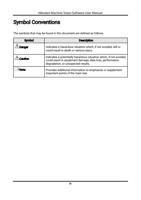
T
h
e
s
y
m
bo
l
s
t
h
a
t
m
a
y
be
f
o
u
n
d
i
n
t
h
i
s
d
o
c
u
m
e
n
t
a
re
d
e
f
i
n
e
d
a
s
f
o
l
l
o
w
s
.
S
y
m
b
o
l
D
e
s
c
ri
pt
i
o
n
D
a
n
ge
r
I
n
d
i
c
a
t
e
s
a
h
a
z
a
rdo
u
s
s
i
t
u
a
t
i
o
n
w
h
i
c
h
,
i
f
n
o
t
a
v
o
i
d
e
d
,
w
i
l
l
o
r
c
o
u
l
d
re
s
u
l
t
i
n
d
e
a
t
h
o
r
s
e
rio
u
s
i
n
ju
ry
.
C
a
u
t
i
o
n
I
n
d
i
c
a
t
e
s
a
po
t
e
n
t
i
a
l
l
y
h
a
z
a
rdo
u
s
s
i
t
u
a
t
i
o
n
w
h
i
c
h
,
i
f
n
o
t
a
v
o
i
d
e
d
,
c
o
u
l
d
re
s
u
l
t
i
n
e
q
u
i
pme
n
t
d
a
m
a
g
e
,
d
a
t
a
l
o
s
s
,
pe
rf
o
rm
a
n
c
e
d
e
gra
d
a
t
i
o
n
,
o
r
u
n
e
x
pe
c
t
e
d
r
e
s
u
l
t
s
.
N
o
t
e
P
ro
v
i
d
e
s
a
d
d
i
t
i
o
n
a
l
i
n
f
o
rm
a
t
i
o
n
t
o
e
m
ph
a
s
i
z
e
o
r
s
u
ppl
e
m
e
n
t
i
m
po
rt
a
n
t
po
i
n
t
s
o
f
t
h
e
m
a
i
n
t
e
x
t
.
Hi
k
r
o
b
o
t
M
a
c
h
i
n
e Vi
s
i
o
n
S
o
f
t
w
a
r
e
U
s
er
M
a
n
u
a
l
i
v
C
o
n
te
n
t
s
C
h
a
pt
e
r
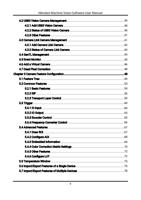
1
O
v
e
rvi
e
w
.
.
.
.
.
.
.
.
.
.
.
.
.
.
.
.
.
.
.
.
.
.
.
.
.
.
.
.
.
.
.
.
.
.
.
.
.
.
.
.
.
.
.
.
.
.
.
.
.
.
.
.
.
.
.
.
.
.
.
.
.
.
.
.
.
.
.
.
.
.
.
.
.
.
.
.
.
.
.
.
.
.
.
.
.
.
.
.
.
.
.
.
.
.
.
.
.
.
.
.
.
.
.
.
.
.
.
.
.
.
1
1.
1
I
n
t
r
o
d
u
c
t
i
o
n
.
.
.
.
.
.
.
.
.
.
.
.
.
.
.
.
.
.
.
.
.
.
.
.
.
.
.
.
.
.
.
.
.
.
.
.
.
.
.
.
.
.
.
.
.
.
.
.
.
.
.
.
.
.
.
.
.
.
.
.
.
.
.
.
.
.
.
.
.
.
.
.
.
.
.
.
.
.
.
.
.
.
.
.
.
.
.
.
.
.
.
.
.
.
.
.
.
.
.
.
.
.
.
.
.
.
.
.
.
.
.
.
.
.
.
.
.
1
1.
2
K
e
y
F
e
a
t
u
re
s
.
.
.
.
.
.
.
.
.
.
.
.
.
.
.
.
.
.
.
.
.
.
.
.
.
.
.
.
.
.
.
.
.
.
.
.
.
.
.
.
.
.
.
.
.
.
.
.
.
.
.
.
.
.
.
.
.
.
.
.
.
.
.
.
.
.
.
.
.
.
.
.
.
.
.
.
.
.
.
.
.
.
.
.
.
.
.
.
.
.
.
.
.
.
.
.
.
.
.
.
.
.
.
.
.
.
.
.
.
.
.
.
.
.
.
.
1
1.
3
S
y
s
t
e
m
R
e
q
u
i
re
m
e
n
t
s
.
.
.
.
.
.
.
.
.
.
.
.
.
.
.
.
.
.
.
.
.
.
.
.
.
.
.
.
.
.
.
.
.
.
.
.
.
.
.
.
.
.
.
.
.
.
.
.
.
.
.
.
.
.
.
.
.
.
.
.
.
.
.
.
.
.
.
.
.
.
.
.
.
.
.
.
.
.
.
.
.
.
.
.
.
.
.
.
.
.
.
.
.
.
.
.
.
.
.
.
.
1
1.
4
R
e
v
i
s
i
o
n
H
i
s
t
o
r
y
.
.
.
.
.
.
.
.
.
.
.
.
.
.
.
.
.
.
.
.
.
.
.
.
.
.
.
.
.
.
.
.
.
.
.
.
.
.
.
.
.
.
.
.
.
.
.
.
.
.
.
.
.
.
.
.
.
.
.
.
.
.
.
.
.
.
.
.
.
.
.
.
.
.
.
.
.
.
.
.
.
.
.
.
.
.
.
.
.
.
.
.
.
.
.
.
.
.
.
.
.
.
.
.
.
.
.
.
.
.
2
1.
5
M
a
i
n
W
i
n
d
o
w
I
n
t
r
o
d
u
c
t
i
o
n
.
.
.
.
.
.
.
.
.
.
.
.
.
.
.
.
.
.
.
.
.
.
.
.
.
.
.
.
.
.
.
.
.
.
.
.
.
.
.
.
.
.
.
.
.
.
.
.
.
.
.
.
.
.
.
.
.
.
.
.
.
.
.
.
.
.
.
.
.
.
.
.
.
.
.
.
.
.
.
.
.
.
.
.
.
.
.
.
.
.
.
.
.
8
C
h
a
pt
e
r
2
E
n
v
i
r
o
n
m
e
n
t
C
o
n
f
i
g
u
rat
i
o
n
.
.
.
.
.
.
.
.
.
.
.
.
.
.
.
.
.
.
.
.
.
.
.
.
.
.
.
.
.
.
.
.
.
.
.
.
.
.
.
.
.
.
.
.
.
.
.
.
.
.
.
.
.
.
.
.
.
.
.
.
.
.
.
.
.
.
.
.
.
.
.
.
.
.
.
.
.
.
.
.
.
1
0
2.
1
C
o
n
f
i
g
u
r
a
t
i
o
n
s
be
f
o
re
U
s
i
n
g
Gi
gE
V
i
s
i
o
n
C
a
m
e
ras
.
.
.
.
.
.
.
.
.
.
.
.
.
.
.
.
.
.
.
.
.
.
.
.
.
.
.
.
.
.
.
.
.
.
.
.
.
.
.
.
.
.
.
.
.
.
.
.
.
.
.
.
1
0
2.
2
C
o
n
f
i
g
u
r
a
t
i
o
n
s
be
f
o
re
U
s
i
n
g
U
S
B
3
V
i
s
i
o
n
C
a
m
e
ras
.
.
.
.
.
.
.
.
.
.
.
.
.
.
.
.
.
.
.
.
.
.
.
.
.
.
.
.
.
.
.
.
.
.
.
.
.
.
.
.
.
.
.
.
.
.
.
.
.
.
.
1
3
2.
3
C
o
n
f
i
g
u
r
a
t
i
o
n
s
be
f
o
re
U
s
i
n
g
C
a
m
e
ra
L
i
n
k
C
a
m
e
ras
.
.
.
.
.
.
.
.
.
.
.
.
.
.
.
.
.
.
.
.
.
.
.
.
.
.
.
.
.
.
.
.
.
.
.
.
.
.
.
.
.
.
.
.
.
.
.
.
.
.
1
4
C
h
a
pt
e
r
3
M
e
n
u
B
a
r
.
.
.
.
.
.
.
.
.
.
.
.
.
.
.
.
.
.
.
.
.
.
.
.
.
.
.
.
.
.
.
.
.
.
.
.
.
.
.
.
.
.
.
.
.
.
.
.
.
.
.
.
.
.
.
.
.
.
.
.
.
.
.
.
.
.
.
.
.
.
.
.
.
.
.
.
.
.
.
.
.
.
.
.
.
.
.
.
.
.
.
.
.
.
.
.
.
.
.
.
.
.
.
.
.
.
.
.
1
5
3.
1
F
i
l
e
.
.
.
.
.
.
.
.
.
.
.
.
.
.
.
.
.
.
.
.
.
.
.
.
.
.
.
.
.
.
.
.
.
.
.
.
.
.
.
.
.
.
.
.
.
.
.
.
.
.
.
.
.
.
.
.
.
.
.
.
.
.
.
.
.
.
.
.
.
.
.
.
.
.
.
.
.
.
.
.
.
.
.
.
.
.
.
.
.
.
.
.
.
.
.
.
.
.
.
.
.
.
.
.
.
.
.
.
.
.
.
.
.
.
.
.
.
.
.
.
.
.
.
.
.
.
.
.
.
.
1
5
3.
2
V
i
e
w
.
.
.
.
.
.
.
.
.
.
.
.
.
.
.
.
.
.
.
.
.
.
.
.
.
.
.
.
.
.
.
.
.
.
.
.
.
.
.
.
.
.
.
.
.
.
.
.
.
.
.
.
.
.
.
.
.
.
.
.
.
.
.
.
.
.
.
.
.
.
.
.
.
.
.
.
.
.
.
.
.
.
.
.
.
.
.
.
.
.
.
.
.
.
.
.
.
.
.
.
.
.
.
.
.
.
.
.
.
.
.
.
.
.
.
.
.
.
.
.
.
.
.
.
.
.
.
1
6
3.
3
S
e
t
t
i
n
gs
.
.
.
.
.
.
.
.
.
.
.
.
.
.
.
.
.
.
.
.
.
.
.
.
.
.
.
.
.
.
.
.
.
.
.
.
.
.
.
.
.
.
.
.
.
.
.
.
.
.
.
.
.
.
.
.
.
.
.
.
.
.
.
.
.
.
.
.
.
.
.
.
.
.
.
.
.
.
.
.
.
.
.
.
.
.
.
.
.
.
.
.
.
.
.
.
.
.
.
.
.
.
.
.
.
.
.
.
.
.
.
.
.
.
.
.
.
.
.
.
.
.
1
7
3.
3.
1
Ge
n
e
ral
S
e
t
t
i
n
g
s
.
.
.
.
.
.
.
.
.
.
.
.
.
.
.
.
.
.
.
.
.
.
.
.
.
.
.
.
.
.
.
.
.
.
.
.
.
.
.
.
.
.
.
.
.
.
.
.
.
.
.
.
.
.
.
.
.
.
.
.
.
.
.
.
.
.
.
.
.
.
.
.
.
.
.
.
.
.
.
.
.
.
.
.
.
.
.
.
.
.
.
.
.
.
.
.
.
1
7
3.
3.
2
C
a
pt
u
re
a
n
d
R
e
c
o
r
d
i
n
g
S
e
t
t
i
n
g
s
.
.
.
.
.
.
.
.
.
.
.
.
.
.
.
.
.
.
.
.
.
.
.
.
.
.
.
.
.
.
.
.
.
.
.
.
.
.
.
.
.
.
.
.
.
.
.
.
.
.
.
.
.
.
.
.
.
.
.
.
.
.
.
.
.
.
.
.
.
.
.
.
1
9
3.
3.
3
N
e
t
w
o
r
k
S
e
t
t
i
n
gs
.
.
.
.
.
.
.
.
.
.
.
.
.
.
.
.
.
.
.
.
.
.
.
.
.
.
.
.
.
.
.
.
.
.
.
.
.
.
.
.
.
.
.
.
.
.
.
.
.
.
.
.
.
.
.
.
.
.
.
.
.
.
.
.
.
.
.
.
.
.
.
.
.
.
.
.
.
.
.
.
.
.
.
.
.
.
.
.
.
.
.
.
.
.
.
.
2
3
3.
3.
4
B
u
f
f
e
r
S
e
t
t
i
n
g
s
.
.
.
.
.
.
.
.
.
.
.
.
.
.
.
.
.
.
.
.
.
.
.
.
.
.
.
.
.
.
.
.
.
.
.
.
.
.
.
.
.
.
.
.
.
.
.
.
.
.
.
.
.
.
.
.
.
.
.
.
.
.
.
.
.
.
.
.
.
.
.
.
.
.
.
.
.
.
.
.
.
.
.
.
.
.
.
.
.
.
.
.
.
.
.
.
.
.
.
.
2
4
3.
3.
5
R
e
s
e
n
d
P
a
c
k
e
t
.
.
.
.
.
.
.
.
.
.
.
.
.
.
.
.
.
.
.
.
.
.
.
.
.
.
.
.
.
.
.
.
.
.
.
.
.
.
.
.
.
.
.
.
.
.
.
.
.
.
.
.
.
.
.
.
.
.
.
.
.
.
.
.
.
.
.
.
.
.
.
.
.
.
.
.
.
.
.
.
.
.
.
.
.
.
.
.
.
.
.
.
.
.
.
.
.
.
.
.
2
5
3.
3.
6
S
h
o
rt
c
u
t
.
.
.
.
.
.
.
.
.
.
.
.
.
.
.
.
.
.
.
.
.
.
.
.
.
.
.
.
.
.
.
.
.
.
.
.
.
.
.
.
.
.
.
.
.
.
.
.
.
.
.
.
.
.
.
.
.
.
.
.
.
.
.
.
.
.
.
.
.
.
.
.
.
.
.
.
.
.
.
.
.
.
.
.
.
.
.
.
.
.
.
.
.
.
.
.
.
.
.
.
.
.
.
.
.
.
.
.
.
.
2
6
3.
4
T
o
o
l
.
.
.
.
.
.
.
.
.
.
.
.
.
.
.
.
.
.
.
.
.
.
.
.
.
.
.
.
.
.
.
.
.
.
.
.
.
.
.
.
.
.
.
.
.
.
.
.
.
.
.
.
.
.
.
.
.
.
.
.
.
.
.
.
.
.
.
.
.
.
.
.
.
.
.
.
.
.
.
.
.
.
.
.
.
.
.
.
.
.
.
.
.
.
.
.
.
.
.
.
.
.
.
.
.
.
.
.
.
.
.
.
.
.
.
.
.
.
.
.
.
.
.
.
.
.
.
.
2
7
3.
5
H
e
l
p
.
.
.
.
.
.
.
.
.
.
.
.
.
.
.
.
.
.
.
.
.
.
.
.
.
.
.
.
.
.
.
.
.
.
.
.
.
.
.
.
.
.
.
.
.
.
.
.
.
.
.
.
.
.
.
.
.
.
.
.
.
.
.
.
.
.
.
.
.
.
.
.
.
.
.
.
.
.
.
.
.
.
.
.
.
.
.
.
.
.
.
.
.
.
.
.
.
.
.
.
.
.
.
.
.
.
.
.
.
.
.
.
.
.
.
.
.
.
.
.
.
.
.
.
.
.
.
.
2
8
C
h
a
pt
e
r
4
D
e
v
i
c
e
M
a
n
a
ge
m
e
n
t
.
.
.
.
.
.
.
.
.
.
.
.
.
.
.
.
.
.
.
.
.
.
.
.
.
.
.
.
.
.
.
.
.
.
.
.
.
.
.
.
.
.
.
.
.
.
.
.
.
.
.
.
.
.
.
.
.
.
.
.
.
.
.
.
.
.
.
.
.
.
.
.
.
.
.
.
.
.
.
.
.
.
.
.
.
.
.
.
.
.
.
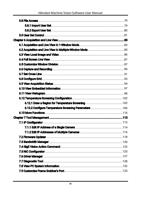
2
9
4.
1
Gi
gE
V
i
s
i
o
n
C
a
m
e
r
a
M
a
n
a
ge
m
e
n
t
.
.
.
.
.
.
.
.
.
.
.
.
.
.
.
.
.
.
.
.
.
.
.
.
.
.
.
.
.
.
.
.
.
.
.
.
.
.
.
.
.
.
.
.
.
.
.
.
.
.
.
.
.
.
.
.
.
.
.
.
.
.
.
.
.
.
.
.
.
.
.
.
.
.
.
.
.
.
.
2
9
4.
1.
1
C
o
n
n
e
c
t
G
i
gE
V
i
s
i
o
n
C
a
m
e
ra
.
.
.
.
.
.
.
.
.
.
.
.
.
.
.
.
.
.
.
.
.
.
.
.
.
.
.
.
.
.
.
.
.
.
.
.
.
.
.
.
.
.
.
.
.
.
.
.
.
.
.
.
.
.
.
.
.
.
.
.
.
.
.
.
.
.
.
.
.
.
.
.
.
.
.
.
.
2
9
4.
1.
2
S
t
a
t
u
s
o
f
Gi
gE
V
i
s
i
o
n
C
a
m
e
ra
.
.
.
.
.
.
.
.
.
.
.
.
.
.
.
.
.
.
.
.
.
.
.
.
.
.
.
.
.
.
.
.
.
.
.
.
.
.
.
.
.
.
.
.
.
.
.
.
.
.
.
.
.
.
.
.
.
.
.
.
.
.
.
.
.
.
.
.
.
.
.
.
.
.
.
3
3
4.
1.
3
E
d
i
t
C
a
m
e
ra
I
P
A
d
d
re
s
s
.
.
.
.
.
.
.
.
.
.
.
.
.
.
.
.
.
.
.
.
.
.
.
.
.
.
.
.
.
.
.
.
.
.
.
.
.
.
.
.
.
.
.
.
.
.
.
.
.
.
.
.
.
.
.
.
.
.
.
.
.
.
.
.
.
.
.
.
.
.
.
.
.
.
.
.
.
.
.
.
.
.
.
.
.
3
4
4.
1.
4
M
u
l
t
i
c
a
s
t
S
e
t
t
i
n
g
s
.
.
.
.
.
.
.
.
.
.
.
.
.
.
.
.
.
.
.
.
.
.
.
.
.
.
.
.
.
.
.
.
.
.
.
.
.
.
.
.
.
.
.
.
.
.
.
.
.
.
.
.
.
.
.
.
.
.
.
.
.
.
.
.
.
.
.
.
.
.
.
.
.
.
.
.
.
.
.
.
.
.
.
.
.
.
.
.
.
.
.
.
.
.
3
4
4.
1.
5
O
t
h
e
r
F
e
a
t
u
re
s
.
.
.
.
.
.
.
.
.
.
.
.
.
.
.
.
.
.
.
.
.
.
.
.
.
.
.
.
.
.
.
.
.
.
.
.
.
.
.
.
.
.
.
.
.
.
.
.
.
.
.
.
.
.
.
.
.
.
.
.
.
.
.
.
.
.
.
.
.
.
.
.
.
.
.
.
.
.
.
.
.
.
.
.
.
.
.
.
.
.
.
.
.
.
.
.
.
.
.
.
3
7
Hi
k
r
o
b
o
t
M
a
c
h
i
n
e Vi
s
i
o
n
S
o
f
t
w
a
r
e
U
s
er
M
a
n
u
a
l
v
4.
2
U
S
B
3
V
i
s
i
o
n
C
a
m
e
ra
M
a
n
a
ge
m
e
n
t
.
.
.
.
.
.
.
.
.
.
.
.
.
.
.
.
.
.
.
.
.
.
.
.
.
.
.
.
.
.
.
.
.
.
.
.
.
.
.
.
.
.
.
.
.
.
.
.
.
.
.
.
.
.
.
.
.
.
.
.
.
.
.
.
.
.
.
.
.
.
.
.
.
.
.
.
.
.
3
9
4.
2.
1
A
d
d
U
S
B
3
V
i
s
i
o
n
C
a
m
e
ra
.
.
.
.
.
.
.
.
.
.
.
.
.
.
.
.
.
.
.
.
.
.
.
.
.
.
.
.
.
.
.
.
.
.
.
.
.
.
.
.
.
.
.
.
.
.
.
.
.
.
.
.
.
.
.
.
.
.
.
.
.
.
.
.
.
.
.
.
.
.
.
.
.
.
.
.
.
.
.
.
.
.
4
0
4.
2.
2
S
t
a
t
u
s
o
f
U
S
B
3
V
i
s
i
o
n
C
a
m
e
ra
.
.
.
.
.
.
.
.
.
.
.
.
.
.
.
.
.
.
.
.
.
.
.
.
.
.
.
.
.
.
.
.
.
.
.
.
.
.
.
.
.
.
.
.
.
.
.
.
.
.
.
.
.
.
.
.
.
.
.
.
.
.
.
.
.
.
.
.
.
.
.
.
.
.
4
0
4.
2.
3
O
t
h
e
r
F
e
a
t
u
re
s
.
.
.
.
.
.
.
.
.
.
.
.
.
.
.
.
.
.
.
.
.
.
.
.
.
.
.
.
.
.
.
.
.
.
.
.
.
.
.
.
.
.
.
.
.
.
.
.
.
.
.
.
.
.
.
.
.
.
.
.
.
.
.
.
.
.
.
.
.
.
.
.
.
.
.
.
.
.
.
.
.
.
.
.
.
.
.
.
.
.
.
.
.
.
.
.
.
.
.
.
4
1
4.
3
C
a
m
e
ra
Li
n
k
C
a
m
e
ra
M
a
n
a
ge
m
e
n
t
.
.
.
.
.
.
.
.
.
.
.
.
.
.
.
.
.
.
.
.
.
.
.
.
.
.
.
.
.
.
.
.
.
.
.
.
.
.
.
.
.
.
.
.
.
.
.
.
.
.
.
.
.
.
.
.
.
.
.
.
.
.
.
.
.
.
.
.
.
.
.
.
.
.
.
.
.
4
1
4.
3.
1
A
d
d
C
a
m
e
ra
Li
n
k
C
a
m
e
ra
.
.
.
.
.
.
.
.
.
.
.
.
.
.
.
.
.
.
.
.
.
.
.
.
.
.
.
.
.
.
.
.
.
.
.
.
.
.
.
.
.
.
.
.
.
.
.
.
.
.
.
.
.
.
.
.
.
.
.
.
.
.
.
.
.
.
.
.
.
.
.
.
.
.
.
.
.
.
.
.
.
.
4
2
4.
3.
2
S
t
a
t
u
s
o
f
C
a
m
e
ra
Li
n
k
C
a
m
e
ra
.
.
.
.
.
.
.
.
.
.
.
.
.
.
.
.
.
.
.
.
.
.
.
.
.
.
.
.
.
.
.
.
.
.
.
.
.
.
.
.
.
.
.
.
.
.
.
.
.
.
.
.
.
.
.
.
.
.
.
.
.
.
.
.
.
.
.
.
.
.
.
.
.
4
3
4.
4
Ge
n
T
L
M
a
n
a
ge
m
e
n
t
.
.
.
.
.
.
.
.
.
.
.
.
.
.
.
.
.
.
.
.
.
.
.
.
.
.
.
.
.
.
.
.
.
.
.
.
.
.
.
.
.
.
.
.
.
.
.
.
.
.
.
.
.
.
.
.
.
.
.
.
.
.
.
.
.
.
.
.
.
.
.
.
.
.
.
.
.
.
.
.
.
.
.
.
.
.
.
.
.
.
.
.
.
.
.
.
.
.
.
.
.
4
3
4.
5
E
v
e
n
t
M
o
n
i
t
o
r
.
.
.
.
.
.
.
.
.
.
.
.
.
.
.
.
.
.
.
.
.
.
.
.
.
.
.
.
.
.
.
.
.
.
.
.
.
.
.
.
.
.
.
.
.
.
.
.
.
.
.
.
.
.
.
.
.
.
.
.
.
.
.
.
.
.
.
.
.
.
.
.
.
.
.
.
.
.
.
.
.
.
.
.
.
.
.
.
.
.
.
.
.
.
.
.
.
.
.
.
.
.
.
.
.
.
.
.
.
.
.
.
4
5
4.
6
A
d
d
a
V
i
rt
u
a
l
C
a
m
e
ra
.
.
.
.
.
.
.
.
.
.
.
.
.
.
.
.
.
.
.
.
.
.
.
.
.
.
.
.
.
.
.
.
.
.
.
.
.
.
.
.
.
.
.
.
.
.
.
.
.
.
.
.
.
.
.
.
.
.
.
.
.
.
.
.
.
.
.
.
.
.
.
.
.
.
.
.
.
.
.
.
.
.
.
.
.
.
.
.
.
.
.
.
.
.
.
.
.
.
.
.
4
6
4.
7
D
e
a
d
P
i
x
e
l
C
o
rr
e
c
t
i
o
n
.
.
.
.
.
.
.
.
.
.
.
.
.
.
.
.
.
.
.
.
.
.
.
.
.
.
.
.
.
.
.
.
.
.
.
.
.
.
.
.
.
.
.
.
.
.
.
.
.
.
.
.
.
.
.
.
.
.
.
.
.
.
.
.
.
.
.
.
.
.
.
.
.
.
.
.
.
.
.
.
.
.
.
.
.
.
.
.
.
.
.
.
.
.
.
.
.
.
.
4
8
C
h
a
pt
e
r
5
C
a
m
e
r
a
F
e
a
t
u
re
C
o
n
f
i
g
u
rat
i
o
n
.
.
.
.
.
.
.
.
.
.
.
.
.
.
.
.
.
.
.
.
.
.
.
.
.
.
.
.
.
.
.
.
.
.
.
.
.
.
.
.
.
.
.
.
.
.
.
.
.
.
.
.
.
.
.
.
.
.
.
.
.
.
.
.
.
.
.
.
.
.
.
.
.
.
.
.
4
9
5.
1
F
e
a
t
u
re
T
re
e
.
.
.
.
.
.
.
.
.
.
.
.
.
.
.
.
.
.
.
.
.
.
.
.
.
.
.
.
.
.
.
.
.
.
.
.
.
.
.
.
.
.
.
.
.
.
.
.
.
.
.
.
.
.
.
.
.
.
.
.
.
.
.
.
.
.
.
.
.
.
.
.
.
.
.
.
.
.
.
.
.
.
.
.
.
.
.
.
.
.
.
.
.
.
.
.
.
.
.
.
.
.
.
.
.
.
.
.
.
.
.
.
.
.
4
9
5.
2
C
o
m
m
o
n
F
e
a
t
u
re
s
.
.
.
.
.
.
.
.
.
.
.
.
.
.
.
.
.
.
.
.
.
.
.
.
.
.
.
.
.
.
.
.
.
.
.
.
.
.
.
.
.
.
.
.
.
.
.
.
.
.
.
.
.
.
.
.
.
.
.
.
.
.
.
.
.
.
.
.
.
.
.
.
.
.
.
.
.
.
.
.
.
.
.
.
.
.
.
.
.
.
.
.
.
.
.
.
.
.
.
.
.
.
.
.
5
3
5.
2.
1
B
a
s
i
c
F
e
a
t
u
re
s
.
.
.
.
.
.
.
.
.
.
.
.
.
.
.
.
.
.
.
.
.
.
.
.
.
.
.
.
.
.
.
.
.
.
.
.
.
.
.
.
.
.
.
.
.
.
.
.
.
.
.
.
.
.
.
.
.
.
.
.
.
.
.
.
.
.
.
.
.
.
.
.
.
.
.
.
.
.
.
.
.
.
.
.
.
.
.
.
.
.
.
.
.
.
.
.
.
.
.
.
5
4
5.
2.
2
I
S
P
.
.
.
.
.
.
.
.
.
.
.
.
.
.
.
.
.
.
.
.
.
.
.
.
.
.
.
.
.
.
.
.
.
.
.
.
.
.
.
.
.
.
.
.
.
.
.
.
.
.
.
.
.
.
.
.
.
.
.
.
.
.
.
.
.
.
.
.
.
.
.
.
.
.
.
.
.
.
.
.
.
.
.
.
.
.
.
.
.
.
.
.
.
.
.
.
.
.
.
.
.
.
.
.
.
.
.
.
.
.
.
.
.
.
.
.
.
.
.
5
6
5.
2.
3
T
ra
n
s
p
o
rt
La
y
e
r
C
o
n
t
r
o
l
.
.
.
.
.
.
.
.
.
.
.
.
.
.
.
.
.
.
.
.
.
.
.
.
.
.
.
.
.
.
.
.
.
.
.
.
.
.
.
.
.
.
.
.
.
.
.
.
.
.
.
.
.
.
.
.
.
.
.
.
.
.
.
.
.
.
.
.
.
.
.
.
.
.
.
.
.
.
.
.
.
.
.
.
.
5
9
5.
3
T
rig
ge
r
.
.
.
.
.
.
.
.
.
.
.
.
.
.
.
.
.
.
.
.
.
.
.
.
.
.
.
.
.
.
.
.
.
.
.
.
.
.
.
.
.
.
.
.
.
.
.
.
.
.
.
.
.
.
.
.
.
.
.
.
.
.
.
.
.
.
.
.
.
.
.
.
.
.
.
.
.
.
.
.
.
.
.
.
.
.
.
.
.
.
.
.
.
.
.
.
.
.
.
.
.
.
.
.
.
.
.
.
.
.
.
.
.
.
.
.
.
.
.
.
.
.
.
.
6
0
5.
3.
1
I
O
I
n
p
u
t
.
.
.
.
.
.
.
.
.
.
.
.
.
.
.
.
.
.
.
.
.
.
.
.
.
.
.
.
.
.
.
.
.
.
.
.
.
.
.
.
.
.
.
.
.
.
.
.
.
.
.
.
.
.
.
.
.
.
.
.
.
.
.
.
.
.
.
.
.
.
.
.
.
.
.
.
.
.
.
.
.
.
.
.
.
.
.
.
.
.
.
.
.
.
.
.
.
.
.
.
.
.
.
.
.
.
.
.
.
.
.
.
6
0
5.
3.
2
I
O
O
u
t
p
u
t
.
.
.
.
.
.
.
.
.
.
.
.
.
.
.
.
.
.
.
.
.
.
.
.
.
.
.
.
.
.
.
.
.
.
.
.
.
.
.
.
.
.
.
.
.
.
.
.
.
.
.
.
.
.
.
.
.
.
.
.
.
.
.
.
.
.
.
.
.
.
.
.
.
.
.
.
.
.
.
.
.
.
.
.
.
.
.
.
.
.
.
.
.
.
.
.
.
.
.
.
.
.
.
.
.
.
.
.
.
6
3
5.
3.
3
E
n
c
o
d
e
r
C
o
n
t
r
o
l
.
.
.
.
.
.
.
.
.
.
.
.
.
.
.
.
.
.
.
.
.
.
.
.
.
.
.
.
.
.
.
.
.
.
.
.
.
.
.
.
.
.
.
.
.
.
.
.
.
.
.
.
.
.
.
.
.
.
.
.
.
.
.
.
.
.
.
.
.
.
.
.
.
.
.
.
.
.
.
.
.
.
.
.
.
.
.
.
.
.
.
.
.
.
.
.
.
.
6
5
5.
3.
4
F
re
q
u
e
n
c
y
C
o
n
v
e
rt
e
r
C
o
n
t
r
o
l
.
.
.
.
.
.
.
.
.
.
.
.
.
.
.
.
.
.
.
.
.
.
.
.
.
.
.
.
.
.
.
.
.
.
.
.
.
.
.
.
.
.
.
.
.
.
.
.
.
.
.
.
.
.
.
.
.
.
.
.
.
.
.
.
.
.
.
.
.
.
.
.
.
.
.
.
.
6
6
5.
4
A
d
v
a
n
c
e
d
F
e
a
t
u
re
s
.
.
.
.
.
.
.
.
.
.
.
.
.
.
.
.
.
.
.
.
.
.
.
.
.
.
.
.
.
.
.
.
.
.
.
.
.
.
.
.
.
.
.
.
.
.
.
.
.
.
.
.
.
.
.
.
.
.
.
.
.
.
.
.
.
.
.
.
.
.
.
.
.
.
.
.
.
.
.
.
.
.
.
.
.
.
.
.
.
.
.
.
.
.
.
.
.
.
.
.
.
.
.
6
7
5.
4.
1
D
r
a
w
R
O
I
.
.
.
.
.
.
.
.
.
.
.
.
.
.
.
.
.
.
.
.
.
.
.
.
.
.
.
.
.
.
.
.
.
.
.
.
.
.
.
.
.
.
.
.
.
.
.
.
.
.
.
.
.
.
.
.
.
.
.
.
.
.
.
.
.
.
.
.
.
.
.
.
.
.
.
.
.
.
.
.
.
.
.
.
.
.
.
.
.
.
.
.
.
.
.
.
.
.
.
.
.
.
.
.
.
.
.
.
.
6
7
5.
4.
2
C
o
n
f
i
g
u
re
A
O
I
.
.
.
.
.
.
.
.
.
.
.
.
.
.
.
.
.
.
.
.
.
.
.
.
.
.
.
.
.
.
.
.
.
.
.
.
.
.
.
.
.
.
.
.
.
.
.
.
.
.
.
.
.
.
.
.
.
.
.
.
.
.
.
.
.
.
.
.
.
.
.
.
.
.
.
.
.
.
.
.
.
.
.
.
.
.
.
.
.
.
.
.
.
.
.
.
.
.
.
.
.
6
8
5.
4.
3
E
m
be
d
d
e
d
I
n
f
o
r
m
a
t
i
o
n
.
.
.
.
.
.
.
.
.
.
.
.
.
.
.
.
.
.
.
.
.
.
.
.
.
.
.
.
.
.
.
.
.
.
.
.
.
.
.
.
.
.
.
.
.
.
.
.
.
.
.
.
.
.
.
.
.
.
.
.
.
.
.
.
.
.
.
.
.
.
.
.
.
.
.
.
.
.
.
.
.
.
.
.
.
.
6
9
5.
4.
4
C
o
l
o
r
C
o
rr
e
c
t
i
o
n
M
a
t
rix
S
e
t
t
i
n
g
s
.
.
.
.
.
.
.
.
.
.
.
.
.
.
.
.
.
.
.
.
.
.
.
.
.
.
.
.
.
.
.
.
.
.
.
.
.
.
.
.
.
.
.
.
.
.
.
.
.
.
.
.
.
.
.
.
.
.
.
.
.
.
.
.
.
.
.
.
.
.
.
7
0
5.
4.
5
O
t
h
e
r
F
e
a
t
u
re
s
.
.
.
.
.
.
.
.
.
.
.
.
.
.
.
.
.
.
.
.
.
.
.
.
.
.
.
.
.
.
.
.
.
.
.
.
.
.
.
.
.
.
.
.
.
.
.
.
.
.
.
.
.
.
.
.
.
.
.
.
.
.
.
.
.
.
.
.
.
.
.
.
.
.
.
.
.
.
.
.
.
.
.
.
.
.
.
.
.
.
.
.
.
.
.
.
.
.
.
.
7
2
5.
4.
6
C
o
n
f
i
g
u
re
LU
T
.
.
.
.
.
.
.
.
.
.
.
.
.
.
.
.
.
.
.
.
.
.
.
.
.
.
.
.
.
.
.
.
.
.
.
.
.
.
.
.
.
.
.
.
.
.
.
.
.
.
.
.
.
.
.
.
.
.
.
.
.
.
.
.
.
.
.
.
.
.
.
.
.
.
.
.
.
.
.
.
.
.
.
.
.
.
.
.
.
.
.
.
.
.
.
.
.
.
.
.
.
7
2
5.
5
T
e
m
pe
rat
u
re
W
i
n
d
o
w
.
.
.
.
.
.
.
.
.
.
.
.
.
.
.
.
.
.
.
.
.
.
.
.
.
.
.
.
.
.
.
.
.
.
.
.
.
.
.
.
.
.
.
.
.
.
.
.
.
.
.
.
.
.
.
.
.
.
.
.
.
.
.
.
.
.
.
.
.
.
.
.
.
.
.
.
.
.
.
.
.
.
.
.
.
.
.
.
.
.
.
.
.
.
.
.
.
.
.
7
5
5.
6
I
m
p
o
rt
/
E
x
p
o
rt
F
e
a
t
u
re
s
o
f
a
S
i
n
gl
e
D
e
v
i
c
e
.
.
.
.
.
.
.
.
.
.
.
.
.
.
.
.
.
.
.
.
.
.
.
.
.
.
.
.
.
.
.
.
.
.
.
.
.
.
.
.
.
.
.
.
.
.
.
.
.
.
.
.
.
.
.
.
.
.
.
.
.
.
.
.
.
.
7
6
5.
7
I
m
p
o
rt
/
E
x
p
o
rt
F
e
a
t
u
re
s
o
f
M
u
l
t
i
pl
e
D
e
v
i
c
e
s
.
.
.
.
.
.
.
.
.
.
.
.
.
.
.
.
.
.
.
.
.
.
.
.
.
.
.
.
.
.
.
.
.
.
.
.
.
.
.
.
.
.
.
.
.
.
.
.
.
.
.
.
.
.
.
.
.
.
.
.
.
.
.
7
8
Hi
k
r
o
b
o
t
M
a
c
h
i
n
e Vi
s
i
o
n
S
o
f
t
w
a
r
e
U
s
er
M
a
n
u
a
l
v
i
5.
8
F
i
l
e
A
c
c
e
s
s
.
.
.
.
.
.
.
.
.
.
.
.
.
.
.
.
.
.
.
.
.
.
.
.
.
.
.
.
.
.
.
.
.
.
.
.
.
.
.
.
.
.
.
.
.
.
.
.
.
.
.
.
.
.
.
.
.
.
.
.
.
.
.
.
.
.
.
.
.
.
.
.
.
.
.
.
.
.
.
.
.
.
.
.
.
.
.
.
.
.
.
.
.
.
.
.
.
.
.
.
.
.
.
.
.
.
.
.
.
.
.
.
.
.
.
.
7
9
5.
8.
1
I
m
p
o
rt
U
s
e
r
S
e
t
.
.
.
.
.
.
.
.
.
.
.
.
.
.
.
.
.
.
.
.
.
.
.
.
.
.
.
.
.
.
.
.
.
.
.
.
.
.
.
.
.
.
.
.
.
.
.
.
.
.
.
.
.
.
.
.
.
.
.
.
.
.
.
.
.
.
.
.
.
.
.
.
.
.
.
.
.
.
.
.
.
.
.
.
.
.
.
.
.
.
.
.
.
.
.
.
.
.
.
7
9
5.
8.
2
E
x
p
o
rt
U
s
e
r
S
e
t
.
.
.
.
.
.
.
.
.
.
.
.
.
.
.
.
.
.
.
.
.
.
.
.
.
.
.
.
.
.
.
.
.
.
.
.
.
.
.
.
.
.
.
.
.
.
.
.
.
.
.
.
.
.
.
.
.
.
.
.
.
.
.
.
.
.
.
.
.
.
.
.
.
.
.
.
.
.
.
.
.
.
.
.
.
.
.
.
.
.
.
.
.
.
.
.
.
.
.
8
0
5.
9
U
s
e
r
S
e
t
C
o
n
t
r
o
l
.
.
.
.
.
.
.
.
.
.
.
.
.
.
.
.
.
.
.
.
.
.
.
.
.
.
.
.
.
.
.
.
.
.
.
.
.
.
.
.
.
.
.
.
.
.
.
.
.
.
.
.
.
.
.
.
.
.
.
.
.
.
.
.
.
.
.
.
.
.
.
.
.
.
.
.
.
.
.
.
.
.
.
.
.
.
.
.
.
.
.
.
.
.
.
.
.
.
.
.
.
.
.
.
.
.
.
.
8
1
C
h
a
pt
e
r
6
A
c
q
u
i
s
i
t
i
o
n
a
n
d
Li
v
e
V
i
e
w
.
.
.
.
.
.
.
.
.
.
.
.
.
.
.
.
.
.
.
.
.
.
.
.
.
.
.
.
.
.
.
.
.
.
.
.
.
.
.
.
.
.
.
.
.
.
.
.
.
.
.
.
.
.
.
.
.
.
.
.
.
.
.
.
.
.
.
.
.
.
.
.
.
.
.
.
.
.
.
.
.
.
.
8
3
6.
1
A
c
q
u
i
s
i
t
i
o
n
a
n
d
Liv
e
V
i
e
w
i
n
1
-
W
i
n
d
o
w
M
o
d
e
.
.
.
.
.
.
.
.
.
.
.
.
.
.
.
.
.
.
.
.
.
.
.
.
.
.
.
.
.
.
.
.
.
.
.
.
.
.
.
.
.
.
.
.
.
.
.
.
.
.
.
.
.
.
.
.
.
.
.
.
.
8
3
6.
2
A
c
q
u
i
s
i
t
i
o
n
a
n
d
Liv
e
V
i
e
w
i
n
M
u
l
t
i
pl
e
-
W
i
n
d
o
w
M
o
d
e
.
.
.
.
.
.
.
.
.
.
.
.
.
.
.
.
.
.
.
.
.
.
.
.
.
.
.
.
.
.
.
.
.
.
.
.
.
.
.
.
.
.
.
.
.
.
.
.
.
8
5
6.
3
V
i
e
w
L
o
c
a
l
I
m
a
ge
a
n
d
V
i
d
e
o
.
.
.
.
.
.
.
.
.
.
.
.
.
.
.
.
.
.
.
.
.
.
.
.
.
.
.
.
.
.
.
.
.
.
.
.
.
.
.
.
.
.
.
.
.
.
.
.
.
.
.
.
.
.
.
.
.
.
.
.
.
.
.
.
.
.
.
.
.
.
.
.
.
.
.
.
.
.
.
.
.
.
.
.
.
.
.
.
8
6
6.
4
F
u
l
l
S
c
re
e
n
Liv
e
V
i
e
w
.
.
.
.
.
.
.
.
.
.
.
.
.
.
.
.
.
.
.
.
.
.
.
.
.
.
.
.
.
.
.
.
.
.
.
.
.
.
.
.
.
.
.
.
.
.
.
.
.
.
.
.
.
.
.
.
.
.
.
.
.
.
.
.
.
.
.
.
.
.
.
.
.
.
.
.
.
.
.
.
.
.
.
.
.
.
.
.
.
.
.
.
.
.
.
.
.
.
.
.
8
7
6.
5
C
u
s
t
o
m
i
z
e
W
i
n
d
o
w
D
i
v
i
s
i
o
n
.
.
.
.
.
.
.
.
.
.
.
.
.
.
.
.
.
.
.
.
.
.
.
.
.
.
.
.
.
.
.
.
.
.
.
.
.
.
.
.
.
.
.
.
.
.
.
.
.
.
.
.
.
.
.
.
.
.
.
.
.
.
.
.
.
.
.
.
.
.
.
.
.
.
.
.
.
.
.
.
.
.
.
.
.
.
.
.
.
8
7
6.
6
C
a
pt
u
re
a
n
d
R
e
c
o
rdi
n
g
.
.
.
.
.
.
.
.
.
.
.
.
.
.
.
.
.
.
.
.
.
.
.
.
.
.
.
.
.
.
.
.
.
.
.
.
.
.
.
.
.
.
.
.
.
.
.
.
.
.
.
.
.
.
.
.
.
.
.
.
.
.
.
.
.
.
.
.
.
.
.
.
.
.
.
.
.
.
.
.
.
.
.
.
.
.
.
.
.
.
.
.
.
.
.
.
.
9
0
6.
7
S
e
t
C
r
o
s
s
Li
n
e
.
.
.
.
.
.
.
.
.
.
.
.
.
.
.
.
.
.
.
.
.
.
.
.
.
.
.
.
.
.
.
.
.
.
.
.
.
.
.
.
.
.
.
.
.
.
.
.
.
.
.
.
.
.
.
.
.
.
.
.
.
.
.
.
.
.
.
.
.
.
.
.
.
.
.
.
.
.
.
.
.
.
.
.
.
.
.
.
.
.
.
.
.
.
.
.
.
.
.
.
.
.
.
.
.
.
.
.
.
.
.
9
1
6.
8
C
o
n
f
i
g
u
re
Grid
.
.
.
.
.
.
.
.
.
.
.
.
.
.
.
.
.
.
.
.
.
.
.
.
.
.
.
.
.
.
.
.
.
.
.
.
.
.
.
.
.
.
.
.
.
.
.
.
.
.
.
.
.
.
.
.
.
.
.
.
.
.
.
.
.
.
.
.
.
.
.
.
.
.
.
.
.
.
.
.
.
.
.
.
.
.
.
.
.
.
.
.
.
.
.
.
.
.
.
.
.
.
.
.
.
.
.
.
.
.
.
9
3
6.
9
V
i
e
w
A
c
q
u
i
s
i
t
i
o
n
S
t
a
t
u
s
.
.
.
.
.
.
.
.
.
.
.
.
.
.
.
.
.
.
.
.
.
.
.
.
.
.
.
.
.
.
.
.
.
.
.
.
.
.
.
.
.
.
.
.
.
.
.
.
.
.
.
.
.
.
.
.
.
.
.
.
.
.
.
.
.
.
.
.
.
.
.
.
.
.
.
.
.
.
.
.
.
.
.
.
.
.
.
.
.
.
.
.
.
.
.
.
9
4
6.
10
V
i
e
w
E
m
be
d
d
e
d
I
n
f
o
r
m
a
t
i
o
n
.
.
.
.
.
.
.
.
.
.
.
.
.
.
.
.
.
.
.
.
.
.
.
.
.
.
.
.
.
.
.
.
.
.
.
.
.
.
.
.
.
.
.
.
.
.
.
.
.
.
.
.
.
.
.
.
.
.
.
.
.
.
.
.
.
.
.
.
.
.
.
.
.
.
.
.
.
.
.
.
.
.
.
.
.
.
9
7
6.
11
V
i
e
w
H
i
s
t
o
gra
m
.
.
.
.
.
.
.
.
.
.
.
.
.
.
.
.
.
.
.
.
.
.
.
.
.
.
.
.
.
.
.
.
.
.
.
.
.
.
.
.
.
.
.
.
.
.
.
.
.
.
.
.
.
.
.
.
.
.
.
.
.
.
.
.
.
.
.
.
.
.
.
.
.
.
.
.
.
.
.
.
.
.
.
.
.
.
.
.
.
.
.
.
.
.
.
.
.
.
.
.
.
.
.
.
.
.
.
9
8
6.
12
T
e
m
pe
r
a
t
u
re
S
c
re
e
n
i
n
g
C
o
n
f
i
g
u
rat
i
o
n
.
.
.
.
.
.
.
.
.
.
.
.
.
.
.
.
.
.
.
.
.
.
.
.
.
.
.
.
.
.
.
.
.
.
.
.
.
.
.
.
.
.
.
.
.
.
.
.
.
.
.
.
.
.
.
.
.
.
.
.
.
.
.
.
.
.
.
.
1
0
2
6.
12
.
1
D
ra
w
a
R
e
gi
o
n
f
o
r
T
e
m
pe
r
a
t
u
re
S
c
re
e
n
i
n
g
.
.
.
.
.
.
.
.
.
.
.
.
.
.
.
.
.
.
.
.
.
.
.
.
.
.
.
.
.
.
.
.
.
.
.
.
.
.
.
.
.
.
.
.
.
.
.
.
.
.
1
0
2
6.
12
.
2
C
o
n
f
i
g
u
re
T
e
m
pe
r
a
t
u
re
S
c
re
e
n
i
n
g
P
a
ra
m
e
t
e
r
s
.
.
.
.
.
.
.
.
.
.
.
.
.
.
.
.
.
.
.
.
.
.
.
.
.
.
.
.
.
.
.
.
.
.
.
.
.
.
.
.
.
.
.
1
0
6
6.
13
M
o
re
F
u
n
c
t
i
o
n
s
.
.
.
.
.
.
.
.
.
.
.
.
.
.
.
.
.
.
.
.
.
.
.
.
.
.
.
.
.
.
.
.
.
.
.
.
.
.
.
.
.
.
.
.
.
.
.
.
.
.
.
.
.
.
.
.
.
.
.
.
.
.
.
.
.
.
.
.
.
.
.
.
.
.
.
.
.
.
.
.
.
.
.
.
.
.
.
.
.
.
.
.
.
.
.
.
.
.
.
.
.
.
.
.
.
1
1
0
C
h
a
pt
e
r
7
T
o
o
l
M
a
n
a
ge
m
e
n
t
.
.
.
.
.
.
.
.
.
.
.
.
.
.
.
.
.
.
.
.
.
.
.
.
.
.
.
.
.
.
.
.
.
.
.
.
.
.
.
.
.
.
.
.
.
.
.
.
.
.
.
.
.
.
.
.
.
.
.
.
.
.
.
.
.
.
.
.
.
.
.
.
.
.
.
.
.
.
.
.
.
.
.
.
.
.
.
.
.
.
.
.
1
1
3
7.
1
I
P
C
o
n
f
i
g
u
rat
o
r
.
.
.
.
.
.
.
.
.
.
.
.
.
.
.
.
.
.
.
.
.
.
.
.
.
.
.
.
.
.
.
.
.
.
.
.
.
.
.
.
.
.
.
.
.
.
.
.
.
.
.
.
.
.
.
.
.
.
.
.
.
.
.
.
.
.
.
.
.
.
.
.
.
.
.
.
.
.
.
.
.
.
.
.
.
.
.
.
.
.
.
.
.
.
.
.
.
.
.
.
.
.
.
.
.
.
.
.
1
1
3
7.
1.
1
E
d
i
t
I
P
A
d
d
re
s
s
o
f
a
S
i
n
gl
e
C
a
m
e
ra
.
.
.
.
.
.
.
.
.
.
.
.
.
.
.
.
.
.
.
.
.
.
.
.
.
.
.
.
.
.
.
.
.
.
.
.
.
.
.
.
.
.
.
.
.
.
.
.
.
.
.
.
.
.
.
.
.
.
.
.
.
.
.
.
1
1
4
7.
1.
2
E
d
i
t
I
P
A
d
d
re
s
s
e
s
o
f
M
u
l
t
i
pl
e
C
a
m
e
ra
s
.
.
.
.
.
.
.
.
.
.
.
.
.
.
.
.
.
.
.
.
.
.
.
.
.
.
.
.
.
.
.
.
.
.
.
.
.
.
.
.
.
.
.
.
.
.
.
.
.
.
.
.
.
.
.
.
.
.
1
1
6
7.
2
F
i
r
m
w
a
re
U
pd
a
t
e
r
.
.
.
.
.
.
.
.
.
.
.
.
.
.
.
.
.
.
.
.
.
.
.
.
.
.
.
.
.
.
.
.
.
.
.
.
.
.
.
.
.
.
.
.
.
.
.
.
.
.
.
.
.
.
.
.
.
.
.
.
.
.
.
.
.
.
.
.
.
.
.
.
.
.
.
.
.
.
.
.
.
.
.
.
.
.
.
.
.
.
.
.
.
.
.
.
.
.
.
.
.
.
.
.
1
1
8
7.
3
B
a
n
d
w
i
d
t
h
M
a
n
a
ge
r
.
.
.
.
.
.
.
.
.
.
.
.
.
.
.
.
.
.
.
.
.
.
.
.
.
.
.
.
.
.
.
.
.
.
.
.
.
.
.
.
.
.
.
.
.
.
.
.
.
.
.
.
.
.
.
.
.
.
.
.
.
.
.
.
.
.
.
.
.
.
.
.
.
.
.
.
.
.
.
.
.
.
.
.
.
.
.
.
.
.
.
.
.
.
.
.
.
.
.
.
1
2
0
7.
4
Gi
gE
V
i
s
i
o
n
A
c
t
i
o
n
C
o
m
m
a
n
d
.
.
.
.
.
.
.
.
.
.
.
.
.
.
.
.
.
.
.
.
.
.
.
.
.
.
.
.
.
.
.
.
.
.
.
.
.
.
.
.
.
.
.
.
.
.
.
.
.
.
.
.
.
.
.
.
.
.
.
.
.
.
.
.
.
.
.
.
.
.
.
.
.
.
.
.
.
.
.
.
.
.
.
.
1
2
2
7.
5
N
I
C
C
o
n
f
i
g
u
rat
o
r
.
.
.
.
.
.
.
.
.
.
.
.
.
.
.
.
.
.
.
.
.
.
.
.
.
.
.
.
.
.
.
.
.
.
.
.
.
.
.
.
.
.
.
.
.
.
.
.
.
.
.
.
.
.
.
.
.
.
.
.
.
.
.
.
.
.
.
.
.
.
.
.
.
.
.
.
.
.
.
.
.
.
.
.
.
.
.
.
.
.
.
.
.
.
.
.
.
.
.
.
.
.
.
.
.
1
2
5
7.
6
D
riv
e
r
M
a
n
a
ge
r
.
.
.
.
.
.
.
.
.
.
.
.
.
.
.
.
.
.
.
.
.
.
.
.
.
.
.
.
.
.
.
.
.
.
.
.
.
.
.
.
.
.
.
.
.
.
.
.
.
.
.
.
.
.
.
.
.
.
.
.
.
.
.
.
.
.
.
.
.
.
.
.
.
.
.
.
.
.
.
.
.
.
.
.
.
.
.
.
.
.
.
.
.
.
.
.
.
.
.
.
.
.
.
.
.
.
.
.
1
2
7
7.
7
D
i
a
g
n
o
s
t
i
c
T
o
o
l
.
.
.
.
.
.
.
.
.
.
.
.
.
.
.
.
.
.
.
.
.
.
.
.
.
.
.
.
.
.
.
.
.
.
.
.
.
.
.
.
.
.
.
.
.
.
.
.
.
.
.
.
.
.
.
.
.
.
.
.
.
.
.
.
.
.
.
.
.
.
.
.
.
.
.
.
.
.
.
.
.
.
.
.
.
.
.
.
.
.
.
.
.
.
.
.
.
.
.
.
.
.
.
.
.
.
.
1
2
8
7.
8
V
i
e
w
P
C
S
y
s
t
e
m
I
n
f
o
r
m
a
t
i
o
n
.
.
.
.
.
.
.
.
.
.
.
.
.
.
.
.
.
.
.
.
.
.
.
.
.
.
.
.
.
.
.
.
.
.
.
.
.
.
.
.
.
.
.
.
.
.
.
.
.
.
.
.
.
.
.
.
.
.
.
.
.
.
.
.
.
.
.
.
.
.
.
.
.
.
.
.
.
.
.
.
.
.
.
.
.
.
1
3
2
7.
9
C
u
s
t
o
m
i
z
e
F
ra
m
e
G
ra
b
be
r
'
s
P
o
rt
.
.
.
.
.
.
.
.
.
.
.
.
.
.
.
.
.
.
.
.
.
.
.
.
.
.
.
.
.
.
.
.
.
.
.
.
.
.
.
.
.
.
.
.
.
.
.
.
.
.
.
.
.
.
.
.
.
.
.
.
.
.
.
.
.
.
.
.
.
.
.
.
.
.
.
.
.
.
.
1
3
3
Hi
k
r
o
b
o
t
M
a
c
h
i
n
e Vi
s
i
o
n
S
o
f
t
w
a
r
e
U
s
er
M
a
n
u
a
l
v
i
i
C
h
a
pt
e
r
8
L
o
g
s
.
.
.
.
.
.
.
.
.
.
.
.
.
.
.
.
.
.
.
.
.
.
.
.
.
.
.
.
.
.
.
.
.
.
.
.
.
.
.
.
.
.
.
.
.
.
.
.
.
.
.
.
.
.
.
.
.
.
.
.
.
.
.
.
.
.
.
.
.
.
.
.
.
.
.
.
.
.
.
.
.
.
.
.
.
.
.
.
.
.
.
.
.
.
.
.
.
.
.
.
.
.
.
.
.
.
.
.
.
.
.
.
.
1
3
4
8.
1
S
o
f
t
w
a
re
L
o
g
s
.
.
.
.
.
.
.
.
.
.
.
.
.
.
.
.
.
.
.
.
.
.
.
.
.
.
.
.
.
.
.
.
.
.
.
.
.
.
.
.
.
.
.
.
.
.
.
.
.
.
.
.
.
.
.
.
.
.
.
.
.
.
.
.
.
.
.
.
.
.
.
.
.
.
.
.
.
.
.
.
.
.
.
.
.
.
.
.
.
.
.
.
.
.
.
.
.
.
.
.
.
.
.
.
.
.
.
.
.
1
3
4
8.
2
L
o
g
V
i
e
w
e
r
T
o
o
l
.
.
.
.
.
.
.
.
.
.
.
.
.
.
.
.
.
.
.
.
.
.
.
.
.
.
.
.
.
.
.
.
.
.
.
.
.
.
.
.
.
.
.
.
.
.
.
.
.
.
.
.
.
.
.
.
.
.
.
.
.
.
.
.
.
.
.
.
.
.
.
.
.
.
.
.
.
.
.
.
.
.
.
.
.
.
.
.
.
.
.
.
.
.
.
.
.
.
.
.
.
.
.
.
.
.
1
3
5
8.
2.
1
V
i
e
w
S
D
K
L
o
g
s
.
.
.
.
.
.
.
.
.
.
.
.
.
.
.
.
.
.
.
.
.
.
.
.
.
.
.
.
.
.
.
.
.
.
.
.
.
.
.
.
.
.
.
.
.
.
.
.
.
.
.
.
.
.
.
.
.
.
.
.
.
.
.
.
.
.
.
.
.
.
.
.
.
.
.
.
.
.
.
.
.
.
.
.
.
.
.
.
.
.
.
.
.
.
.
.
.
1
3
5
8.
2.
2
C
o
n
f
i
g
u
re
L
o
g
s
.
.
.
.
.
.
.
.
.
.
.
.
.
.
.
.
.
.
.
.
.
.
.
.
.
.
.
.
.
.
.
.
.
.
.
.
.
.
.
.
.
.
.
.
.
.
.
.
.
.
.
.
.
.
.
.
.
.
.
.
.
.
.
.
.
.
.
.
.
.
.
.
.
.
.
.
.
.
.
.
.
.
.
.
.
.
.
.
.
.
.
.
.
.
.
.
.
1
3
7
C
h
a
pt
e
r
9
E
r
r
o
r
C
o
d
e
L
i
s
t
.
.
.
.
.
.
.
.
.
.
.
.
.
.
.
.
.
.
.
.
.
.
.
.
.
.
.
.
.
.
.
.
.
.
.
.
.
.
.
.
.
.
.
.
.
.
.
.
.
.
.
.
.
.
.
.
.
.
.
.
.
.
.
.
.
.
.
.
.
.
.
.
.
.
.
.
.
.
.
.
.
.
.
.
.
.
.
.
.
.
.
.
.
.
.
.
.
.
1
3
9
C
h
a
pt
e
r
1
0
F
A
Q
.
.
.
.
.
.
.
.
.
.
.
.
.
.
.
.
.
.
.
.
.
.
.
.
.
.
.
.
.
.
.
.
.
.
.
.
.
.
.
.
.
.
.
.
.
.
.
.
.
.
.
.
.
.
.
.
.
.
.
.
.
.
.
.
.
.
.
.
.
.
.
.
.
.
.
.
.
.
.
.
.
.
.
.
.
.
.
.
.
.
.
.
.
.
.
.
.
.
.
.
.
.
.
.
.
.
.
.
.
.
.
.
1
4
2
10
.
1
N
o
Gi
gE
V
i
s
i
o
n
c
a
m
e
ra
i
s
e
n
u
m
e
r
a
t
e
d
a
f
t
e
r
ru
n
n
i
n
g
t
h
e
S
o
f
t
w
a
re
.
.
.
.
.
.
.
.
.
.
.
.
.
.
.
.
.
.
.
.
.
.
.
1
4
2
10
.
2
N
o
U
S
B
3
V
i
s
i
o
n
c
a
m
e
ra
i
s
e
n
u
m
e
rat
e
d
a
f
t
e
r
ru
n
n
i
n
g
t
h
e
S
o
f
t
w
a
re
.
.
.
.
.
.
.
.
.
.
.
.
.
.
.
.
.
.
.
.
.
.
1
4
2
10
.
3
N
o
C
a
m
e
r
a
Li
n
k
c
a
m
e
ra
i
s
e
n
u
m
e
r
a
t
e
d
a
f
t
e
r
ru
n
n
i
n
g
t
h
e
S
o
f
t
w
a
re
.
.
.
.
.
.
.
.
.
.
.
.
.
.
.
.
.
.
.
.
.
1
4
3
10
.
4
R
u
n
t
i
m
e
e
rr
o
r
o
c
c
u
rr
e
d
w
h
e
n
e
n
u
m
e
rat
i
n
g
C
a
m
e
ra
Li
n
k
c
a
m
e
ra.
.
.
.
.
.
.
.
.
.
.
.
.
.
.
.
.
.
.
.
.
.
.
.
.
1
4
3
10
.
5
T
h
e
S
o
f
t
w
a
re
e
n
u
m
e
rat
e
s
a
Gi
gE
V
i
s
i
o
n
c
a
m
e
ra,
b
u
t
f
a
i
l
s
t
o
c
o
n
n
e
c
t
i
t
.
.
.
.
.
.
.
.
.
.
.
.
.
.
1
4
4
10
.
6
T
h
e
S
o
f
t
w
a
re
e
n
u
m
e
rat
e
s
a
U
S
B
3
V
i
s
i
o
n
c
a
m
e
ra,
bu
t
f
a
i
l
s
t
o
c
o
n
n
e
c
t
i
t
.
.
.
.
.
.
.
.
.
.
.
.
.
1
4
4
10
.
7
T
h
e
S
o
f
t
w
a
re
e
n
u
m
e
rat
e
s
a
C
a
m
e
ra
Lin
k
c
a
m
e
ra,
bu
t
f
a
i
l
s
t
o
c
o
n
n
e
c
t
i
t
.
.
.
.
.
.
.
.
.
.
.
.
1
4
4
10
.
8
Liv
e
v
i
e
w
s
h
o
w
s
bl
a
c
k
i
m
a
ge
.
.
.
.
.
.
.
.
.
.
.
.
.
.
.
.
.
.
.
.
.
.
.
.
.
.
.
.
.
.
.
.
.
.
.
.
.
.
.
.
.
.
.
.
.
.
.
.
.
.
.
.
.
.
.
.
.
.
.
.
.
.
.
.
.
.
.
.
.
.
.
.
.
.
.
.
.
.
.
.
.
.
.
1
4
5
10
.
9
A
c
q
u
i
s
i
t
i
o
n
w
o
rk
s
f
i
n
e
.
B
u
t
w
h
e
n
t
h
e
t
ri
gg
e
r
s
i
g
n
a
l
s
a
re
pr
o
v
i
d
e
d
b
y
e
x
t
e
r
n
a
l
d
e
v
i
c
e
,
n
o
i
m
a
ge
i
s
t
rig
ge
re
d
.
.
.
.
.
.
.
.
.
.
.
.
.
.
.
.
.
.
.
.
.
.
.
.
.
.
.
.
.
.
.
.
.
.
.
.
.
.
.
.
.
.
.
.
.
.
.
.
.
.
.
.
.
.
.
.
.
.
.
.
.
.
.
.
.
.
.
.
.
.
.
.
.
.
.
.
.
.
.
.
.
.
.
.
1
4
5
C
h
a
pt
e
r
1
1
Ge
t
S
u
pp
o
rt
.
.
.
.
.
.
.
.
.
.
.
.
.
.
.
.
.
.
.
.
.
.
.
.
.
.
.
.
.
.
.
.
.
.
.
.
.
.
.
.
.
.
.
.
.
.
.
.
.
.
.
.
.
.
.
.
.
.
.
.
.
.
.
.
.
.
.
.
.
.
.
.
.
.
.
.
.
.
.
.
.
.
.
.
.
.
.
.
.
.
.
.
.
.
.
.
.
.
.
.
1
4
6
Hi
k
r
o
b
o
t
M
a
c
h
i
n
e Vi
s
i
o
n
S
o
f
t
w
a
r
e
U
s
er
M
a
n
u
a
l
1
C
h
ap
te
r
1
O
v
e
r
v
i
e
w
T
h
i
s
c
h
a
pt
e
r
m
a
i
n
l
y
i
n
t
ro
d
u
c
e
t
h
e
S
o
f
t
w
a
re
,
i
n
c
l
u
d
i
n
g
t
h
e
k
e
y
f
e
a
t
u
re
s
,
s
y
s
t
e
m
re
q
u
i
re
m
e
n
t
s
,
re
v
i
s
i
o
n
h
i
s
t
o
ry
,
a
n
d
m
a
i
n
i
n
t
e
rf
a
c
e
.
1.
1
I
n
t
r
o
d
u
c
t
i
o
n
T
h
e
S
o
f
t
w
a
re
i
s
d
e
s
i
gn
e
d
by
H
i
k
ro
bo
t
f
o
r
c
o
n
t
ro
l
l
i
n
g
a
n
d
m
a
n
a
gi
n
g
t
h
e
m
a
c
h
i
n
e
v
i
s
i
o
n
c
a
m
e
ras
(i
n
c
l
u
d
i
n
g
Gi
g
E
V
i
s
i
o
n
c
a
m
e
ras,
U
S
B
3
V
i
s
i
o
n
c
a
m
e
ras,
C
a
m
e
ra
Lin
k
c
a
m
e
ras,
10
Gi
gE
c
a
m
e
ras,
a
n
d
C
o
a
X
P
re
s
s
c
a
m
e
r
a
s
)
i
n
y
o
u
r
V
i
s
i
o
n
s
y
s
t
e
m
.
T
h
e
S
o
f
t
w
a
re
a
l
l
o
w
s
y
o
u
t
o
ba
t
c
h
e
x
po
rt
a
n
d
i
m
po
rt
f
e
a
t
u
re
s
o
f
d
i
f
f
e
r
e
n
t
c
a
m
e
ras
v
i
a
m
u
l
t
i
pl
e
m
e
t
h
o
d
s
,
pro
v
i
d
i
n
g
gre
a
t
c
o
n
v
e
n
i
e
n
c
e
f
o
r
c
a
m
e
ra
f
e
a
t
u
re
c
o
n
f
i
g
u
rat
i
o
n
i
n
d
i
f
f
e
re
n
t
u
s
a
ge
s
c
e
n
a
rio
s
.
N
o
t
ju
s
t
a
c
o
n
t
ro
l
l
e
r,
i
t
a
l
s
o
re
c
e
i
v
e
s
i
m
a
g
e
d
a
t
a
a
n
d
a
l
l
o
w
s
y
o
u
t
o
v
i
e
w
t
h
e
l
i
v
e
v
i
d
e
o
s
s
t
re
a
m
e
d
f
ro
m
c
a
m
e
ra
s
.
W
h
i
l
e
v
i
e
w
i
n
g
t
h
e
l
i
v
e
v
i
d
e
o
s
,
y
o
u
c
a
n
a
d
ju
s
t
t
h
e
i
m
a
g
e
q
u
a
l
i
t
y
,
s
a
v
e
c
a
p
t
u
re
d
pi
c
t
u
re
s
a
n
d
re
c
o
rde
d
v
i
d
e
o
s
,
a
n
d
a
d
ju
s
t
c
a
m
e
ra
pa
rame
t
e
rs
.
W
i
t
h
t
h
e
S
o
f
t
w
a
re
,
y
o
u
c
a
n
d
e
t
e
rm
i
n
e
t
h
e
o
pt
i
m
a
l
s
e
t
t
i
n
gs
f
o
r
y
o
u
r
V
i
s
i
o
n
s
y
s
t
e
m
.
1.
2
K
e
y
F
e
a
t
u
r
e
s
●
E
a
s
y
t
o
I
n
s
t
a
l
l
:
I
n
s
t
a
l
l
t
h
e
s
o
f
t
w
a
re
e
a
s
i
l
y
w
i
t
h
o
u
t
i
n
s
t
a
l
l
i
n
g
d
r
i
v
e
r
s
e
pa
ra
t
e
l
y
.
●
W
i
d
e
C
o
m
pa
t
i
bi
l
i
t
y
:
S
u
ppo
rt
s
m
u
l
t
i
pl
e
o
pe
r
a
t
i
o
n
s
y
s
t
e
m
s
i
n
c
l
u
d
i
n
g
W
i
n
d
o
w
s
X
P
(3
2
-
bi
t
)
,
W
i
n
d
o
w
s
7/
10
(3
2/
64
-
bi
t
)
.
●
I
n
t
e
rf
a
c
e
f
o
r
B
e
t
t
e
r
U
s
e
r
E
x
pe
r
i
e
n
c
e
:
P
ro
v
i
d
e
s
c
l
e
a
r
a
n
d
s
i
m
pl
e
u
s
e
r
i
n
t
e
rf
a
c
e
s
.
●
M
u
l
t
i
pl
e
-
C
a
m
e
ra
Liv
e
V
i
e
w
:
S
u
ppo
rt
s
s
e
t
t
i
n
g
w
i
n
d
o
w
d
i
v
i
s
i
o
n
a
n
d
v
i
e
w
i
n
g
t
h
e
l
i
v
e
v
i
e
w
o
f
m
u
l
t
i
pl
e
c
a
m
e
ras
s
i
m
u
l
t
a
n
e
o
u
s
l
y
.
1.
3
S
y
s
t
e
m
Re
q
u
i
r
e
m
e
n
t
s
M
a
k
e
s
u
re
t
h
e
c
o
m
pu
t
e
r
o
n
w
h
i
c
h
y
o
u
i
n
s
t
a
l
l
t
h
e
c
l
i
e
n
t
s
o
f
t
w
a
re
a
t
l
e
a
s
t
m
e
e
t
s
t
h
e
m
i
n
i
m
u
m
re
q
u
i
re
m
e
n
t
s
.
N
o
t
e
●
T
h
i
s
s
o
f
t
w
a
re
h
a
s
i
n
t
e
gra
t
e
d
a
l
l
t
h
e
re
q
u
i
re
d
d
riv
e
rs
.
A
s
a
r
e
s
u
l
t
,
y
o
u
c
a
n
i
n
s
t
a
l
l
t
h
e
s
o
f
t
w
a
re
e
a
s
i
l
y
w
i
t
h
o
u
t
i
n
s
t
a
l
l
i
n
g
d
ri
v
e
r
s
e
pa
r
a
t
e
l
y
.
●
W
e
r
e
c
o
m
m
e
n
d
a
d
d
i
n
g
t
h
e
s
o
f
t
w
a
re
t
o
t
h
e
w
h
i
t
e
l
i
s
t
o
f
t
h
e
a
n
t
i
v
i
ru
s
s
o
f
t
w
a
re
,
i
n
c
a
s
e
o
f
be
i
n
g
re
c
o
gn
i
z
e
d
a
s
v
i
ru
s
.
R
e
c
om
m
e
n
d
e
d
●
O
pe
rat
i
n
g
S
y
s
t
e
m
:
M
i
c
ro
s
o
f
t
W
i
n
d
o
w
s
7/
10
(3
2/
64
-
bi
t
)
o
r
M
i
c
ro
s
o
f
t
W
i
n
d
o
w
s
X
P
Hi
k
r
o
b
o
t
M
a
c
h
i
n
e Vi
s
i
o
n
S
o
f
t
w
a
r
e
U
s
er
M
a
n
u
a
l
2
(
3
2
-
bi
t
)
●
C
P
U
:
I
n
t
e
l
P
e
n
t
i
u
m
I
V
3.
0
GH
z
a
n
d
a
bo
v
e
●
M
e
m
o
ry
:
4G
B
a
n
d
a
bo
v
e
●
D
i
s
pl
a
y
R
e
s
o
l
u
t
i
o
n
:
64
0
×
48
0
o
r
a
bo
v
e
●
N
e
t
w
o
rk
A
d
a
pt
e
r:
I
n
t
e
l
P
ro
10
00
,
I
21
0,
I
35
0
s
e
r
i
e
s
●
U
S
B
3.
0:
I
n
d
u
s
t
ria
l
p
e
rs
o
n
a
l
c
o
m
pu
t
e
r
o
r
P
C
n
e
e
d
s
t
o
s
u
ppo
rt
U
S
B
3.
0
i
n
t
e
rf
a
c
e
M
i
n
im
um
●
O
pe
rat
i
n
g
S
y
s
t
e
m
:
M
i
c
ro
s
o
f
t
W
i
n
d
o
w
s
7/
10
(3
2/
64
-
bi
t
)
o
r
M
i
c
ro
s
o
f
t
W
i
n
d
o
w
s
X
P
(
3
2
-
bi
t
)
●
C
P
U
:
I
n
t
e
l
P
e
n
t
i
u
m
I
V
2.
0
GH
z
●
M
e
m
o
ry
:
1G
B
●
D
i
s
pl
a
y
R
e
s
o
l
u
t
i
o
n
:
64
0
×
48
0
o
r
a
bo
v
e
●
N
e
t
w
o
rk
A
d
a
pt
e
r:
I
n
t
e
l
P
ro
10
00
,
I
21
0,
I
35
0
s
e
r
i
e
s
●
U
S
B
3.
0:
I
n
d
u
s
t
ria
l
p
e
rs
o
n
a
l
c
o
m
pu
t
e
r
o
r
P
C
n
e
e
d
s
t
o
s
u
ppo
rt
U
S
B
3.
0
i
n
t
e
rf
a
c
e
1.
4
Re
v
i
s
i
o
n
H
i
s
t
o
r
y
T
h
e
f
o
l
l
o
w
i
n
g
t
a
bl
e
s
h
o
w
s
t
h
e
re
v
i
s
i
o
n
h
i
s
t
o
ry
o
f
t
h
e
S
o
f
t
w
a
re
.
T
a
bl
e
1
-
1
R
e
v
i
s
i
o
n
H
i
s
t
o
ry
V
e
r
s
i
o
n
D
a
t
e
C
h
a
n
ge
s
V
4.
0.
0
2
2
n
d
D
e
c
.
20
22
●
I
n
Ge
n
e
ral
S
e
t
t
i
n
g
s
,
a
d
d
e
d
d
e
s
c
ript
i
o
n
s
o
f
t
e
m
pe
ra
t
u
re
s
c
re
e
n
i
n
g
s
e
t
t
i
n
gs
a
n
d
ba
y
e
r
i
n
t
e
rpo
l
a
t
i
o
n
.
●
U
pd
a
t
e
d
t
h
e
s
e
l
e
c
t
i
n
g
m
o
d
e
o
f
e
v
e
n
t
i
n
E
v
e
n
t
M
o
n
i
t
o
r
.
●
I
n
A
d
d
a
V
i
rt
u
a
l
C
a
m
e
r
a
,
a
d
d
e
d
t
h
e
d
e
s
c
ript
i
o
n
s
o
f
c
h
a
n
gi
n
g
o
n
l
i
n
e
m
o
d
e
.
●
A
d
d
e
d
D
e
a
d
P
i
x
e
l
C
o
rr
e
c
t
i
o
n
.
●
O
n
t
h
e
C
a
m
e
ra
F
e
a
t
u
re
C
o
n
f
i
gu
rat
i
o
n
pa
n
e
,
a
d
d
e
d
T
e
m
pe
r
a
t
u
re
W
i
n
d
o
w
.
●
A
d
d
e
d
T
e
m
pe
r
a
t
u
re
S
c
re
e
n
i
n
g
C
o
n
f
i
g
u
rat
i
o
n
.
●
I
n
F
i
r
m
w
a
re
U
pd
a
t
e
r
,
a
d
d
e
d
d
e
s
c
ript
i
o
n
s
o
f
f
ra
m
e
gra
bbe
r
a
n
d
b
a
t
c
h
u
pgra
d
i
n
g
f
i
rm
w
a
re
s
o
f
c
a
m
e
ras
u
n
d
e
r
a
f
rame
gra
bbe
r
.
●
I
n
N
I
C
C
o
n
f
i
g
u
r
a
t
o
r
,
a
d
d
e
d
d
e
s
c
ript
i
o
n
s
o
f
ba
t
c
h
m
o
d
i
f
y
i
n
g
I
P
,
S
pe
e
d
,
a
n
d
D
u
pl
e
x
.
●
A
d
d
e
d
C
u
s
t
o
m
i
z
e
F
ra
m
e
Gra
bbe
r
'
s
P
o
rt
.
●
S
u
ppo
rt
s
v
i
e
w
i
n
g
a
n
d
c
o
n
f
i
gu
rin
g
R
GB
D
S
D
K
l
o
gs
.
S
e
e
V
i
e
w
S
D
K
L
o
g
s
a
n
d
C
o
n
f
i
gu
re
L
o
gs
.
3.
4.
2
2
5
t
h
M
a
y
.
20
22
●
A
d
d
e
d
t
h
e
f
o
l
l
o
w
i
n
g
f
u
n
c
t
i
o
n
s
.
"
Do you need help?
Call Me Back
"
Do you need help?
Call Me Back