Hikrobot Machine Vision Software User Manual
Chapter 2 Environment Configuration
Before further operations such as camera feature configuration and image data
acquisition, you should configure the running environment for the Software to ensure
stability and fluency of Software running and data transmission.
2.1 Configurations before Using GigE Vision Cameras
Before using GigE Vision cameras, you should make sure that the cameras and the PC are
on the same subnet, and that the Jumbo Frame functionality has been enabled in the
Windows system.
Before You Start
Make sure that the cameras are powered on and connected to network.
Steps
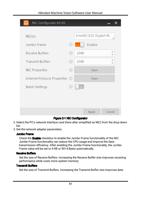
1. Run NIC Configurator.
– Go to Start → All Programs → MVS → Tools in the Windows system, and then click
NIC_Configurator.
– Go to Applications → NIC_Configurator in the Software's installation folder, and then
click NIC_Configurator. exe.
10