Hikrobot Machine Vision Software User Manual
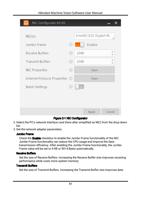
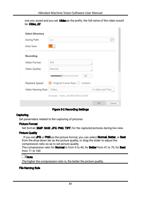
Customize a prefix and select Date and Time, Frame No., or Time Stamp as the
naming rule for the captured pictures.
Date and Time
The picture name will be a number which represents the data and time when the
video file is saved. For example, if you set Image as the prefix of the name, the full
name would be Image_20190424051532390.
Frame No.
The picture names will be frame No. For example, if a picture file is the second
one you saved and you set Image as the prefix, the full name of the video would
be Image_02.
Time Stamp
The picture name will be a serial number which represents the timestamp. For
example, Image_00000001576677065.
Continuous Capture
Set the capture mode.
Capture by Frame
The pictures will be captured by frame(s) and the capture will be stopped after
the set number of frames . For example, if you set "Capture Every 3 Frame(s)" and
"Stop Capturing after 1000 Frame(s)" as the capture mode, a picture will be
captured for each 3 frames, and the capture actions end after 1000 frames being
acquired.
Capture by Time
The pictures will be captured by time and the capture will be stopped after the
time period you set. For example, if you set "Capture Every 2 Second(s)" and "Stop
Capturing after 5 Minute(s)" as the capture mode, one picture will be captured
each two seconds, and the capture actions will last 5 minutes.
22