Hikrobot Machine Vision Software User Manual
Chapter 7 Tool Management
The Software provides multiples tools for the management, configuration, and
maintenance of cameras, such as IP Configurator (for editing camera IP address),
Bandwidth Manager (for optimizing bandwidth occupied by cameras), GigE Vision Action
Command (for trigger actions in multiple cameras simultaneously), etc.
7.1 IP Configurator
The online GigE Vision cameras in the same local subnet with the PC on which the
Software runs will be enumerated in the device list. You can configure the IP addresses
and other network parameters of these cameras.
Note
You can move the cursor to GigE and then click
to manually refresh the cameras.
You can view the camera status on the Status column of the device list. If the camera
status is free or unreachable, you can edit its network parameters including IP address.
Free
The camera is available and you can edit its IP address.
In Use
The Software or other processes are accessing the camera. You need to stop the live
view and disconnect the camera, or terminate other processes to access the camera.
Unreachable
The camera is unreachable due to one of the following two reasons:
● The network of the camera is abnormal. Check the camera network settings.
● The camera is on the same subnet with the PC on which the Software runs, but NOT in
the same network segment. You should modify its IP address to the same network
segment with the PC to make the camera available for connection and use.
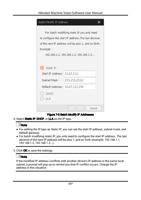
You can also click to select camera information (model name, device user ID, status,
etc.). The selected item will be displayed on the camera list.
113