Guangzhou Senyang Electronic Technology Co.
Chapter 5 "Setting up" module description
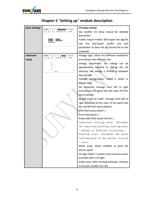
Basic Settings
advanced
setup
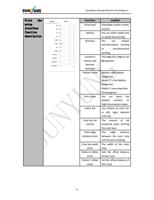
UV lamp control:
See another UV lamp manual for detailed
description.
Profile: Import Profile: Will.Import the pfg file
into the tool.Export profile: the tool
parameters to.Save the pfg format file to the
computer.
Voltage type: Select the different waveforms
according to the different inks.
Voltage adjustment: the voltage can be
appropriately adjusted to change the ink
intensity, the voltage is limited to between
450 and 600.
Channel Configuration: Select a white or
double color.
Ink sequence: Arrange from left to right
according to the panel test bar color, fill from
top to bottom.
Double-head ink order: Arrange from left to
right according to the color of the panel test
bar, and fill from top to bottom.
Print flash spray switch: /
Print Flash points: /
Empty data flash spray interval: /
Consistent starting point: Determine
the consistent printing starting point
/ default at different resolutions.
Platform reset: determine the print
starting point at the current location
/ reset.
White jump: Select whether to print the
picture space.
UV light offset: It needs to be turned on when
provided with a UV light.
Empty pass: After printing drawings, continue
to set pass number (no ink)
12