



User’sManualofLasercutofflinecontrolsystemChapter1Overview1.1LaserengravingcuttingsystemintroductionLaserengravingcuttingsystemthroughacomputernumericalcontrolmachinetoolstoachieveeffectivecontrol,accordingtotheuser’sdifferentrequirementsofthecompletionofprocessingtasks。Thesystemincludingcontrolboardandcontrolpanel,andsupportingsoftware.Thismanualdescribeshowtousethesoftwaretocompletethetaskoflaserprocessing.(Motherboardwiringandcontrolpaneloperations,seetheaccompanyingmanualandcontrolpanelwiringboardoperatinginstructions)1.2SoftwaresupportedfileformatsVectorformat:dxf,ai,plt,dst,dsb…etc。Bitmapformat:bmp,jpg,gif,png,mng,…etc。1.3Environmentalrequirements
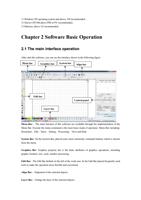
⑴WindowsXPoperatingsystemandabove,XPrecommended。⑵AboveCPU586,abovePIIIorPVrecommended。⑶Memory,above1GrecommendedChapter2SoftwareBasicOperation2.1ThemaininterfaceoperationAfterstartthesoftware,youcanseetheinterfaceshowninthefollowingfigure.MenuBar:ThemainfunctionofthissoftwareareavailablethroughtheimplementationoftheMenuBar.Executethemenucommandisthemostbasicmodeofoperation.MenuBarincluding:Document、Edit、Draw、Setting、Processing、ViewandHelp.SystemBar:OntheSystemBar,placedsomemostcommonlycommandbuttonswhichischosenfromthemenu.GraphicsBar:Graphicspropertybaristhebasicattributesofgraphicsoperations,includinggraphiclocation,size,scale,numberprocessing.EditBar:TheEditBardefaultontheleftoftheworkarea.IntheEditBarplacedfrequentlyusedtoolstomaketheoperationmoreflexibleandconvenient.AlignBar:Alignmentoftheselectedobjects。LayerBar:Changethelayeroftheselectedobjects。MenubarSystembarEditbarAlignbarLayerbarControlpanelGraphicsbar
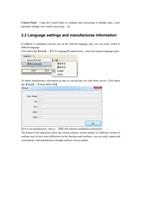
ControlPanel:UsingtheControlPaneltocompletelaserprocessingofmultipletasks,Layerparametersettings,axiscontrol,processing…etc.2.2LanguagesettingsandmanufacturesinformationInadditiontoinstallationprocesscansetthesoftwarelanguagetype,youcaneasilyswitchindifferentlanguage.ClickMenuBar【Help】->【语言/Language】expandmenu,selecttherequiredlanguagetypes.Toobtainmanufacturersinformation,sothatwecanprovideyouwithbetterservice.ClickMenuBar【Help】->【AboutRDCAM】Howtosetmanufacturers,referto《RDCAMsoftwareinstallationinstructions》Thebottomofthedialogboxshowsthecurrentsoftwareversionnumber.Asdifferentversionsofsoftwaremaybehavesomedifferencesonthefunctionsandinterfaces,youcaneasilycontactandcommunicatewithmanufacturersthroughsoftwareversionnumber.
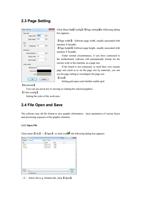
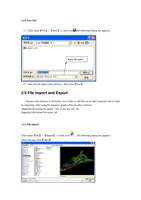
2.3PageSettingClickMenuBar【Config】->【Pagesetting】thefollowingdialogboxappears:【Pagewidth】:Softwarepagewidth,usuallyassociatedwithmachineXbreadth。【Pageheight】:Softwarepageheight,usuallyassociatedwithmachineYbreadth。Undernormalcircumstances,ifyouhaveconnectedtothemotherboard,softwarewillautomaticallyformatforthecurrentworkofthemachine,asapagesize.Iftheboardisnotconnected,orneedtheirowncustompagesize(suchastosetthepagesizebymaterial),youcanusethepagesettingtoreconfigurethepagesize.【Grid】Settinggirdspaceandwhetherenablegrid.【Keyboard】Usercanusearrowkeytomovingorrotatingtheselectedgraphics.【Colorconfig】Settingthecoloroftheworkarea.2.4FileOpenandSaveThesoftwareusesrldfileformattosavegraphicinformation、layerparametersofvariouslayersandprocessingsequenceofthegraphicelements.2.4.1OpenFileClickmenu【File】->【Open】,orclickicon,thefollowingdialogboxappears:(2)Selectfile(e.g.Default.rld),click【Open】。
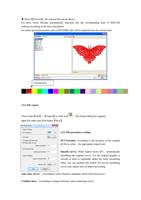
2.4.2SaveFile(1)Clickmenu【File】->【Save】,orclickicon,thefollowingdialogboxappears:(2)Enterthefilenameintheeditbox,thenclick【Save】。2.5FileImportandExportBecausethissoftwareisrldformat,sotomakeoredittheuseofothermaterialswillbedonebyimporting.AfterusingtheExporttographicfilesforothersoftware.Supportedfileformatforimport:dxf,ai,plt,dst,dsb...etcSupportedfileformatforexport:plt2.5.1FileImportClickmenu【File】->【Import】,orclickicon。Thefollowingdialogboxappears.Selectfile,andclick【Open】。Inputfilename
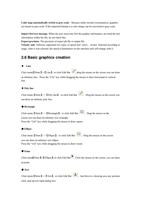
◆Select【Preview】,theselectedfilecanbeshown.Formostvectorfile,dataautomaticallyimportedintothecorrespondinglayerofRDCAMsoftwareaccordingtothelayerdescription.ForsomespecialdocumentssuchasDST/DSB,datawillbeimportedintothecurrentlayer.2.5.2FileexportClickmenu【File】->【Export】orclickicon。TheExportdialogboxappears.Inputfilename,andclickbutton【Save】.2.5.3FileparameterssettingPLTPrecision:Accordingtotheaccuracyoftheoriginalpltfiletoselecttheappropriateimportunit.Smoothcurves:Whenimportvectorfile,automaticallysmoothingtheoriginalcurves.Fortheoriginalgraphicissmoothorneedtorepeatedlyadjustthebesetsmoothingeffect,youcanuncheckthisbutton.Donotdosmoothingcurvesmayreducetimeofimportprocessing.Autoclosecurves:AccordingtoclosetoleranceautomaticcheckandclosedcurveCombinelines:Accordingtomergertolerance,auto-connectingcurves.Currentlayer
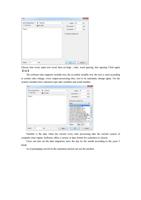
Colormapautomaticallyswitchtograyscale:Becauseundernormalcircumstances,graphicsarebasedongrayscale.Iftheimportedbitmapisacolorimagecanbeconvertedtograyscale.ImportDxftextmessage:WhentheuserneedonlyDxfthegraphicinformation,notneedthetextinformationwithinthefile,donotcheckthis.Exportprecision:Theprecisionofexportpltfileoroutputfile.Velocityunit:Softwaresupportedtwotypesofspeedunit:mm/s、m/min.Selectedaccordingtousage.Afteritwasselected,thespeedofparametersontheinterfaceunitwillchangewithit.2.6Basicgraphicscreation◆LineClickmenu【Draw】->【Line】,orclickEditBar,dragthemouseonthescreenyoucandrawanarbitraryline。Pressthe“Ctrl”keywhiledraggingthemousetodrawhorizontalorverticalline.◆PolylineClickmenu【Draw】->【Polyline】,orclickEditBar。Dragthemouseonthescreenyoucandrawanarbitrarypolyline.◆RectangleClickmenu【Draw】->【Rectangle】,orclickEditBar。Dragthemouseonthescreenyoucandrawanarbitrarysizerectangle.Pressthe“Ctrl”keywhiledraggingthemousetodrawsquare.◆EllipseClickmenu【Draw】->【Ellipse】,orclickEditBar。Dragthemouseonthescreenyoucandrawanarbitrarysizeellipse.Pressthe“Ctrl”keywhiledraggingthemousetodrawround.◆PointClickmenu【Draw】->【Ellipse】,orclickEditBar.Clickthemouseonthescreen,youcandrawanpoint.◆TextClickmenu【Draw】->【Text】,orclickEditBar。Andtheninadrawingareaanypositionclick,pop-uptextinputdialogbox.
Choosefontword,inputtextword,thensethigh,wide,wordspacing,linespacing.Clickagain【OK】.Thesoftwarealsosupportsvariabletext,theso-calledvariabletext,thetextisneedaccordingtocertainruleschange,everyoutputprocessingtime,texttobeautomaticchangeagain.Forthesystemvariableshavecharactertypedatevariablesandserialnumber.Variableisthedatewhenthecurrenteverytimeprocessingtakethecurrentsystemofcomputertimeoutput.Softwareoffersavarietyofdateformatforcustomerstochoose.Userscanalsosetthedatemigration,havethedaybythemonthaccordingtotheyears3kinds.Asinpackagingcarvedontheexpirationperiodcanusetheproduct.
IfABC0001DEFprocessesrepeatedly,ABC0002DEF,ABC003DEFuntilABC9999DEFagroupofserialnumber.【Prefix】:serialnumberprefix,exampleABCisleadingstring.【Suffix】:theserialnumberofthesuffix,exampleDEFisthestringafter.【StartSN】:fromwhichaspecifiednumberstartmanufacturing,exampleistostartto0001serialnumber.【CurrentSN】:thecurrentprocessingtowhich,serialNumbers,canalsobeusedtospecifythecurrenttoprocessingwhichserialnumber.Asintheprocessingagroupofserialnumber,leakageprocessingtheone,butthroughthedesignatedthecurrentserialnumbertomakeprocessing,notsetstart,serialNumbers,becauseinsomecasesagroupofserialnumberrequiresrepeatedprocessing,namelytoaserialnumber,needtogobacktothestartserialnumberstartmanufacturing.【SNInc】:theintervalnumbercanbeprescribedsequencenumber.Examplewillinturnprocessingfrom0001to9999serialnumber,theincrementis1.Ifonlyneedtooutputevenoroddnumberserialnumber,cansetincrementalis2.【Enablereset】:whenserialnumberprocessingtoresettheserialnumber,【currentSN】willbeautomaticallyresetto【startSN】.Examplerequiresrepeatedprocessingfrom0001to9999,serialNumbers,socanbedesignated9999asreset,serialNumbers,whenprocessingthe9999serialnumber,textwillautomaticallychangeto0001.【EnableprefixZERO】:ifnotleadtozero,thesystemwillautomaticallyremovethefirstintheserialnumberofzerodigitalbeforethezero.Suchastheexample,serialNumbers,ifnottheleader'szerocanABC0001DEFwillbecomeABC1DEF.Butitisworthnotingthat,ifwewanttooutputserialnumberisABC1DEF,ABC2DEFuntilABC9999DEF,wecan'tthroughthewill【startSN】setto1toachieve,butthroughthecancel【EnableprefixZERO】toachieve,thisisbecausesetinthespecifiednumberfromthestarttheserialnumberwhichone,beginningoutside,alsospecifiesthenumberofsignificantdigits,suchaswillbegintoserialnumbersetto1,thechangeoftheserialnumberorderis:1,2,3,4,5,6,7,8,9,0,1,2,3,4,5...Serialnumberwon'tchangeto10,becausetheeffectiveaserialnumberhad1.
【EnableSNarray】tothearrayofway,one-timeprocessingmoreserialnumber.forinstance:000100020003afterthisbatchprocessingserialnumber,001500140013000600050004skipdirectlytothenextgroupof000700080009001600170018001600170018◆CaptureClickmenu【Draw】->【Capture】,orclickEditBarIfthecomputerhasbeenconnectedtotheimagedevice,thedialogboxwillappear.Afteritwasselected,youcancollectthepicturesfromthespecifieddevice.2.7ObjectSelectionIntheprocessofdrawingandeditgraphics,firstofallistoselecttheobject.Whentheobjectisbeingselected,inthecenterofthisobjectwillhaveashapedmark“×”,andsurroundedbyeightcontrolpoints.Clickmenu【Draw】->【Select】,orclickEditBar,switchtostatus“Select”。Underthisstatus,youcanselectobject.Thefollowingarefivekindsofmethodofselecting:◆Clickmenu【Edit】->【SelectAll】(ShortcutsCtrl+A),selectallobjects。◆Clickmouseonthescreentoselectsingleobject