Shenzhen RelFar Intelligent Technology Co., Ltd.
Chapter 7 HMI Operating Instruction
7.1 HMI function introduction
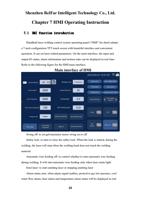
Handheld laser welding control system operating panel (“HMI” for short) adopts
a 7-inch configuration TFT touch screen with beautiful interface and convenient
operation. It can set laser related parameters. On the main interface, the input and
output IO status, alarm information and motion state can be displayed in real time.
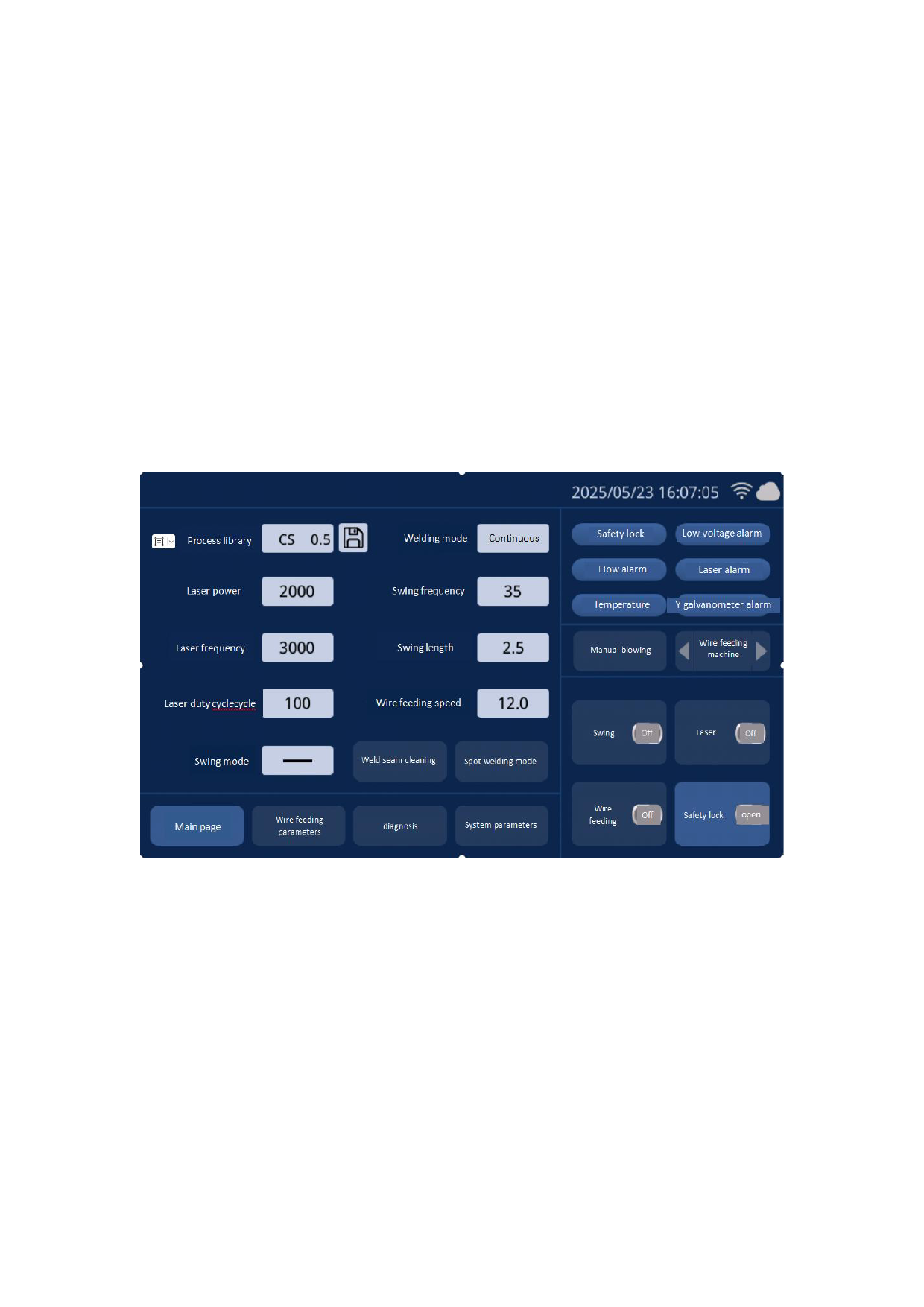
Refer to the following figure for the HMI main interface.
Main interface of HMI
Swing off: to set galvanometer motor swing on or off
Safety lock: to start or close the safety lock. When the lock is started, during the
welding, the laser will stop when the welding head does not touch the welding
material.
Automatic wire feeding off: to control whether to start automatic wire feeding
during welding. It will start automatic wire feeding only when laser emits light.
Emit laser: to start emitting laser or stopping emitting laser
Alarm status area: when alarm signal enables, protective gas low pressure, cool
water flow alarm, laser alarm and temperature alarm status will be displayed in real
25