(Please Read this Manual Carefully before Installing the Printer)
1.1 Product Instruction
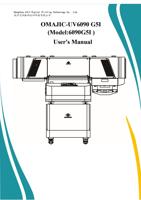
OMAJIC-UV6090 printer is equipped with 3pcs G5I printheads, which can print color, white and varnish at the
same time on both flat and rotary materials, such as: acrylic, glass, metal, wood, bottle, mug etc.
1.2 Attentions Before Installation
Please power on the machine with single-phase 220V±5%, frequency 50-60Hz, peak power 3KW
and pay attention to circuit requirements.
The ground wire must be installed in advance ,to prevent static . Please make computer and
printer under same powder, to prevent voltage difference and static.
Environment: Temperature:22℃-32℃. Humidity: 40% and 60%. Keep the room clean and little
dust.
1.3 Computer configuration requirements:
Intel i5 /AMD R5 or more advanced. MAC System is NOT WORKABLE
8G RAM or More
256G Storage or More (solid state disk is recommended)
Gigabit Ethernet
1.4 Attentions During Installation
Please strictly follow the manual and engineer’s instructions.
Remove all the fixture before installation.
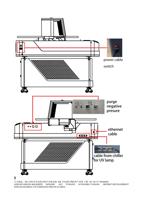
Power on the machine and check initialization actions (There will be a beep sound, which is a
normal to remind you put ink ).
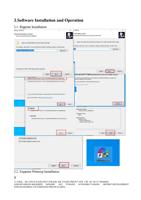
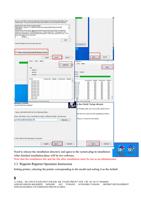
Install the software (See page for details)
Make a printing job without printheads, to make sure the mechanic and electronic are in good
condition.
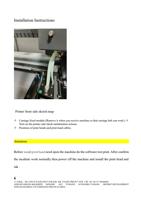
Turn off machine. Next to put ink and install the printheads. (Printhead is Fragile and expensive,
pls strictly follow engineer’s instruction. Supplier will not be responsible for Human error)
3
公司地址:浙江省杭州市余杭区临平东湖北路 488 号东湖生物医药产业园 3 楼 Tel:+86 571 88568605
ADD:4FLOOR,NO.486,NORTH DONGHU AVE YUHANG ECONOMIC,YUHANG DISTRICT,DEVELOPMENT
ZONE,HANGZHOU CITY,ZHEJIANG PROVICE,CHINA