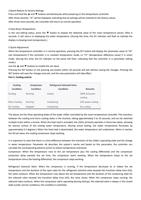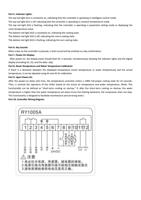
3.Quick Restore to Factory Settings:
Press and hold the ▲ and ▼ buttons simultaneously while powering on the temperature controller.
After three seconds, "rE" will be displayed, indicating that all settings will be restored to the factory values.
After three more seconds, the controller will return to normal operation.
4.View Room Temperature:
In the non-setting status, press the ▼ button to display the detected value of the room temperature sensor. After 6
seconds, it will return to displaying the water temperature. (During this time, the D1 indicator will flash to indicate the
display is showing room temperature.)
5.Quick Adjustment:
When the temperature controller is in normal operation, pressing the SET button will display the parameter value of "F0"
(set temperature) if the controller is in constant temperature mode, or "F1" (temperature difference value) if in smart
mode. (During this time, the D1 indicator on the panel will flash, indicating that the controller is in parameter setting
mode.)
Use the ▲ and ▼ buttons to modify the set value.
Pressing the SET button or not pressing any button within 20 seconds will exit without saving the changes. Pressing the
RET button will save the changes and exit, and the new parameters will take effect.
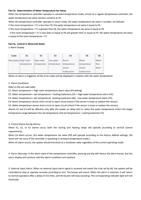
Part 2. Cooling control
Cooling
Condition
Cooling
Compressor
Condition
Running
Micro Cooling
No Cooling
Running
Stopped
Refrigerant Solenoid Valve
Condition
Closed
Conducting
Conducting
Remarks
100% full power
cooling
10% power cooling
No cooling
The above are the three operating states of the water chiller controlled by the smart temperature controller. The transition
between the cooling and micro cooling states is the shortest, taking approximately 5 to 10 seconds, and can be switched
multiple times within a minute. When the heat load is activated, the chiller primarily operates in these two states, allowing
for precise control of the cooling water temperature. (During actual testing, the water temperature fluctuates by
approximately 0.3 degrees.) When the heat load is deactivated, the water temperature will undershoot. When it reaches
the A0 set value, the cooling compressor stops working.
It is important to note that there is a time difference between the transition of the chiller's operating state and the change
in water temperature. Parameter A6 describes the system's inertia and based on this parameter, the controller can
calculate the corresponding advance action to reduce temperature overshoot.
Compressor: When the temperature rises to the set temperature plus the cooling differential and the compressor
protection delay exceeds the set time, the compressor starts working. When the temperature drops to the set
temperature minus the heating differential, the compressor stops working.
Refrigerant Solenoid Valve: When the compressor is running, if the temperature decreases to or below the set
temperature and the duration of the open state for the refrigerant solenoid valve exceeds the transition delay time (A3),
the valve conducts. When the temperature rises above the set temperature and the duration of the conducting state for
the solenoid valve exceeds the transition delay time (A3), the valve closes. When the compressor stops running, the
solenoid valve conducts. When the compressor starts operating (during startup), the solenoid valve is always in the closed
state (under normal conditions, this condition is satisfied).