PL-2303 Mac OS X Driver Installation Guide
Document Rev 1.0
PL-2303 Mac OS X Driver Installation Guide
Using ZTerm program under Mac OS X
You can also test the PL-2303 device by using the ZTerm serial port terminal program and a null
modem cable to connect two computers and transmit/receive data files. The following steps will show
how to use the program:
1. Download the ZTERM program from below website and install the program under Mac OS X:
http://homepage.mac.com/dalverson/zterm/
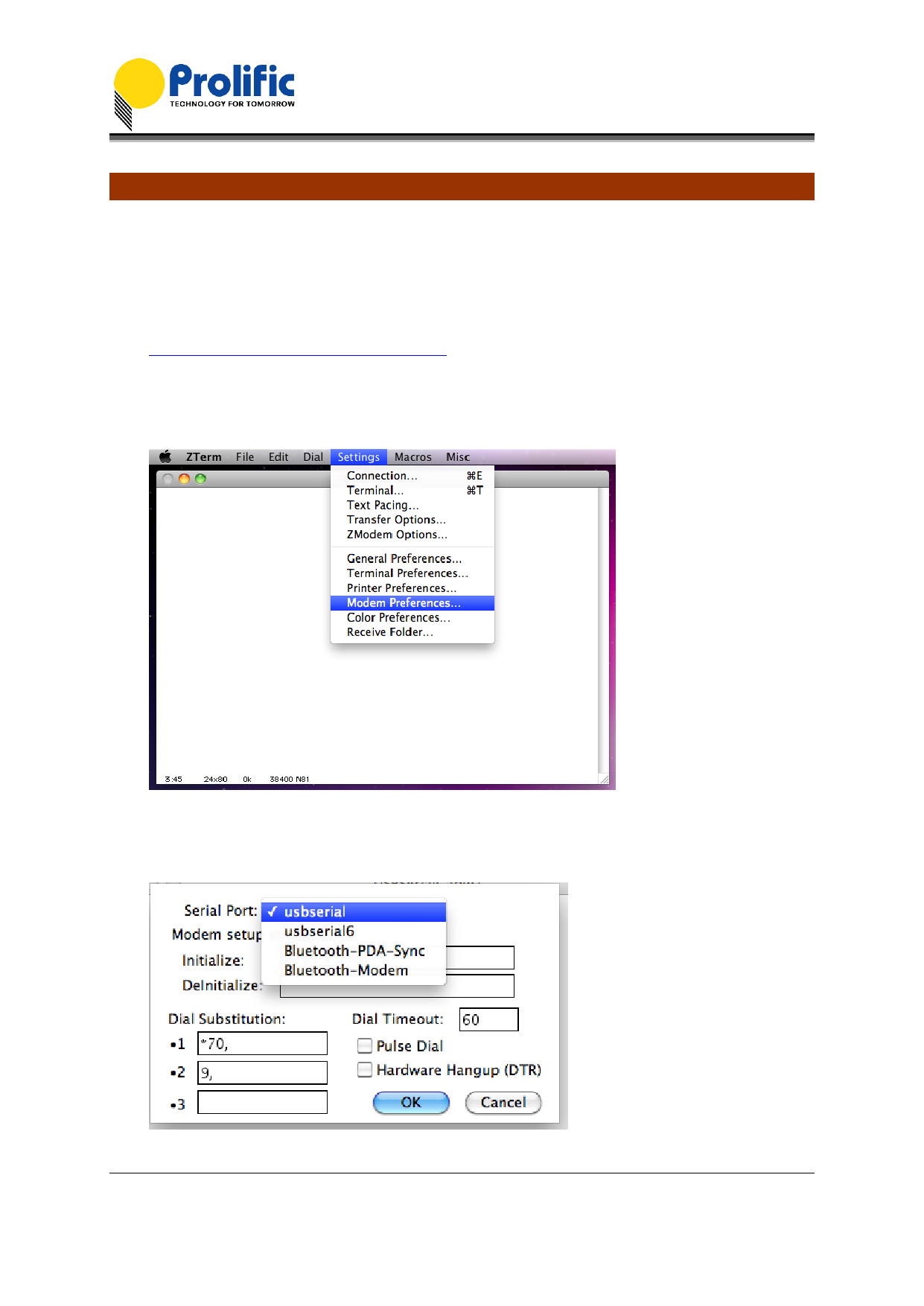
2. Run the ZTERM program and select the PL-2303 device by clicking on Settings-Modem
Preferences.
3. Click on the Serial Port box. If you have several PL-2303 devices attached, you will find those
devices listed similar to the list shown when running the Mac OS Terminal program.
Prolific Technology Inc.
- 9 of 11 -
May 13, 2011
All information herein is subject to change without prior notice. Prolific Technology Inc. does not make any warranties regarding
the accuracy and completeness of this document and shall in no event be liable for any loss of profit or any other commercial
damage, including but not limited to special, incidental, consequential, or other damages.