Home
3D
PrintUP 3D Printer
PioCreat 3D Printer
Printers
FastCOLOUR >>
ATools
DTF Textile
UV-DTF
FlatPRINT
PrintExp
InkRIP
Lasers
TruCUT CO
2
>>
TruCUT RDWorks
TruCUT 2020+
TruCUT Express
TruCUT Lite >>
4030 & Vertical Software
4030 & Vertical Documents
New 6040 Desktop
LabelMark
RayCUT
MorCUT >>
MorCUT-Cyclops
LaserMaster
Plasmas
MetalWise
Fabricam
Routers
EasyRoute
PowerRoute
Blade Cutters
Vinyl Cutters >>
V-Series
V-Smart
V-Auto (& V-Smart+)
Vinyl4
Flatbed Cutters >>
FlatCUT
Label Cutters >>
V-Auto Label Cutters
Software >>
VinylCut
More
FastCUT
Heatware
Rollman
ScreenMaster
Other Software
Miscellaneous
AM.CO.ZA
/
Buy CNC Software
/
CNC Software Training
/
CNC Software Downloads
Sales: 072 222 2211
Support: 076 666 6655
Training: 060 818 1818
Jo’burg: 087 802 5368
Cape Town: 087 802 7106
An
Project
Multimedia
Univision Videos
#SortIT Videos
MakersLab.TV
Software Training
Welldone Gallery
Updates
Prevision Blog
Cornerstone Trust
Email Campaigns
Contact Us
Sales WhatsApp
060 600 6000
Support WhatsApp
060 600 7000
Johannesburg Headquarters
011 397 1429
087 802 5368
Cape Town Showroom
021 555 3250
087 802 7106
Links
CNC Machine Repair
Vinyl Cutter
Heatware
You are here:
AM.CO.ZA
Buythis
CNC Utilities Homepage
FlatPRINT-Flatbed-UV-Printer
Component Manuals
UV 平板机 6090 安装指引 中文-.pdf
Page 41 of 42
机器校准
Machine calibration
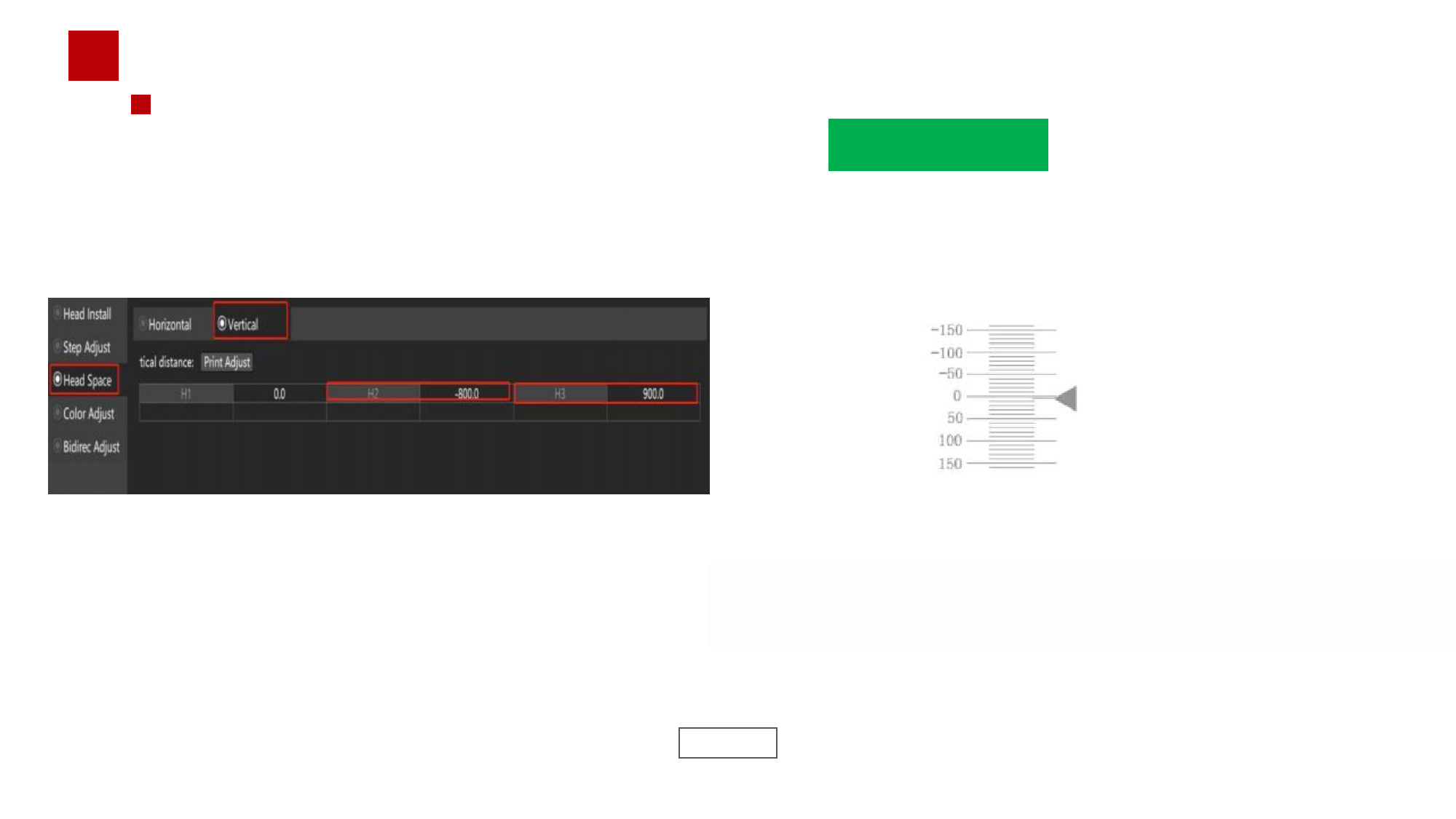
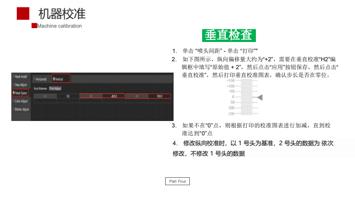
垂直检查
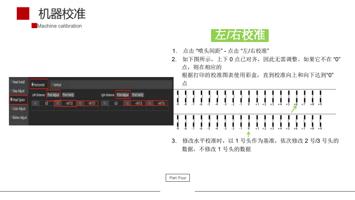
1.
单击
“
喷头间距
”
-
单击
“
打印
”
"
2.
如下图所示,纵向偏移量大约为
“+2”
,需要在垂直校准
“H2”
编
辑框中填写
“
原始值
+ 2”
,然后点击
“
应用
”
按钮保存,然后点击
“
垂直校准
”
,然后打印垂直校准图表,确认步长是否在零位。
3.
如果不在
“0”
点,则根据打印的校准图表进行加减,直到校
准达到
“0”
点
4.
修改纵向校准时,以
1
号头为基准,
2
号头的数据为 依次
修改,不修改
1
号头的数据
Part Four
"
Do you need help?
Call Me Back