User Manual of Machine Vision Camera SDK Demo (C#)
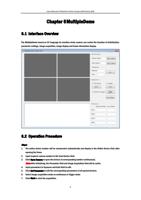
The live image will display in the left display area.
The acquired frame number and lost frame number will be refreshed (refresh per second).
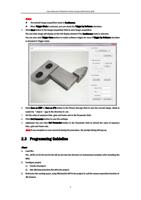
8. Click Save to save the four camera’s pictures as files named by image1-image4.bmp under the directory
of executing program.
9. (Optional) Click Stop and Close to end the operation.
Note: If exception or error occurred during the procedure, the message will be output.
6.3 Programming Guideline
6.3.1 Multiple Cameras
Based on the BasicDemo, the MultipleDemo added a member variable m_bEnabled array in the class. This
variable is used to enable four cameras, and the m_bEnabled status (True or False) is determined by the used
device number and opened device number when initializing. The following basic operations (do or not) of
corresponding cameras are also determined by m_bEnabled.
6.3.2 Total/Lost Frame Number and Picture Storage
The total frame number (member variable) is calculated in the callback function.
Get the lost frame number by calling API CSI.MV_CC_GetAllMatchInfo_CSI (ref pstInfo).
The update period of total frame and lost frame is 1 second. Set the timer and get the lost frame number per
second, and then update the total frame number and lost frame number.
The callback function can also save the pictures and judge whether to save the current frame as picture via
the click of Save Picture button. After saving the picture, edit the flag bit to avoid saving picture repeatedly.
10