Machine Vision Camera SDK (DotNet) Developer Guide
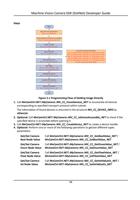
c. Call MvCamCtrl.NET::MyCamera::MV_CC_GetFloatValue_NET (handle, " TriggerDelay",
&stFloatValue) and MvCamCtrl.NET::MyCamera::MV_CC_SetFloatValue_NET (handle, "
TriggerDelay", value) to get and set the triggering delay time.
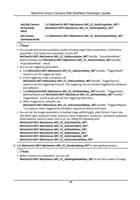
d. When triggered by software, call
MvCamCtrl.NET::MyCamera::MV_CC_SetCommandValue_NET (handle, "TriggerSoftware
") to capture; when triggered by hardware, capture by device local input.
• You can set the image parameters, including image width/height, pixel format, frame rate,
AIO offset, gain, exposure mode, exposure value, brightness, sharpness, saturation, grayscale,
white balance, Gamma value, and so on, by calling the following APIs:
MvCamCtrl.NET::MyCamera::MV_CC_SetIntValueEx_NET ,
MvCamCtrl.NET::MyCamera::MV_CC_SetEnumValue_NET ,
MvCamCtrl.NET::MyCamera::MV_CC_SetFloatValue_NET ,
MvCamCtrl.NET::MyCamera::MV_CC_SetBoolValue_NET ,
MvCamCtrl.NET::MyCamera::MV_CC_SetStringValue_NET ,
MvCamCtrl.NET::MyCamera::MV_CC_SetCommandValue_NET .
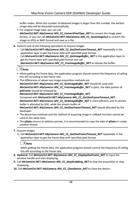
5. Acquire images.
1) Call MvCamCtrl.NET::MyCamera::MV_CC_RegisterImageCallBackEx_NET to set data
callback function.
2) Call MvCamCtrl.NET::MyCamera::MV_CC_StartGrabbing_NET to start getting steams.
Note
• Before starting the acquisition, you can call
MvCamCtrl.NET::MyCamera::MV_CC_SetImageNodeNum_NET to set the number of
image buffer nodes. When the number of obtained images is larger than this number, the
earliest image data will be discarded automatically.
• For original image data, you can call
MvCamCtrl.NET::MyCamera::MV_CC_ConvertPixelType_NET to convert the image pixel
format, or you can call MvCamCtrl.NET::MyCamera::MV_CC_SaveImageEx2
MV_CC_SaveImageEx2_NET to convert the image to JPEG or BMP format and save as a file.
6. Optional: Call MvCamCtrl.NET::MyCamera::MV_CC_DisplayOneFrame_NET to input the
window handle and start displaying.
7. Call MvCamCtrl.NET::MyCamera::MV_CC_StopGrabbing_NET to stop the acquisition or stop
displaying.
8. Call MvCamCtrl.NET::MyCamera::MV_CC_CloseDevice_NET to close the device.
9. Call MvCamCtrl.NET::MyCamera::MV_CC_DestroyDevice_NET to destroy the handle and
release resources.
17