1
GigE Camera Kernel Driver Update
2014/11/21
1. Document Description
This document takes Windows 7 as an example to introduce how
to update the GigE camera kernel driver.
The update can ensure that users' camera software and drivers
are kept up - to - date, allowing them to enjoy the benefits
brought by improvements and bug fixes.
2. Applicable Products
MindVision GigE Industrial Cameras
3. Pre - use Preparations
Before the update, users are requested to prepare the following
resources:
●Software installation package: Mindvision Camera Platform
Setup(x.x.x).exe
●One GigE camera
4. Install the New Software Package
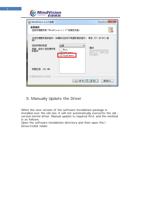
Run the latest software installation package. On the "Select
Components" page, check GigeCamera (it is selected by default).