



ShenzhenHosonsoftCo.,Ltd.No.:HS/D-YF-A0-005Add:Room 1703,BuildingC6,HengfengIndustrialCity,XixiangStreet,Bao’anDistrict,ShenzhenTel:86-0755-28940020Fax:27961549http://www.hosonsoft.comPrinting Software Instruction
ShenzhenHosonsoftCo.,Ltd.No.:HS/D-YF-A0-005Add:Room 1703,BuildingC6,HengfengIndustrialCity,XixiangStreet,Bao’anDistrict,ShenzhenTel:86-0755-28940020Fax:27961549http://www.hosonsoft.comRevision RecordDateVersionRevisedsectionsRevisiondescriptionAuthorMarch15,2018FirstversionLiuGuangtao,ChenyanApril17,2018Addbuttondescription,operationstepsof newversionof card,networkaccessmethod,judgmentmethodof gigabitNIC,firmwareimport/exportandsoon.LiuGuangtaoTableofContentsI.Printingsoftwareoverview........................................................................................................................................................5II.Softwarestartandonline.........................................................................................................................................................51.Startprintcontrolsoftware................................................................................................................................................52.Softwareonlinesettings.....................................................................................................................................................52.1GigabitNICjudgment............................................................................................................................................52.2Networksettings.....................................................................................................................................................6III.Operationstepsbeforethenewboardcardisused.................................................................................................................91SettheIPaddress..............................................................................................................................................................102Motorgearratiocalibration.............................................................................................................................................103Cleanprinthead...............................................................................................................................................................104Calibration.......................................................................................................................................................................105Drawingprintingsettings................................................................................................................................................10
ShenzhenHosonsoftCo.,Ltd.No.:HS/D-YF-A0-005Add:Room 1703,BuildingC6,HengfengIndustrialCity,XixiangStreet,Bao’anDistrict,ShenzhenTel:86-0755-28940020Fax:27961549http://www.hosonsoft.comIV.Introductionofmaininterfacewindowofthesoftware.......................................................................................................101Mainmenu.......................................................................................................................................................................112Files..................................................................................................................................................................................123Print..................................................................................................................................................................................143.1Openthetasklist..................................................................................................................................................163.2Historicaltasklist.................................................................................................................................................173.3Taskattributes.......................................................................................................................................................184Settings.............................................................................................................................................................................195Calibration.......................................................................................................................................................................215.1Introductiontonozzledetectionfunction..............................................................................................................235.2Introductiontoleveldetectionfunction.......................................................................................................................245.3Introductiontoverticaldetectionfunction...........................................................................................................255.4Introductiontosteppingcalibrationfunction........................................................................................................255.5Introductiontoprintheadhorizontalspacingcalibration....................................................................................265.6Introductiontoprintheadverticalspacingcalibration.........................................................................................275.7Introductiontobidirectionalcalibrationfunction................................................................................................295.8Introductiontotrappingprintingcalibrationfunction.........................................................................................306Voltagewindow................................................................................................................................................................317.Advanced........................................................................................................................Error!Bookmarknotdefined.7.1Versioninformation..............................................................................................................................................337.2Upgrade.................................................................................................................................................................347.3Sharpeningoverprinting......................................................................................................................................357.4Brokenholecompensation...................................................................................................................................428Logs...................................................................................................................................................................................459.Shortcutbutton.................................................................................................................................................................4610Statusbar........................................................................................................................................................................47V.Factorymode...........................................................................................................................................................................48
ShenzhenHosonsoftCo.,Ltd.No.:HS/D-YF-A0-005Add:Room 1703,BuildingC6,HengfengIndustrialCity,XixiangStreet,Bao’anDistrict,ShenzhenTel:86-0755-28940020Fax:27961549http://www.hosonsoft.com2Bootinitialization............................................................................................................................................................513Xmotor.............................................................................................................................................................................524Ymotor.............................................................................................................................................................................535Inkstack............................................................................................................................................................................556Blade................................................................................................................................................................................567Printheadcombination....................................................................................................................................................578Printmode........................................................................................................................................................................579Referencetrapping............................................................................................................................................................5810Automaticcleaning.........................................................................................................................................................5911Manualcleaning..............................................................................................................................................................6012.Automaticflashspray....................................................................................................................................................6113Runningmachine............................................................................................................................................................6214Paperfeeding..................................................................................................................................................................6315Other..............................................................................................................................................................................6516Import/exportfirmware................................................................................................................................................6616.1Importfirmwareconfiguration...........................................................................................................................6616.4Exportingfirmwareparameters..........................................................................................................................69VI.Buttonboardoperationinstructions......................................................................................................................................691.Keyboardboardbuttonlayoutasshownbelow.............................................................................................................692.Menuitemdescription....................................................................................................................................................713.Menulist.........................................................................................................................................................................71
ShenzhenHosonsoftCo.,Ltd.No.:HS/D-YF-A0-005Add:Room 1703,BuildingC6,HengfengIndustrialCity,XixiangStreet,Bao’anDistrict,ShenzhenTel:86-0755-28940020Fax:27961549http://www.hosonsoft.comI.PrintingsoftwareDevelopedbyHosonsoft,PrintExpsoftwareisakindofcontrolsoftwarethatworkswithprinter.Itfeaturesuser-friendlyinterface,simpleoperationandmeetstheneedsofendusersandmanufacturers.Itismainlyusedforprintercontrol,printercalibration,programupgradeandupdate,importandexportofparameters,savingofparameterstotheboard.Inordertoenableuserstoquicklyandcomprehensivelyunderstandtheprintingsoftware,getfamiliarwiththevariousfunctionaloperations,precautionsandpossibleproblems,thefollowingisanintroductiontothedifferentkindsofprintingsoftware.II.Softwarestartandonline1.StartprintcontrolsoftwareThePrintExpsoftwarecanbeuseddirectly.FirstfindthePrintExpsoftwarefolder,openthefolder,findthePrintExp.exeapplication,anddouble-clicktheprogramtostartthePrintExpsoftware.2.Softwareonlinesettings2.1GigabitNICjudgmentBeforenetworkconnection,firstensurethatthecomputer'sNICisGigabitNICfornormalconnection.Thedifferencebetweena100M NICandaGigabitNICis:
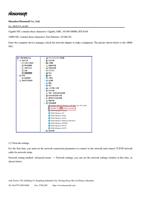
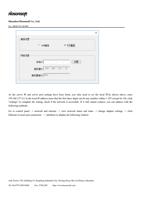
ShenzhenHosonsoftCo.,Ltd.No.:HS/D-YF-A0-005Add:Room 1703,BuildingC6,HengfengIndustrialCity,XixiangStreet,Bao’anDistrict,ShenzhenTel:86-0755-28940020Fax:27961549http://www.hosonsoft.comGigabitNICcontainsthesecharacters:Gigabit,GBE,10/100/1000M,RTL8169.100M NICcontainsthesecharacters:FastEthernet,10/100,FE.Enterthecomputerdevicemanager,checkthenetworkadaptertomakeajudgment.Thepictureshownbelowisthe100MNIC:2.2NetworksettingsForthefirsttime,youmustsetthenetworkconnectionparameterstoconnecttothenetworkandconnectTCP/IPnetworkcablefornetworksetup.Networksettingmethod:AdvancedmenuNetworksettings,youcanseethenetworksettingswindowatthistime,asshownbelow:
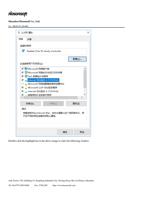
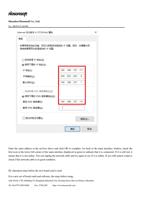
ShenzhenHosonsoftCo.,Ltd.No.:HS/D-YF-A0-005Add:Room 1703,BuildingC6,HengfengIndustrialCity,XixiangStreet,Bao’anDistrict,ShenzhenTel:86-0755-28940020Fax:27961549http://www.hosonsoft.comAstheserverIPandserverportsettingshavebeenfixed,youonlyneedtosetthelocalIP.Asshownabove,enter192.168.127.111inthelocalIPaddress(notethatthefirstthreedigitscanbeanynumberwithin1-255exceptfor10),click"settings"tocompletethesetting,checkifthenetworkisaccessible.Ifitstillcannotconnect,youcanaddresswiththefollowingmethods:GotocontrolpanelnetworkandinternetviewnetworkstatusandtaskschangeadaptersettingsclickEthernetorlocalareaconnectionattributestodisplaythefollowingwindow:
ShenzhenHosonsoftCo.,Ltd.No.:HS/D-YF-A0-005Add:Room 1703,BuildingC6,HengfengIndustrialCity,XixiangStreet,Bao’anDistrict,ShenzhenTel:86-0755-28940020Fax:27961549http://www.hosonsoft.comDouble-clickthehighlightbarintheaboveimagetoenterthefollowingwindow:
ShenzhenHosonsoftCo.,Ltd.No.:HS/D-YF-A0-005Add:Room 1703,BuildingC6,HengfengIndustrialCity,XixiangStreet,Bao’anDistrict,ShenzhenTel:86-0755-28940020Fax:27961549http://www.hosonsoft.comEnterthesameaddressintheredboxaboveandclickOKtocomplete.Gobacktothemaininterfacewindow,checkthefirsticonatthelowerleftcornerofthemaininterfacedisplayedingreentoindicatethatitisconnected.Ifitisstillred,itmeansthatitisnotonline.Youcanunplugthenetworkcableandtryagaintoseeifitisonline.Ifyoustillcannotconnect,checkifthenetworkcableisingoodcondition.III.OperationstepsbeforethenewboardcardisusedForanewsetofboardcardsandsoftware,thestepsbeforeusing:
ShenzhenHosonsoftCo.,Ltd.No.:HS/D-YF-A0-005Add:Room 1703,BuildingC6,HengfengIndustrialCity,XixiangStreet,Bao’anDistrict,ShenzhenTel:86-0755-28940020Fax:27961549http://www.hosonsoft.com1SettheIPaddressThespecificsettingmethodcanbeseeninthe"SoftwareOnlineSettings"in"SoftwareOnlineandStart"above.2MotorgearratiocalibrationItisdescribedinthefollowingsection"FactorySettings"indetail3CleanprintheadEnsurethatallorificesoftheprintheadcanbeinkednormally4CalibrationInthefollowingsection,Calibration"isdescribedindetail5DrawingprintingsettingsInthefollowingsection,"sharpenandprint"isdescribedindetail.IV.IntroductionofmaininterfacewindowofthesoftwareThemaininterfaceofPrintExpsoftwareisasfollows: