



LaserEngravingCuttingSoftwareUserManual----RDCAMV8.0ShenzhenRuiDaTechnologyCO.,LTDTel:86-0755-26066687Fax:86-0755-26982287Web:www.rd-acs.comE-Mail:support@rd-acs.comAdd:1B-1,Building5,Tian'anNanyouIndustryArea,DengliangRoad,NanshanDistrict,Shenzhen,P.R.C.
LaserEngravingCuttingSoftwareUserManual----RDCAMV8.02/76©2016RuidaTechnology.AllRightsReserved.CONTENTSCopyrightDeclaration......................................................................................................................4Chapter1Overview..........................................................................................................................51.1LaserEngravingCuttingSystemIntroduction.....................................................................51.2Softwaresupportedfileformats............................................................................................51.3Environmentalrequirements.................................................................................................5Chapter2SoftwareBasicOperation..............................................................................................62.1Themaininterfaceoperation................................................................................................62.2Languagesettingsandmanufacturesinformation................................................................72.3PageSetting...........................................................................................................................82.4FileOpenandSave...............................................................................................................82.4.1OpenFile....................................................................................................................82.4.2SaveFile.....................................................................................................................92.5FileImportandExport..........................................................................................................92.5.1FileImport...............................................................................................................102.5.2Fileexport................................................................................................................112.5.3Fileparameterssetting.............................................................................................112.5.4ImageLibrary...........................................................................................................122.6Basicgraphicscreation.......................................................................................................122.7ObjectSelection..................................................................................................................152.8ObjectColor........................................................................................................................172.9ObjectTransformation........................................................................................................172.9.1ObjectMirror...........................................................................................................182.9.2ObjectRotate...........................................................................................................192.9.3ObjectSize...............................................................................................................202.9.4Tilt............................................................................................................................222.9.5ObjectArrayCopy...................................................................................................222.9.6PlaceObject.............................................................................................................232.10ObjectAlign......................................................................................................................232.11ObjectView.......................................................................................................................242.12GroupandUngroup..........................................................................................................242.13ImportantTool...................................................................................................................242.13.1Manualsortingandthecuttingpointandthecuttingdirectionsetting.................252.13.2Setting&EditingTheCutIn/CutOutLines.........................................................282.13.3PathOptimization..................................................................................................292.13.4CurveSmooth........................................................................................................302.13.5CheckClosure........................................................................................................322.13.6RemovetheOverlap..............................................................................................322.13.7CombineCurve......................................................................................................322.13.8BitmapHandle.......................................................................................................33
LaserEngravingCuttingSoftwareUserManual----RDCAMV8.03/76©2016RuidaTechnology.AllRightsReserved.2.13.9Processingpreview................................................................................................372.13.10Datacheck............................................................................................................392.13.11Generationparallellines......................................................................................402.13.12LGPdesign...........................................................................................................40Chapter3SystemSettings..............................................................................................................463.1Generalsettings...................................................................................................................463.2SystemInformation.............................................................................................................503.3Userparameters...................................................................................................................513.3.1Cutparameters.........................................................................................................523.3.2Sweep/Scanningparameters....................................................................................533.3.3Homeparameters.....................................................................................................543.3.4Feedingparameters..................................................................................................543.3.5GoScaleparameters................................................................................................543.3.6Otherparameters......................................................................................................553.4DocumentManagement......................................................................................................56Chapter4ProcessingOutput.........................................................................................................584.1DevicePorts........................................................................................................................584.2Layerprocessing.................................................................................................................594.3GraphicPositioningposition..............................................................................................594.4GoScale&CutScale.........................................................................................................594.5Start/Pause/Stop/Saveasoff-lineFile/off-lineFileOutput/Download.............................604.6Outputtheselectedgraphics...............................................................................................604.7PathOptimization...............................................................................................................604.8Test......................................................................................................................................614.9OutputSetting.....................................................................................................................624.9.1RotatingEngraving..................................................................................................624.9.2FeedingSetting........................................................................................................624.9.3OptimizationofBacklashCompensation................................................................634.9.4Laserhead2offset...................................................................................................634.10LayerSettings...................................................................................................................634.10.1Line/columnsetup..................................................................................................644.10.2LaserScanParametersSetting...............................................................................664.10.3Laserscanningparameterssettings.......................................................................704.10.4LaserDottingParametersSetting..........................................................................724.11Vendorparameters.............................................................................................................724.11.1Motorparameters...................................................................................................724.11.2Laserparameters....................................................................................................744.11.3OtherManufacturerParameters.............................................................................75
LaserEngravingCuttingSoftwareUserManual----RDCAMV8.04/76©2016RuidaTechnology.AllRightsReserved.CopyrightDeclarationShenzhenRuidaTechnologyCo.,Ltd.(hereinafterreferredtoas“RuidaTechnology”)Allrightsreserved.1.RuidaTechnologyholdsthepatentrights,copyrightsandotherintellectualpropertyrightsforthisproductanditsrelatedsoftware.Withoutauthorization,nonecompanyororganizationorindividualisallowedtocopy,manufacture,processandusethisproductanditsrelativepartsdirectlyorindirectly,otherwiseshallbeinvestigatedforlegalresponsibilityaccordingtothelaw.2.RuidaTechnologyisentitledtoincreaseorreduceandmodifytheproductsandfunctionsofthisproductstatedhereinaswellasamendanydocumentsattachedtothisproduct,withoutpriornotification.3.Theusersshouldperusethismanualpriortousingtheproductstatedherein,RuidaTechnologyshallnotberesponsibleforthedirect,indirect,special,incidentalorcorrespondinglossesordamagesarisingoutofimproperusehereoforofthisproductasbelow:UsersusingthismanualorproductimproperlyUsersnotfollowtherelatedsafetyoperationrulesThelosscausedbytheforcesofnature4.Themachineinoperationisdangerous,sotheusersareobligedtodesignandinstitutetheeffectivemechanismforerrorhandlingandsafetyprotection.RuidaTechnologyshallnotundertakeanydutiesorresponsibilitiesfortheincidentalorcorrespondinglossesarisingtherefrom.
LaserEngravingCuttingSoftwareUserManual----RDCAMV8.05/76©2016RuidaTechnology.AllRightsReserved.Chapter1Overview1.1LaserEngravingCuttingSystemIntroductionLaserengravingcuttingsystemcontrolsthenumericalcontrolmachinetoolseffectivelythroughcomputer,accordingtotheuser’sdifferentrequirementstocompletetheprocessingtasks.Thesystemincludescontrolmotherboardandcontrolpanel,andsupportingsoftware.Thismanualdescribeshowtousethesoftwaretocompletethetaskoflaserprocessing.(Operationmanualofmotherboardwiringandcontrolpanelpleaserefertotheaccompanyingmanualandcontrolpanelwiringboardoperatinginstructions)1.2SoftwaresupportfileformatsVectorformat:dxf,ai,plt,dst,dsb…etc.Bitmapformat:bmp,jpg,gif,png,mng,…etc.1.3Environmentalrequirements(1)WindowsXPoperatingsystemandabove,XPisrecommended.(2)CPU586above,recommendedthatPIIIorPIVabove.(3)Recommendedtousemorethan1Gofmemory.
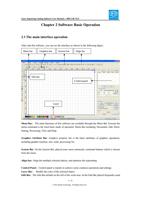
LaserEngravingCuttingSoftwareUserManual----RDCAMV8.06/76©2016RuidaTechnology.AllRightsReserved.Chapter2SoftwareBasicOperation2.1ThemaininterfaceoperationAfterstartthesoftware,youcanseetheinterfaceasshowninthefollowingfigure.MenuBar:ThemainfunctionsofthissoftwareareavailablethroughtheMenuBar.Executethemenucommandisthemostbasicmodeofoperation.MenuBarincluding:Document,Edit,Draw,Setting,Processing,ViewandHelp.GraphicsAttributeBar:Graphicspropertybaristhebasicattributesofgraphicsoperations,includinggraphiclocation,size,scale,processingNo..SystemBar:OntheSystemBar,placedsomemostcommonlycommandbuttonswhichischosenfromthemenu.Alignbar:Alignthemultipleselectedobjects,andoptimizethetypesetting.ControlPanel:Controlpanelismainlytoachievesomecommonoperationsandsettings.LayerBar:Modifythecoloroftheselectedobject.EditBar:TheEditBardefaultontheleftoftheworkarea.IntheEditBarplacedfrequently-usedMenubarSystembarEditbarAlignbarLayerControlpanelGraphicsbar
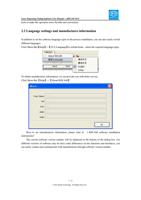
LaserEngravingCuttingSoftwareUserManual----RDCAMV8.07/76©2016RuidaTechnology.AllRightsReserved.toolstomaketheoperationmoreflexibleandconvenient.2.2LanguagesettingsandmanufacturesinformationInadditiontosetthesoftwarelanguagetypesintheprocessinstallation,youcanalsoeasilyswitchdifferentlanguages.ClickMenuBar【Help】->【语言/Language】tounfoldmenu,selecttherequiredlanguagetypes.Toobtainmanufacturersinformation,wecanprovideyouwithbetterservice.ClickMenuBar【Help】->【AboutRDCAM】Howtosetmanufacturersinformation,pleasereferto《RDCAMsoftwareinstallationinstructions》Thecurrentsoftwareversionnumberwillbedisplayedatthebottomofthedialogbox.Fordifferentversionsofsoftwaremaybehavesomedifferencesonthefunctionsandinterfaces,youcaneasilycontactandcommunicatewithmanufacturersthroughsoftwareversionnumber.
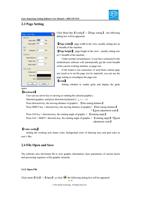
LaserEngravingCuttingSoftwareUserManual----RDCAMV8.08/76©2016RuidaTechnology.AllRightsReserved.2.3PageSettingClickMenuBar【Config】->【Pagesetting】,thefollowingdialogboxwillbeappeared:【Pagewidth】:pagewidthintheview,usuallysettingsizeasXbreadthofthemachine.【Pageheight】:pageheightintheview,usuallysettingsizeasYbreadthofthemachineUndernormalcircumstances,ifyouhaveconnectedtothemotherboard,softwarewillautomaticallygettheworkbreadthofthecurrentworkingmachine,aspagesize.Iftheboardisnotconnected,orneedthemcustompagesize(suchastosetthepagesizebymaterial),youcanusethepagesettingtoreconfigurethepagesize.【Grid】Settingwhethertoenablegridsanddisplaythegirdsspace.【Keyboard】Usercanusearrowkeytomovingorrotatingtheselectedgraphics.Selectedgraphics,andpressdirection-keyboard(↑,↓,←,→):Pressdirectionkey,themovingdistanceofgraphic=【finetuningdistance】PressSHIFTkey+directionkey,themovingdistanceofgraphic=【finetuningdistance】*【greatadjustmentscale】PressCtrlkey+directionkey,therotatingangleofgraphic=【rotatingangle】PressCtrl+SHIFT+directionkey,therotatingangleofgraphic=【rotatingangle】*【greatadjustmentscale】【Colorconfig】Settingtheworkingareaframecolor,backgroundcolorofdrawingareaandgridcolorasuser’slike.2.4FileOpenandSaveThesoftwareusesrld-formatfiletosavegraphicinformation,layerparametersofvariouslayersandprocessingsequenceofthegraphicelements.2.4.1OpenFileClickmenu【File】->【Open】,orclick,thefollowingdialogboxwillbeappeared:
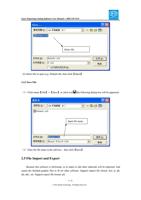
LaserEngravingCuttingSoftwareUserManual----RDCAMV8.09/76©2016RuidaTechnology.AllRightsReserved.(2)Selectfiletoopen(e.g.Default.rld),thenclick【Open】.2.4.2SaveFile(1)Clickmenu【File】->【Save】,orclickicon,thefollowingdialogboxwillbeappeared:(2)Enterthefilenameintheeditbox,thenclick【Save】.2.5FileImportandExportBecausethissoftwareisrld-format,sotomakeoreditothermaterialswillbeimported.Andexportthefinishedgraphicfilestofitforothersoftware.Supportimportfileformat:dxf,ai,plt,dst,dsb...etc.Supportexportfileformat:plt.SelectfileInputfilename
LaserEngravingCuttingSoftwareUserManual----RDCAMV8.010/76©2016RuidaTechnology.AllRightsReserved.2.5.1FileImportClickmenu【File】->【Import】,orclickicon.Thefollowingdialogboxwillbeappeared:Selectthefile,andclick【Open】.◆Select【Preview】,theselectedfilecanbeshown.Forvectorfile,thedatawillbeautomaticallyimportedintothecorrespondinglayerofRDCAMsoftwareasthefileformatoflayerdescription.Forsomespecialdocuments,suchasDST/DSB,datawillbeimportedintothecurrentlayer.Currentlayer