- You are here:
- AM.CO.ZABuythisCNC Utilities Homepage
- LabelMark-Laser-Marking-Machine
- LabelMark Marking Software Manual, v2.8.pdf
- Page 115 of 154
EzCad2UNI User’s Manual
Edit: Revision the content.
Delete:Delete the content.
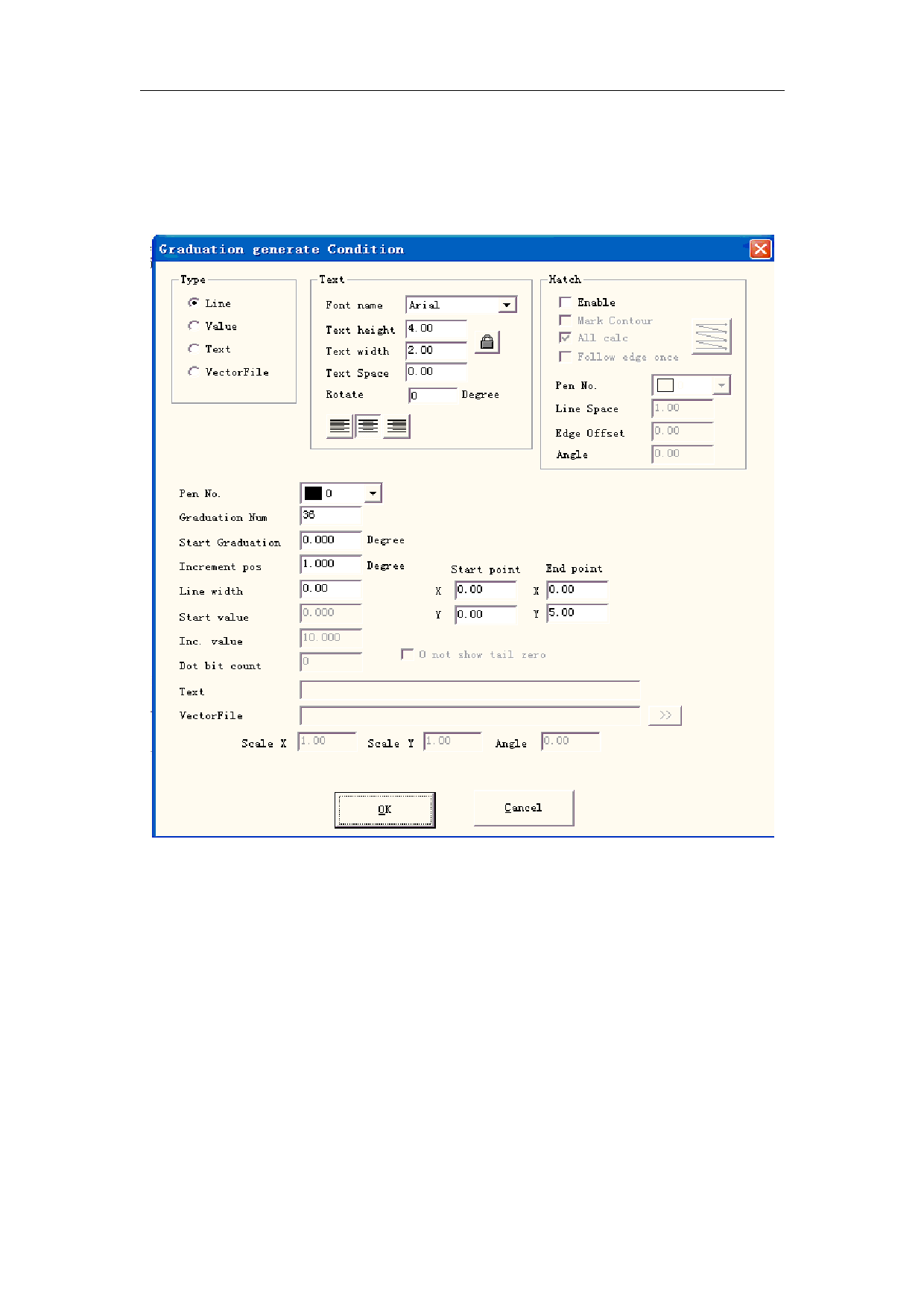
Click “Add” presenting to edit the ruler, following dialog box shown in Figure 8-24:
Figure 8-24 Make ruler dialog box
Type:
Line: The current parameter is the line parameter value
Value:The current parameter is the value parameter value
Text:The current parameter is the text parameter value
VectorFile:The current parameter is the vectorfile parameter value
Text:
Rotate: the angle of the text revolving
Hatch:
Pen No.:This item indicates that objects with selected pen’s number will be marked.
Graduation Num: The total graduation numbers need to be marked
Start Graduation: Set the position of start marking graduation
Increment pos: the space between two neighboring lines
111
All rights reserved