Home
3D
PrintUP 3D Printer
PioCreat 3D Printer
Printers
FastCOLOUR >>
ATools
DTF Textile
UV-DTF
FlatPRINT
PrintExp
InkRIP
Lasers
TruCUT CO
2
>>
TruCUT RDWorks
TruCUT 2020+
TruCUT Express
TruCUT Lite >>
4030 & Vertical Software
4030 & Vertical Documents
New 6040 Desktop
LabelMark
RayCUT
MorCUT >>
MorCUT-Cyclops
LaserMaster
Plasmas
MetalWise
Fabricam
Routers
EasyRoute
PowerRoute
Blade Cutters
Vinyl Cutters >>
V-Series
V-Smart
V-Auto (& V-Smart+)
Vinyl4
Flatbed Cutters >>
FlatCUT
Label Cutters >>
V-Auto Label Cutters
Software >>
VinylCut
More
FastCUT
Heatware
Rollman
ScreenMaster
Other Software
Miscellaneous
AM.CO.ZA
/
Buy CNC Software
/
CNC Software Training
/
CNC Software Downloads
Sales: 072 222 2211
Support: 076 666 6655
Training: 060 818 1818
Jo’burg: 087 802 5368
Cape Town: 087 802 7106
An
Project
Multimedia
Univision Videos
#SortIT Videos
MakersLab.TV
Software Training
Welldone Gallery
Updates
Prevision Blog
Cornerstone Trust
Email Campaigns
Contact Us
Sales WhatsApp
060 600 6000
Support WhatsApp
060 600 7000
Johannesburg Headquarters
011 397 1429
087 802 5368
Cape Town Showroom
021 555 3250
087 802 7106
Links
CNC Machine Repair
Vinyl Cutter
Heatware
You are here:
AM.CO.ZA
Buythis
CNC Utilities Homepage
GoPrinter-Portable-Printer
GoPrinter User Manual.pdf
Page 5 of 21
and keep it properly The picture related to this manual (Page 5 / 21) GoPrinter User Manual
Home
3D
PrintUP 3D Printer
PioCreat 3D Printer
Printers
FastCOLOUR >>
ATools
DTF Textile
UV-DTF
FlatPRINT
PrintExp
InkRIP
Lasers
TruCUT CO
2
>>
TruCUT RDWorks
TruCUT 2020+
TruCUT Express
TruCUT Lite >>
4030 & Vertical Software
4030 & Vertical Documents
New 6040 Desktop
LabelMark
RayCUT
MorCUT >>
MorCUT-Cyclops
LaserMaster
Plasmas
MetalWise
Fabricam
Routers
EasyRoute
PowerRoute
Blade Cutters
Vinyl Cutters >>
V-Series
V-Smart
V-Auto (& V-Smart+)
Vinyl4
Flatbed Cutters >>
FlatCUT
Label Cutters >>
V-Auto Label Cutters
Software >>
VinylCut
More
FastCUT
Heatware
Rollman
ScreenMaster
Other Software
Miscellaneous
AM.CO.ZA
/
Buy CNC Software
/
CNC Software Training
/
CNC Software Downloads
Sales: 072 222 2211
Support: 076 666 6655
Training: 060 818 1818
Jo’burg: 087 802 5368
Cape Town: 087 802 7106
An
Project
Multimedia
Univision Videos
#SortIT Videos
MakersLab.TV
Software Training
Welldone Gallery
Updates
Prevision Blog
Cornerstone Trust
Email Campaigns
Contact Us
Sales WhatsApp
060 600 6000
Support WhatsApp
060 600 7000
Johannesburg Headquarters
011 397 1429
087 802 5368
Cape Town Showroom
021 555 3250
087 802 7106
Links
CNC Machine Repair
Vinyl Cutter
Heatware
You are here:
AM.CO.ZA
Buythis
CNC Utilities Homepage
GoPrinter-Portable-Printer
GoPrinter User Manual.pdf
Page 5 of 21
1
T
ouch
Int
elligent Ink Jet Print
er
A
series general-purpose for
T
ouch
The operation manual of
the GoPrinter
Please read the instruction manual carefully before using and keep it properly
.
The picture related to this manual for reference only
.
All contents are checked
and proofread. If there are any problems such as printing errors, please
understand
English v
er
sion
2
Disclaimer
:
1.
During the use of this product, if there is serous damage, accidental fire, water
ingress, unexplained chemical corrosion, unauthorized
dis assembly
, etc, it isn’t
covered by the warranty
.
2.
If the printer has malfunctioned, please back up the information in time to prevent
loss before repairs.
3.If
the
use
of
the
code
jet
machine
is
abnormal,
please
contact
the
maintenance
engineer or call the manufacturer
’
s service line.
4.Untrained personnel are strictly prohibited to operate and use the jet printer
5.It
is
strictly
prohibited
to
disassemble
the
printer
without
the
permission
of
the
factory staf
f.
6.The
operator
of
the
ink-jet
machine
should
read
the
instruction
carefully
before
operating the machine.
7.The company reserves the right to interpret this disclaimer
.
3
1.The
power
supply
of
the
machine
must
be
cut
of
f
before
loading and unloading the ink cartridge
2.If
you
do
not
use
the
machine
for
more
than
20
minutes,
you
must
remove
the
cartridge
from
the
machine.
And
clip
it
with
the
card.(Be sure to save the clip)
3.Specific
requirements
based
on
the
nature
of
the
ink
cartridge,
you
are
better
to
use
ink
cartridge
out
after
opening
ink cartridge.
4.Because
the
cartridge
is
quick
dry
nature,
so
the
use
of
the
process
of
a
little
drawing,
missing
line
phenomenon,
is
a
normal situation
5.
If
there
is
a
phenomenon
of
a
little
drawing
or
missing
line
,
you
can
use
a
soft
paper
towel
to
wipe
the
nozzle
in
one
direction (Do not damage the nozzle with hard materials)
6.If
it
is
fast
dry
white
ink,
shake
it
for
5-10
minutes
before
each
use,
otherwise
the
color
will
be
lighter
.(Be
careful
not
to
shake
too hard
)
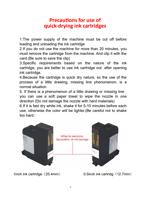
Pr
ec
auons f
or use of
quick
-dr
ying ink c
artridg
es
1inch ink cartridge
(
25.4mm
)
0.5inch ink cartridg
(
12.7mm
)
4
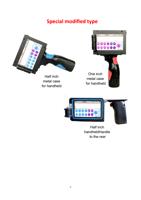
Special modied type
Half inch
metal case
for handheld
One inch
metal case
for handheld
Half inch
handheldHandle
to the rear
5
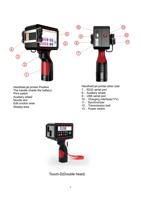
H
a
n
d
h
e
l
d
j
e
t
p
ri
n
t
e
r
Po
si
t
i
ve
T
h
e
h
a
n
d
l
e
(i
n
si
d
e
t
h
e
b
a
t
t
e
ry)
Pri
n
t
sw
i
t
ch
Au
xi
l
i
a
ry
w
h
e
e
l
N
o
zzl
e
sl
o
t
Ed
i
t
u
n
ct
i
o
n
a
re
a
D
i
sp
l
a
y
a
re
a
H
a
n
d
h
e
l
d
j
e
t
p
ri
n
t
e
r
o
t
h
e
r
si
d
e
7
、
R
2
3
2
se
ri
a
l
p
o
rt
8
、
Au
xi
l
i
a
ry
w
h
e
e
l
9
、
U
SB
se
ri
a
l
p
o
rt
1
0
、
C
h
a
rg
i
n
g
i
n
t
e
rf
a
ce
(1
7
V)
1
1
、
Syn
ch
ro
n
i
ze
r
1
2
、
T
ra
n
sm
i
ssi
o
n
b
e
l
t
1
3
、
Po
w
e
r
sw
i
t
ch
T
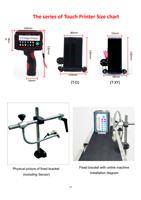
ouch-D(Double head)
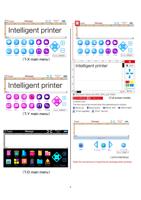
6
(
T
-X main menu
)
(
T
-
Y
main menu
)
(
T
-
D
main menu
)
7
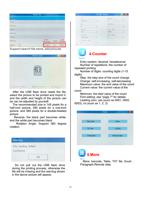
Click on the power switch
And turn on the boot page
(
The boot time is abut 7 seconds
)
Boot interface
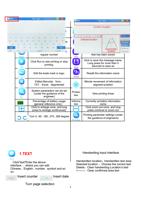
8
Y
ou can edit Chinese, number
,
English, symbols, and so on.
Delete the information segment
that has been edited
Edit variable in year
, month, day
,
hour
, minute and second.
Create a new information
segment.
Editable variable serial number
,
regular number
select the name of the information
that has been saved
Click Run to star printing or stop
printing.
Click to save the message name,
Long press for more than 5
seconds to save as
Edit the trade mark or logo.
Reedit the information name
Edited Barcode
、
form
、
TXT
、
Excel
、
Segmented
Minute movement of information
segment position
System parameters can be set
(under the guidance of the
engineer)
Produc
tion
V
iew printing times
Percentage of battery usage
(general reference only)
)
Informa
tion
Currently printable information
name
Click to enlarge once, and long
press to enlarge continuously
Click zoom out once, and long
press continue to zoom out
T
urn 0
、
90
、
180
、
270
、
360 degree
Printing parameter settings (under
the guidance of engineers)
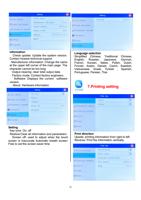
1.TEXT
Click"text"Enter the above
interface
,
where you can edit
Chinese
、
English
、
number
、
symbol and so
on
Handwriting input interface
Handwritten location
:
Handwritten text area
Selected location
:
Choose the correct text
Delete
:
Clear handwriting Location’
s text
<-------
:
Clear confirmed area text
Insert counter
Insert date
T
urn page selection
9
T
ouch-
X
:
The highest printing height is
12.7mm
T
ouch-
Y
:
The highest printing height is
25.4mm
T
ouch-D:The
highest
printing
height
is
48mm
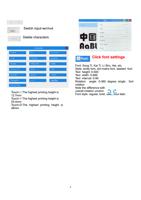
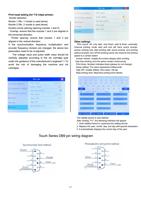
Click font settings
Font: Song
T
i, Kai
T
i, Li Shu, Hei, etc.
Style: entity font, dot matrix font, deleted font
T
ext height: 0-500
T
ext width: 0-999
T
ext interval: 0-99
Rotation
angle:
0-360
degree
single
font
rotation
Note the dif
ference with
overall rotation unction
Font style: regular
, bold, italic, bold italic
Delete characters
Switch input
method
10
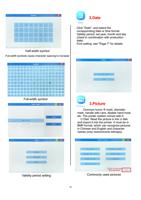
Half-width symbol
Full-width symbols cause character spacing to increase
Full-width symbol
V
alidity period setting
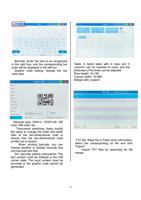
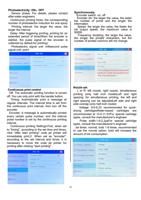
2.Date
Click "Date", and select the
corresponding date or time format.
V
alidity period: set year
, month and day
(Used in combination with production
date)
Font setting: see "Page 7" for details
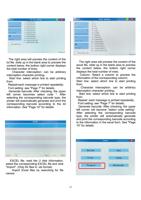
3.Picture
Common icons: R mark, diameter
mark, handle with care, disable hand hook,
etc.
The printer system comes with it.
U Disk: Read the picture in the U disk
and import it into the printer
. It must be in
BMP
format, which can recognize pictures
in Chinese and English and character
names (only monochrome bitmaps).
Commonly used pictures
"
Do you need help?
Call Me Back
"
Do you need help?
Call Me Back