User Manual of Machine Vision Camera SDK Plugin (DirectShow)
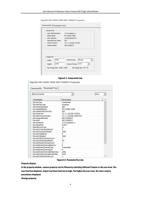
Double-click the value of the column of ParamValue to enter the editable state. And user can modify the
parameter value. The properties of the enumeration type parameter are in the form of the drop-down box for
the user to choose. The properties of the command type property is displayed as an execution button.
Properties of type parameter are in the form of strings for the user to edit.
Chapter 3Example
The sample program DirectShowDisplay is provided for reference. You can get it in the path:
Development\Samples\DirectShow\DirectShowDisplay.
DirectShowDisplay is a console program, and supports playing by Render. And the APIs of getting camera list,
getting parameters, and setting parameters are listed in the header file MvDSSource.h for external calling.
The sample program can compile version x86 and x64, corresponding to the plugin version.
5