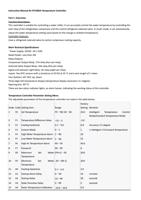
Order Code Setting Item
Range
Factory
Setting Remarks
16 A5 Water Temperature Calibration -10.0~10.0
0.0
17 A6 System Inertia Coefficient
0~40
0
18 A7 Compressor Start Protection 0~99
30 seconds
19 A8 Electric Heating Rod Control -5.0~20.0
Hysteresis
0.2 Reserved
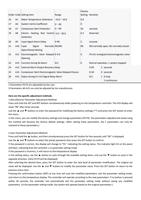
20 A9 Input Signal Alarm Delay
0-99
2
seconds
21 A10 Input Signal Normally NO/NC
Open/Closed Setting
NC NO-normally open, NC-normally closed
22 A11 Electromagnetic Valve Delayed 0-4.0
Opening
0
F0-A11 energized electromagnetic valve
23 A12 Function during E6 Alarm
0/1
0
Normal operation, 1 system stopped
24 A13 External Alarm Output Recovery Delay
0-99
2 seconds
25 A14 Compressor Start Electromagnetic Valve Delayed Closure
0-30
0 seconds
26 A15 Status during Er1-Er5 Signal Relay Alarm
0/1
1 0-stop
1-continuous
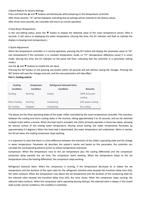
1.Parameters F0-F9 are adjustable by the user.
2.Parameters A0-A15 can only be adjusted by the manufacturer.
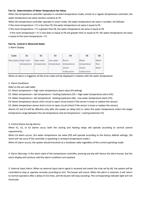
Here are the specific adjustment methods:
1.Manufacturer Parameter Adjustment Method:
Press and hold the SET and RST buttons simultaneously while powering on the temperature controller. The LED display will
show "99" after three seconds.
Use the ▲ and ▼ buttons to enter the password for modifying the factory settings (**) and press the SET button to enter
the menu.
In the menu, you can modify the factory settings and change parameters (F0-F9). The parameters adjusted and saved using
this method will become the factory default settings. (After setting these parameters, the F parameters can only be
restored to these parameters.)
2.User Parameter Adjustment Method:
Press and hold the ▲ button, and then simultaneously press the SET button for five seconds until "00" is displayed.
Use the ▲ and ▼ buttons to select the preset password, then press the SET button to confirm.
If the password is correct, the display will change to "F0," indicating the setting status. The indicator light D1 on the panel
will flash, indicating that the controller is in parameter setting mode.
If the password is incorrect, it will return to the temperature display.
In the setting status, use the ▲ button to cycle through the available setting items, and use the ▼ button to cycle in the
opposite direction. (Only F0-F9 will be displayed)
After selecting the desired item, press the SET button to enter the next level of parameter modification. The original set
value will be displayed. Use the ▲ and ▼ buttons to modify the parameter value. Press the SET button to return to the
previous menu item.
Pressing the confirmation button (RST) at any time will save the modified parameters, exit the parameter setting mode,
and return to the temperature display. The controller will operate according to the new parameters. If no button is pressed
within 20 seconds, the controller will automatically exit the parameter setting mode without saving any modified
parameters. (In the parameter setting mode, the system will operate based on the original parameters.)