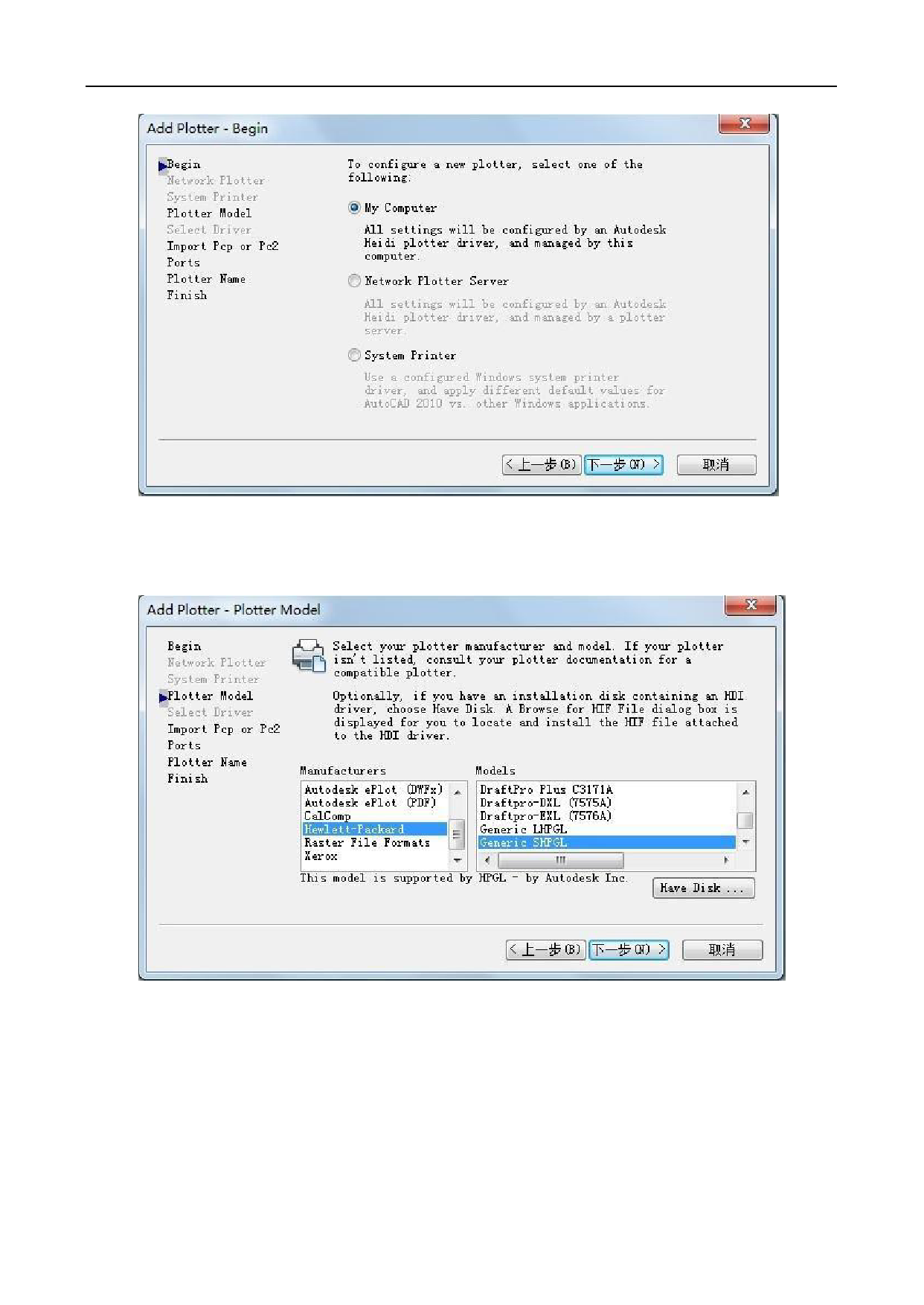




Page 26 / 45 of V-Smart User Manual

USERMANUALV.1.2MAY2011
2TableofContents1.ImportantInformation..........................................................................................................................................32.GeneralInformation.............................................................................................................................................62.1Introduction................................................................................................................................................62.2PackageItems...........................................................................................................................................62.3View.............................................................................................................................................................72.3.1Frontview.........................................................................................................................................72.3.2Leftandrightview.........................................................................................................................82.3.3Controlpanel....................................................................................................................................83.Setupyourcuttingplotter....................................................................................................................................103.1Stand(optional)..........................................................................................................................................103.2Connectyourcuttingplotter......................................................................................................................103.2.1ConnecttheACcable......................................................................................................................103.2.2ConnecttheUSBcable(optional)................................................................................................113.2.3ConnecttheRS-232cable(optional)..........................................................................................133.3Bladeinstallation.....................................................................................................................................133.4Bladeholderinstallation..........................................................................................................................143.5loadingasheet.........................................................................................................................................154.BasicOperations................................................................................................................................................164.1PressureTest............................................................................................................................................164.2PressureandSpeed.................................................................................................................................164.3LanguagesandBaudrate.......................................................................................................................164.4X,Yaxisscale...........................................................................................................................................174.5Distancebetweenreddotandpen.........................................................................................................174.6Testthedistancebetweenreddotandpen...........................................................................................184.7SkinofLCDandStepdistanceofjogmotion........................................................................................184.8CuttingfromFLASH..................................................................................................................................184.9CuttingfromSDcard................................................................................................................................194.10Timesofrepeatcutting..........................................................................................................................194.11Restoretofactorydefaultsetting..........................................................................................................194.12BladeandLasertest..............................................................................................................................194.13PauseandCancelduringoperating......................................................................................................204.14Originbutton...........................................................................................................................................205.Advancedoperations..........................................................................................................................................205.1CutinFlexiSTATERTenethEdition...........................................................................................................225.2OutputfromAutoCAD...............................................................................................................................225.2.1Addaplotter..................................................................................................................................225.2.2Howtooutput................................................................................................................................31
35.3Cut5mmorsmallerletters......................................................................................................................345.4ContourCut(optional)..............................................................................................................................366.AddtionalParts....................................................................................................................................................37FindMoreInformationandResources.PleasevisitourWebsite:Ifyouhaveanyquestions,pleasecontactusoremailtoInformationinthisdocumentissubjecttochangewithoutnotice.ReproductionofthesematerialsinanymannerwhatsoeverwithoutthewrittenpermissionofTenethlnc.Isstrictlyforbidden.
41.ImportantInformationBeforeyouusethecuttingplotter,pleasemakesurethatyouhavereadthesafetyprecautionsandinstructionsbelow.Notes,Cautions,andWarnings
5
62.GeneralInformation2.1IntroductionOurcuttingplottershavebeendesignedtoproducecomputer-generatedimagesorperformcontourcuttingonsheetsorrollsofvinylmedia.ThismanualcoversthefollowingmodelsofTH/TScuttingplotters:·TH/TS740formediawidth:50mm(1.97”)~770mm(30.3”)·TH/TS1300formediawidth:50mm(4.7”)~1270mm(50”)2.2PackageItemsThepackageofthecontentstheitemslistedbelow,pleasecheckcarefully.Ifyoufindanyitemmissing,pleaseconsultyourlocaldealerforfurtherassistance.
72.3View2.3.1Frontview1Steelaxes2Carriage3Rollholder4ACpowerconnector5Powerswitch6Controlpanel7Pinchroller8Stand(optional)MoreinformationpleaseseetheFloorstandguidevideoforbetterunderstanding.
82.3.2Leftandrightview1ACpowerconnector2Powerswitch3Serialport4USBport5Udiskreader2.3.3Controlpanel
91powerlight2setuplight3operatelight4infostatuszone5XRightwardbutton6Frontwardbutton7Menubutton8Enterbutton9Pausebutton10Menubutton11Testbutton12Enterbutton13X,Yoriginbutton14XRightwardbutton15YFrontwardbutton16XLeftwardbutton17YBackwardbutton18Repeatcuttingbutton19Pausebutton20Resetbutton21Testbutton22Repeatcuttingbutton23X,Yoriginbutton24YBackwardbutton25XLeftwardbutton26infostatuszone
103.Setupyourcuttingplotter3.1Stand(optional)CAUTION:MustuseM5*45screwswithwashers.MustuseM5*10screwstofixthecuttingplottertothestand.
    "

Do you need help?

Call Me Back
    "

Do you need help?

Call Me Back