




Shenzhen Hosonsoft Co., Ltd.No.: HS/D-YF-A0-005Printing Software InstructionRevision RecordDateVersionRevised sectionsRevision descriptionAuthorMarch 15, 2018FirstversionLiuGuangtao,ChenyanApril 17, 2018Addbuttondescription,operationstepsofnewversionofcard,networkaccessmethod,judgmentmethodofgigabitNIC,firmwareimport/export and so on.Liu GuangtaoAdd: Room 1703, Building C6, Hengfeng Industrial City, Xixiang Street, Bao’an District, ShenzhenTel: 86-0755-2894 0020 Fax: 27961549 http://www.hosonsoft.com
Shenzhen Hosonsoft Co., Ltd.No.: HS/D-YF-A0-005Table of ContentsI.Printing software overview......................................................................................................................................................4II. Software start and online.......................................................................................................................................................51.Start print control software.............................................................................................................................................52.Software online settings..................................................................................................................................................52.1 Gigabit NIC judgment..........................................................................................................................................52.2 Network settings..................................................................................................................................................5III.Operation steps before the new board card is used...............................................................................................................81Set the IP address.............................................................................................................................................................82 Motor gear ratio calibration............................................................................................................................................83 Clean print head..............................................................................................................................................................84 Calibration......................................................................................................................................................................95 Drawing printing settings................................................................................................................................................9IV. Introduction of main interface window of the software.......................................................................................................91 Main menu......................................................................................................................................................................92 Files..............................................................................................................................................................................103 Print..............................................................................................................................................................................123.1 Open the task list................................................................................................................................................133.2 Historical task list..............................................................................................................................................143.3 Task attributes....................................................................................................................................................154 Settings.........................................................................................................................................................................165 Calibration....................................................................................................................................................................185.1 Introduction tonozzle detection function............................................................................................................195.2 Introduction to level detection function.....................................................................................................................205.3 Introduction to vertical detection function.........................................................................................................215.4 Introduction tostepping calibration function......................................................................................................215.5 Introduction to print head horizontal spacing calibration...................................................................................225.6 Introduction toprint head vertical spacing calibration........................................................................................235.7 Introduction to bidirectional calibration function..............................................................................................245.8 Introduction to trapping printing calibration function........................................................................................256Voltage window.............................................................................................................................................................267.Advanced......................................................................................................................................................................277.1 Version information...........................................................................................................................................287.2 Upgrade..............................................................................................................................................................297.3 Sharpening over printing....................................................................................................................................307.4 Broken hole compensation.................................................................................................................................358Logs...............................................................................................................................................................................379.Shortcut button..............................................................................................................................................................3810 Status bar....................................................................................................................................................................39V.Factory mode........................................................................................................................................................................402 Boot initialization.........................................................................................................................................................43Add: Room 1703, Building C6, Hengfeng Industrial City, Xixiang Street, Bao’an District, ShenzhenTel: 86-0755-2894 0020 Fax: 27961549 http://www.hosonsoft.com
Shenzhen Hosonsoft Co., Ltd.No.: HS/D-YF-A0-0053X motor..........................................................................................................................................................................434Y motor..........................................................................................................................................................................455Ink stack.........................................................................................................................................................................456 Blade.............................................................................................................................................................................467 Print head combination.................................................................................................................................................478 Print mode.....................................................................................................................................................................489Reference trapping.........................................................................................................................................................4910Automatic cleaning......................................................................................................................................................4911Manual cleaning...........................................................................................................................................................5012.Automatic flash spray.................................................................................................................................................5113Running machine.........................................................................................................................................................5114Paper feeding...............................................................................................................................................................5215 Other...........................................................................................................................................................................5316Import / export firmware..............................................................................................................................................5416.1 Import firmware configuration.........................................................................................................................5416.4 Exporting firmware parameters........................................................................................................................57VI.Button board operation instructions....................................................................................................................................571. Keyboard board button layout as shown below...........................................................................................................572. Menu item description.................................................................................................................................................593. Menu list......................................................................................................................................................................59I. Printing software DevelopedbyHosonsoft,PrintExpsoftwareisakindofcontrolsoftwarethatworkswithprinter.Itfeaturesuser-friendlyinterface,simpleoperationandmeetstheneedsofendusersandmanufacturers.Itismainlyusedforprintercontrol,printercalibration,programupgradeandupdate,importandexportofparameters,savingofparameterstotheboard.Inordertoenableuserstoquicklyandcomprehensivelyunderstandtheprintingsoftware,getfamiliarwiththevariousfunctionaloperations, precautions and possible problems, the following is an introduction to the different kinds of printing software.II. Software start and onlineAdd: Room 1703, Building C6, Hengfeng Industrial City, Xixiang Street, Bao’an District, ShenzhenTel: 86-0755-2894 0020 Fax: 27961549 http://www.hosonsoft.com
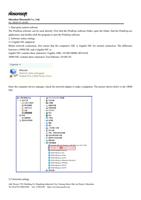
Shenzhen Hosonsoft Co., Ltd.No.: HS/D-YF-A0-0051. Start print control softwareThePrintExpsoftwarecanbeuseddirectly.FirstfindthePrintExpsoftwarefolder,openthefolder,findthePrintExp.exeapplication, and double-click the program to start the PrintExp software.2. Software online settings2.1 Gigabit NIC judgmentBeforenetworkconnection,firstensurethatthecomputer'sNICisGigabitNICfornormalconnection.Thedifferencebetween a 100M NIC and a Gigabit NIC is:Gigabit NIC contains these characters: Gigabit, GBE, 10/100/1000M, RTL8169.100M NIC contains these characters: Fast Ethernet, 10/100, FE.Enterthecomputerdevicemanager,checkthenetworkadaptertomakeajudgment.Thepictureshownbelowisthe100MNIC:2.2 Network settingsAdd: Room 1703, Building C6, Hengfeng Industrial City, Xixiang Street, Bao’an District, ShenzhenTel: 86-0755-2894 0020 Fax: 27961549 http://www.hosonsoft.com
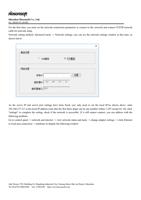
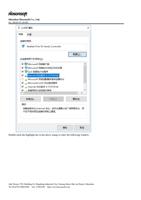
Shenzhen Hosonsoft Co., Ltd.No.: HS/D-YF-A0-005Forthefirsttime,youmustsetthenetworkconnectionparameterstoconnecttothenetworkandconnectTCP/IPnetworkcable for network setup.Networksettingmethod:AdvancedmenuNetworksettings,youcanseethenetworksettingswindowatthistime,asshown below:AstheserverIPandserverportsettingshavebeenfixed,youonlyneedtosetthelocalIP.Asshownabove,enter192.168.127.111inthelocalIPaddress(notethatthefirstthreedigitscanbeanynumberwithin1-255exceptfor10),click"settings"tocompletethesetting,checkifthenetworkisaccessible.Ifitstillcannotconnect,youcanaddresswiththefollowing methods:GotocontrolpanelnetworkandinternetviewnetworkstatusandtaskschangeadaptersettingsclickEthernetor local area connection → attributes to display the following window:Add: Room 1703, Building C6, Hengfeng Industrial City, Xixiang Street, Bao’an District, ShenzhenTel: 86-0755-2894 0020 Fax: 27961549 http://www.hosonsoft.com
Shenzhen Hosonsoft Co., Ltd.No.: HS/D-YF-A0-005Double-click the highlight bar in the above image to enter the following window:Add: Room 1703, Building C6, Hengfeng Industrial City, Xixiang Street, Bao’an District, ShenzhenTel: 86-0755-2894 0020 Fax: 27961549 http://www.hosonsoft.com
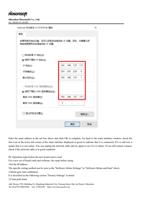
Shenzhen Hosonsoft Co., Ltd.No.: HS/D-YF-A0-005EnterthesameaddressintheredboxaboveandclickOKtocomplete.Gobacktothemaininterfacewindow,checkthefirsticonatthelowerleftcornerofthemaininterfacedisplayedingreentoindicatethatitisconnected.Ifitisstillred,itmeansthatitisnotonline.Youcanunplugthenetworkcableandtryagaintoseeifitisonline.Ifyoustillcannotconnect,check if the network cable is in good condition.III. Operation steps before the new board card is usedFor a new set of board cards and software, the steps before using:1Set the IP addressThe specific setting method can be seen in the "Software Online Settings" in "Software Online and Start" above.2 Motor gear ratio calibrationIt is described in the following section "Factory Settings" in detail3 Clean print headAdd: Room 1703, Building C6, Hengfeng Industrial City, Xixiang Street, Bao’an District, ShenzhenTel: 86-0755-2894 0020 Fax: 27961549 http://www.hosonsoft.com
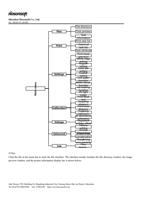
Shenzhen Hosonsoft Co., Ltd.No.: HS/D-YF-A0-005Ensure that all orifices of the print head can be inked normally4 CalibrationIn the following section, “Calibration" is described in detail5 Drawing printing settingsIn the following section, "sharpen and print" is described in detail.IV. Introduction of main interface window of the softwareThe main interface of PrintExp software is as follows:ThemaininterfaceofPrintExpsoftwaremainlyincludesmainmenufunctionarea,shortcutbuttonfunctionarea,printlistfunctionarea,taskpreviewimagedisplayfunctionarea,printtaskinformationfunctionarea,statusbar,etc.,whichareintroduced in the following parts.1 Main menuThe menu tree of the main menu is as follows:Add: Room 1703, Building C6, Hengfeng Industrial City, Xixiang Street, Bao’an District, ShenzhenTel: 86-0755-2894 0020 Fax: 27961549 http://www.hosonsoft.com
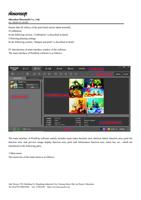
Shenzhen Hosonsoft Co., Ltd.No.: HS/D-YF-A0-0052 FilesClickthefileinthemenubartoenterthefileinterface.Theinterfacemainlyincludesthefiledirectorywindow,theimagepreview window, and the picture information display bar is shown below:Add: Room 1703, Building C6, Hengfeng Industrial City, Xixiang Street, Bao’an District, ShenzhenTel: 86-0755-2894 0020 Fax: 27961549 http://www.hosonsoft.comMainmenuFilesFile directoryTask previewTask informationPrintPrint tasklistHistoricaltask listTask attributeSettingsPrint head selectionWhite edgesettingRegularsettingColor barsettingFeathersettingTest paperfunctionWhite streakfunctionInk loading functionUV lightusageCalibrationPrint head testStepping distancePrint head distanceTrapping calibrationBi-directionalcalibrationVoltageRegulated voltage offsetAdvancedFactorysettingVersioninformationBroken holecompensationSharpening over printingLogTime. source
Shenzhen Hosonsoft Co., Ltd.No.: HS/D-YF-A0-005No. Name Function description1File directory function areaSelect the folder where the print files are stored2Printfilepreviewfunctionarea Display all print files under the specified print file folder3Printfileinformationdisplay function areaDisplay print information of the selected print fileIf you select the preview image and right click, the menu list will pop up as shown below:Add: Room 1703, Building C6, Hengfeng Industrial City, Xixiang Street, Bao’an District, ShenzhenTel: 86-0755-2894 0020 Fax: 27961549 http://www.hosonsoft.com
    "