- You are here:
- AM.CO.ZABuythisCNC Utilities Homepage
- LabelMark-Laser-Marking-Machine
- LabelMark Marking Software Manual, v2.6.pdf
- Page 134 of 154
EzCad2UNI User’s Manual
Chapter 10 Marking
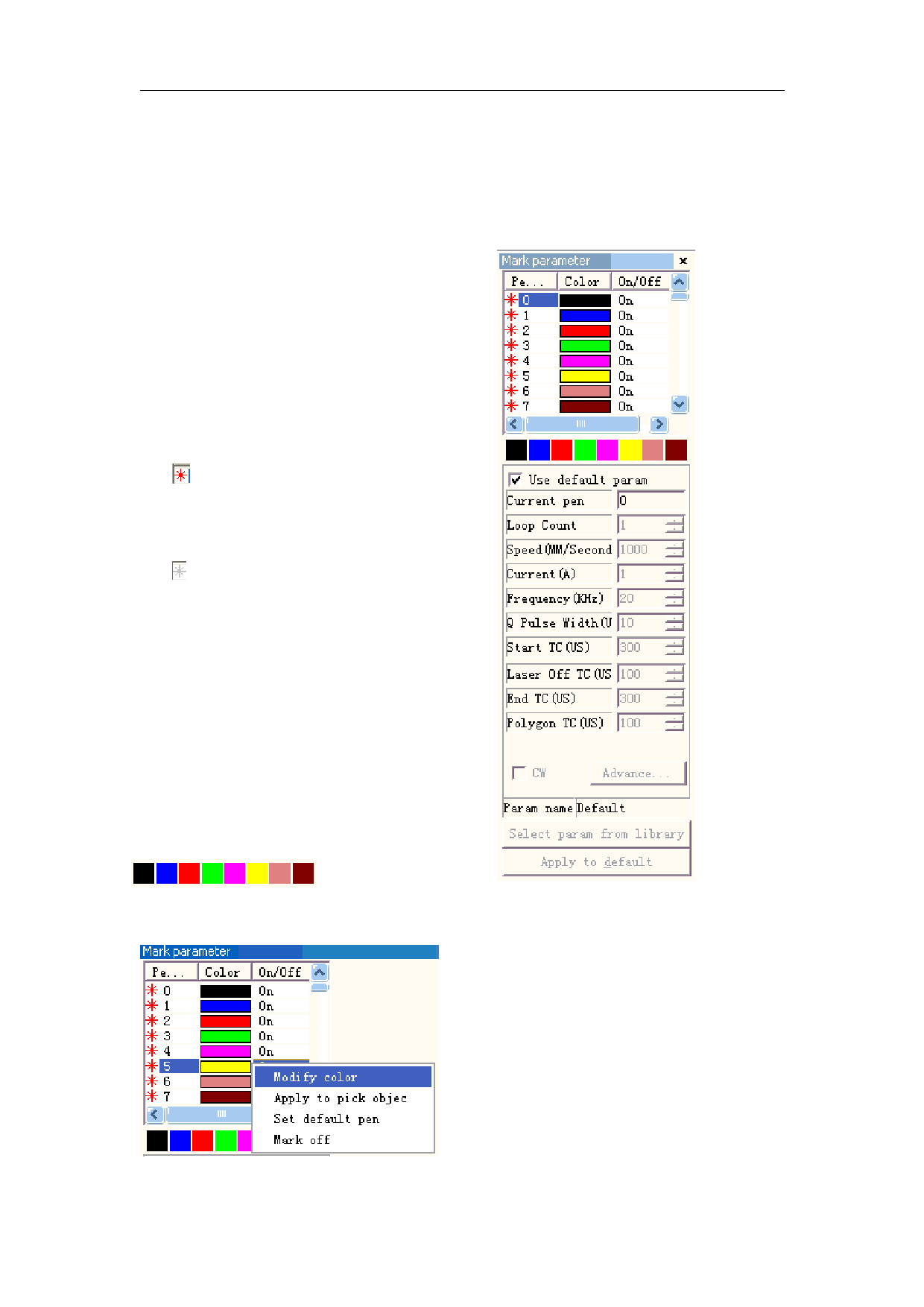
Figure 10-1 is the Marking Properties Table.
10.1 Pen List
In EzCad2, every document file has 256 pens,
0 to 255 numbered, and they are located in the top
of the Marking Properties Table. Each pen is
corresponding to a group of marking parameter and
the parameter base’s name is after the color.
: This item indicates that objects with
selected pen’s number will be marked. Users may
customize the color by double-clicking the color
sticker.
: This item indicates that the current object
has not been marked with a pen’s number, and it
will not be marked.
Color: the current pen’s color
Apply Parameter Button: The buttons show as
Figure 10-2
When pressed the button, the pen number of
the current object will be changed to the one that
the color stands for.
When pressing the right button of the mouse, a
shortcut menu will appear as Figure 10-3 shows.
Figure 10-2 Button to apply parameters
Figure 10-1 Marking Properties Table
128
reserved
All rights