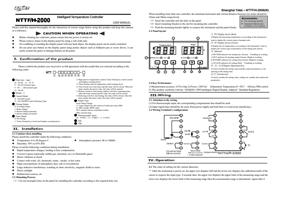






seconds, the upper row displays the measuring value and the lower row displays the setting value. And then the system
enters its normal working state.
Setting of the temperature: Push the SET key (Left side or upper row), the light of SETTEM is Lighting, and left
upper row displays the value of SP and push or key to set the demand value.
Setting of Timing: Push the SET key (Right side or lower row), the light of SETTIME is Lighting, and the right
upper row displays the value of SP and push or key to set the demand value.
Setting of the control parameters: Push the Left side or upper row SET key above 4 seconds, the left upper row
shows the prompt code of the parameter (detail can see the schedule table of the control parameters), then also push
Left side or upper row or key to make the lower row display its needed value. And push the left SET key above 4
seconds, the system returns back to its standard mode. (If no key has pushed down, after 1 minute the system will come
to its standard mode).
If the Lower row of left side display the “ooo” is appeared, the thermocouple is in reverse connection, else the red
display above the “ooo” is appeared,the thermocouple is in open current or the measuring temperature exceeds the
measurement range.
The Auto-tuning function of the instrument’s parameters: After 20 seconds of pushing down the key, the AT
indicator is twinkle and the controller begins to start its Auto-tuning. The temperature goes through one to two times of
oscillation and the AT indicator extinguishes. The instrument will control the process with the updated parameters,
which will be permanently persevered.
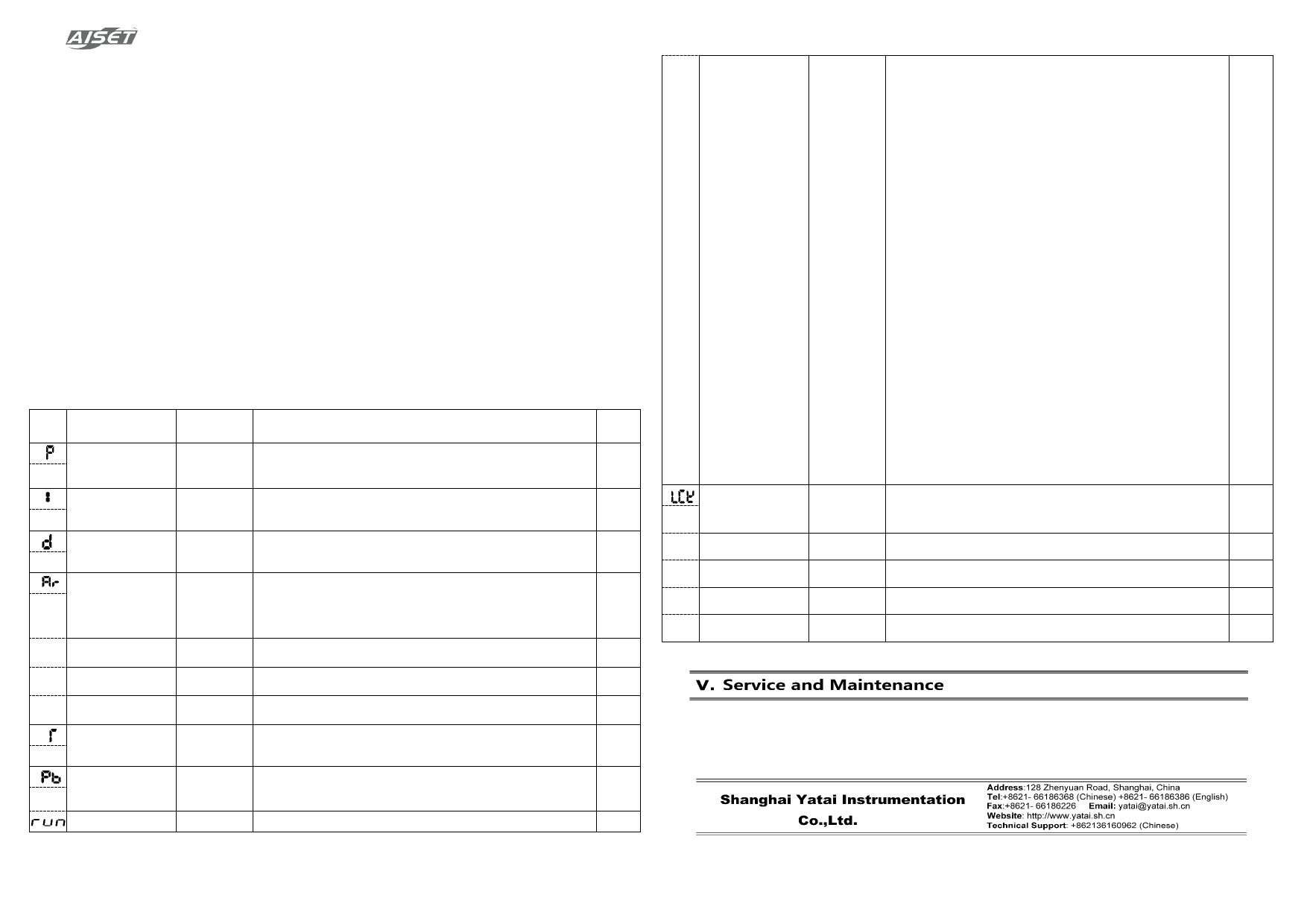
4.2 The schedule table of the control parameter
Prompt
Symbol
Name
Setting Range
Illustration
Beginning
Value
P
Proportional band
(Heating Side)
0…400℃
Proportional Control: The more the value of P, the less the proportional action
and the less the system gain; only acting on the heating side. (P=0 is ON/OFF
Control)
30
I
Integral Time
0…990
Seconds
Integral Time: The more the value of I, the less the Integral action I=0 is PD
Control,Ar=(Remained Error/P)×100
240
D
Differential Time
0…990
seconds
Differential time: The more the Value of D, the more the differential action, which i
able to overcome overshoot (D=0 is PI Control)
60
Overshoot restrain
Used to restrain Overshoot (Ar is set to 1.5~2 times of the output empty ratio in the
Ar
(Proportion re-setting)
(Insensitive interval of
0~100%
steady state of the system)
Reduce Ar energy and temperature overshoot, when SP is changing, Ar must be
100
ON/OFF Control)
adjusted; Ar must be confirmed and will be set according to SP value automatically.
rt Amend Measured value -100…100℃ Amend the measurement error of thermocouple, compensation lead
0
dtc Early warning value 0~60 seconds Count down early warning value
0
m-s
Unit conversion
0; 1
Unit of time conversion; 0: Second; 1: minute
0
Control period
1…100
When the relay output≮20s,SSR and Si-controlled switch transwitch≮2s,
T
(Heating Side)
Seconds
continuous output T is equal to 1s, only acting on heating side
20
Pb
Offset of the Process
Value
-198~ 998℃
Using for correct the measurement error caused by the sensor and the
compensate line of the thermocouple
0
Time control mode
0~16
0 or 10:when switch is on, display will start counting down to 0. When the relay
0
Run
LCK
coded lock
0,1,2
Shanghai Yatai – NTTF/H-2000(N)
is closed, the alarm will be turned on until the switch is off and the relay is open.
The alarm shall stop to complete one cycle of operation.
1 or11:when switch is on, display will start counting down to 0 as relay is
closed. When relay is open, the alarm will be turned on until the switch is off.
The alarm shall stop to complete one cycle of operation;
2 or 12:High and low temperature control. Output will be set when the
temperature is below the preset value. Output will be reset when the preset value
is reached. When the temperature of ON switch is below than the high
temperature preset value, output will be set. When the high temperature preset
value is reached, output will be reset and the counting down will start.
3 or 13:Switch on to start counting down. The relay is closed or the alarm is on
when remaining time is 0 until it has been switch off and on again. Once switch
is cycled, the relay will be opened and the alarm will be stopped to complete one
cycle of operation.
4 or 14:Switch on to start counting down and the relay will be closed. When
remaining time is 0, the relay will be opened or the alarm will be turned on.
Cycle and hold on switch to complete one cycle of operation.
5 or 15:Switch on and off to start counting down, when remaining time is 0, the
relay will be closed or the alarm will be turned on. The relay will open or the
alarm is off until the next time release the switch to start to complete one cycle
of operation.
6 or 16:Releasing switch to start counting down, the relay will be closed or the
alarm will be turned on. When remaining time is 0, the relay is open and one
cycle of operation is completed until the next release of the switch to start, the
relay will be closed and the alarm will be stopped.
Others: not applicable; Note: when the digit segment of 10s is one, mute the
device by press any key.
0:All parameters can be updated
1:Only the Set Point Value can be updated
0
2:All parameters cannot be updated.
Ft
Filtering coefficient
0~255
The lower Filtering coefficient might fluctuate, the upper shows steady
200
dF
Insensitive area
0…100℃
The value could amend the Insensitive area of On-Off PID control
0
CF Switching the unit of Tem
0; 1
CF=0 shows Degree Celsius; CF=1 shows Fahrenheit Degree
0
Sn
Thermocouple Type
K:0~700℃ E:0~400℃ J:0~550℃
0
Notice: Change of each function parameter in the table may alter the control effect of the system.
This controller is under warranty for 12 months since the day of purchase (the warranty only stands if the problem is
caused by the malfunction due to manufacturing). Any repairment for damages caused by improper use of the controller
will be charged. The controller is provided with lifetime maintenance and repair on cost.
Please keep the controller in a dry place with air and NO corrosive gas.